

Question
User Question: How to hide planes in Creo?
Today a user tweeted the following issue to
"I need to figure out how to turn off plane visibility. Here's what I'm talking about. Planes everywhere:
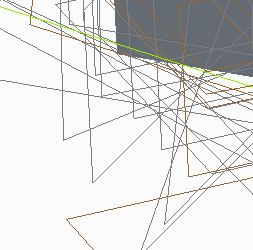
I can right click on each plane and hide it, but that's a bit tedious. They didn't show up until I reopened file."
And here is the answer from a PM:
"If he’s on Creo 1.0 (guessing based on the white background of the screenshot)
There is an icon in the Graphics Toolbar that controls the datum display:
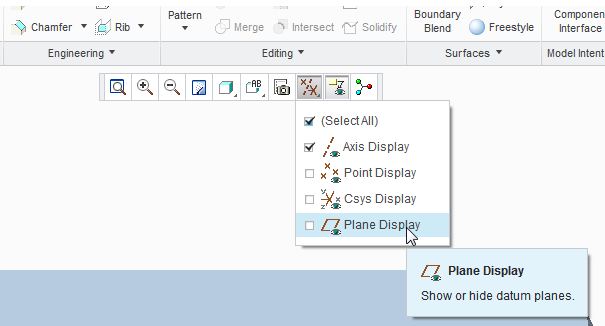
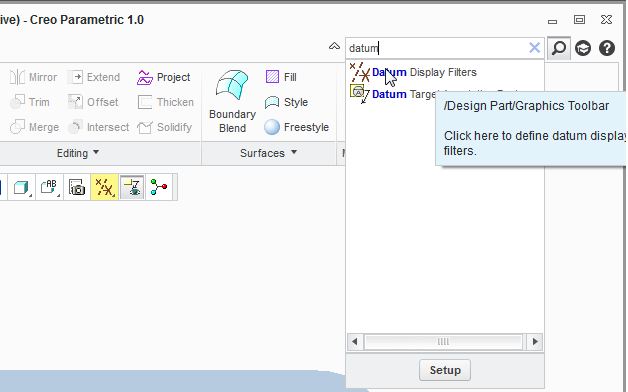
In the future, he can consider the Command Search tool to find a command. The Command Search can be accessed from the upper right of the Creo window:
 "
"
Hope this helps!
^LC
This thread is inactive and closed by the PTC Community Management Team. If you would like to provide a reply and re-open this thread, please notify the moderator and reference the thread. You may also use "Start a topic" button to ask a new question. Please be sure to include what version of the PTC product you are using so another community member knowledgeable about your version may be able to assist.