
1-Visitor
June 9, 2021
Solved

using external references in sketched holes

  • June 9, 2021
  • 1 reply
  • 3402 views

I've been making more use of sketched holes in my designs recently, but I noticed that when you use this this type of hole, I lose the ability to set a parametric end condition, so if a plate that contains the hole feature changes thickness, the hole may become short.  So far, the only way I can deal with this is to write a direct relation to force the hole length to match the plate thickness, but is there anyway to establish a reference to another part inside the sketch from the hole feature so that my sketched hole automatically adjust to changes in plate thickness, or is the only way to accomplish this through a relation?

Best answer by tbraxton

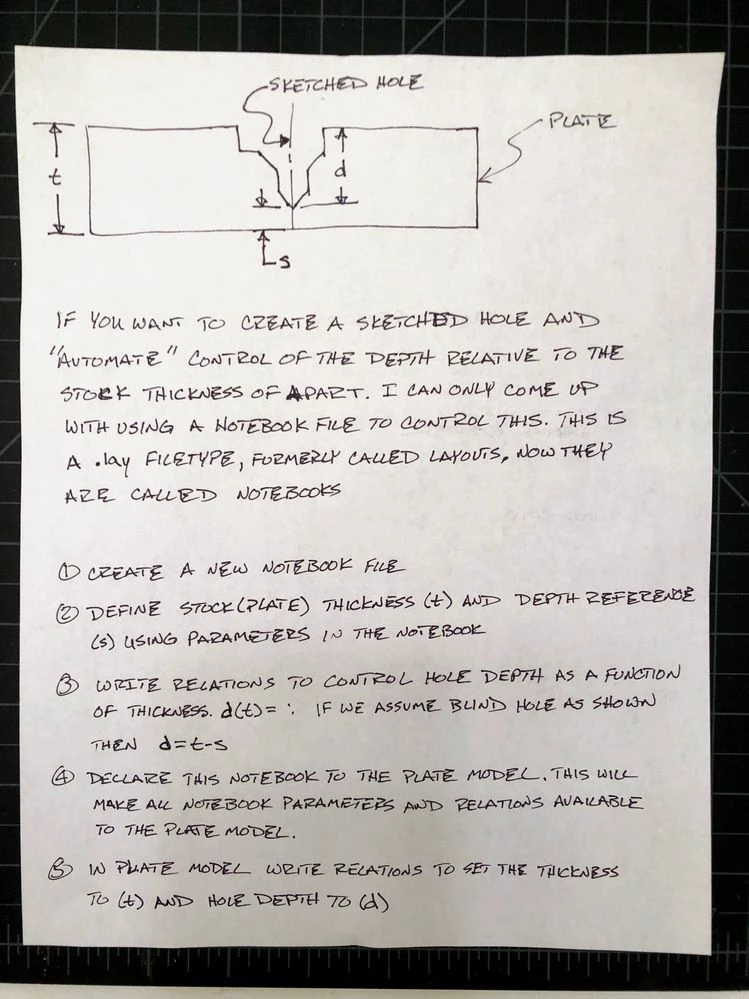
A notebook declared to the plate with one or more sketched holes should handle this situation. It will use relations but can automate if you have defined design standards that you can capture. I would not use sketch relations for this, use feature relations to control the hole in the plate.


See the pic of the written steps for a given hole depth control scenario. This assumes that the plate thickness is the same at the location of all holes of this type. If the thickness varies then you would employ an analysis feature to define the stock thickness at each hole location and incorporate that into the relations to maintain stock of thickness "s" below each hole of this type.


If you can standardize plate thickness to discrete sizes then you could use a single Notebook file to define the depth of hole for each of the stock plates in a single file and declare that to any new plate design to control the hole depths. As long as the layout is declared to the model with the holes in it then the hole depth will update is the thickness changes.


Depending on what your hole looks like it may be easier to make a UDF for the custom "hole" and define the depth reference in the feature which would not require the use of a Notebook as described here.


Notebook to control hole depth as a function of stock thicknessNotebook to control hole depth as a function of stock thickness

1 reply

tbraxton
22-Sapphire II
tbraxton22-Sapphire IIAnswer
22-Sapphire II
June 10, 2021

A notebook declared to the plate with one or more sketched holes should handle this situation. It will use relations but can automate if you have defined design standards that you can capture. I would not use sketch relations for this, use feature relations to control the hole in the plate.


See the pic of the written steps for a given hole depth control scenario. This assumes that the plate thickness is the same at the location of all holes of this type. If the thickness varies then you would employ an analysis feature to define the stock thickness at each hole location and incorporate that into the relations to maintain stock of thickness "s" below each hole of this type.


If you can standardize plate thickness to discrete sizes then you could use a single Notebook file to define the depth of hole for each of the stock plates in a single file and declare that to any new plate design to control the hole depths. As long as the layout is declared to the model with the holes in it then the hole depth will update is the thickness changes.


Depending on what your hole looks like it may be easier to make a UDF for the custom "hole" and define the depth reference in the feature which would not require the use of a Notebook as described here.


Notebook to control hole depth as a function of stock thicknessNotebook to control hole depth as a function of stock thickness

1-Visitor
June 10, 2021

Unfortunately, declaring a notebook is a non-starter for the engineering manager here. He had a bad experience once when trying to modify an assembly that had a declared notebook, but couldn't break the parameter he needed to redefine, despite having removed every parameter and relation in the notebook.  I still think we were missing something, but now I can't bring up the Notebook as a means of improving design workflow without risking a trauma response.


Using a UDF would be a more palatable solution probably, unless the intersecting surface wasn't planar. Maybe I can set the hole to intersect the next geometric surface in the UDF definition.

tbraxton
22-Sapphire II
22-Sapphire II
June 10, 2021

If you have not seen this thread it may be relevant to the issue you had with the layout.


https://community.ptc.com/t5/3D-Part-Assembly-Design/How-to-delete-parameters-from-Notebook-files-ex-Layout/m-p/704240#M118207