

15-Moonstone
April 22, 2015
Solved

What's the trick for plotting full size?

  • April 22, 2015
  • 3 replies
  • 10732 views

I have a die model that I wish to plot out as a drawing.

I can get the plotter to pick up the plot request but I don't see how it is possible to print out the model at full size which I need.

I have tried the actual size option which results in a smaller size.

I have tried the 100% size, which results in a very small size.

I don't see any other option that would actually give you the correct size. Is this possible?
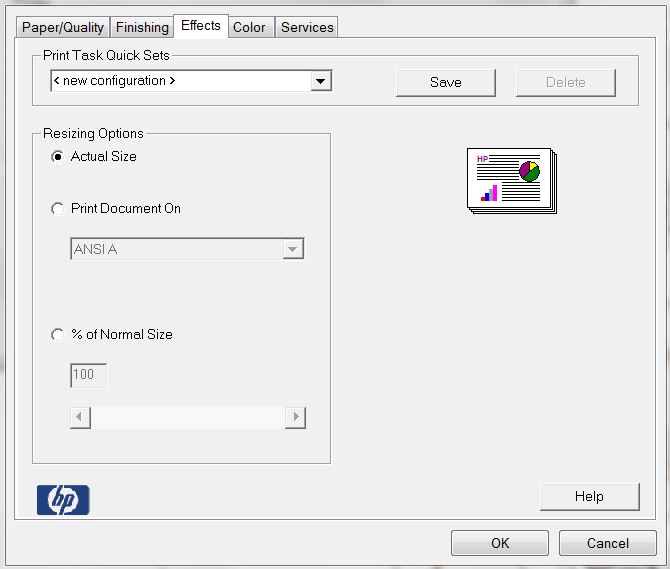
Plot Size.JPG


This thread is inactive and closed by the PTC Community Management Team. If you would like to provide a reply and re-open this thread, please notify the moderator and reference the thread. You may also use "Start a topic" button to ask a new question. Please be sure to include what version of the PTC product you are using so another community member knowledgeable about your version may be able to assist.
Best answer by dgschaefer

You cannot print from the model to a specific size. To print a specific scale, you need to make a drawing. it wasn't clear to me if you were trying to print from a drawing or the model.

The drawing then needs to be a sheet size that matches what your printer has available, the views need to be set to 1:1 scale and then, as Stephen indicated, you need to tell Creo to print to that sheet size and to print 1:1 scale.

Then, assuming your printer doesn't "scale to fit", you should get a full scale print.

3 replies

23-Emerald III
April 22, 2015

Make sure in the Creo printer configuration dialog, the sheet size is set appropriately and the model is set to full plot/scale 1. Sometimes it helps to turn off format...sometimes.

printsize.jpgfull-plto.jpg

A lot of the time, printers will do some sort of scale to fit sheet so I also do trial and error checking on the print out in both the horizontal direction and vertical direction. Then I adjust the printer scale in your image above to correct scaling issues.

I used to have to print out full scale patterns for burn table parts. Had to be perfect otherwise we were making scrap. It can sometimes be a challenge to figure out all the places that "scale" the printouts.

pimm15-MoonstoneAuthor
15-Moonstone
April 22, 2015

Stephen,

It appears your plotter has some print options that ours does not.

I might experiment with the % of Normal Size to see if I can get close.

With our other CAD system the scale is true size.

I'm also noticing that when I try plotting from the model the 100% is really small, and when I plot from a rough drawing the 100% scale is quite a bit larger.

23-Emerald III
April 22, 2015

The screen shots I am showing are the printer configuration within Creo, prior to printer specific options. Go FILE - PRINT and its the GUI box that pops up first.

I don't ever print directly from the model so I don't know what 100% scale would mean in that case.


24-Ruby III
April 22, 2015

Paul,

what width+height is assigned to the boundary of view of die model on the drawing (approximatelly) ?

Martin Hanak

pimm15-MoonstoneAuthor
15-Moonstone
April 22, 2015

Martin,

Are you talking about a setting on the drawing or in the printer settings?

I can't seem to locate this.


24-Ruby III
April 22, 2015

Paul,

I am talking about size of your model when printed in scale 1:1. I need to know what format size is suitable for your model.

Martin Hanak

21-Topaz II
April 23, 2015

You cannot print from the model to a specific size. To print a specific scale, you need to make a drawing. it wasn't clear to me if you were trying to print from a drawing or the model.

The drawing then needs to be a sheet size that matches what your printer has available, the views need to be set to 1:1 scale and then, as Stephen indicated, you need to tell Creo to print to that sheet size and to print 1:1 scale.

Then, assuming your printer doesn't "scale to fit", you should get a full scale print.

pimm15-MoonstoneAuthor
15-Moonstone
April 23, 2015

Sorry for being slow to reply it's been busy here.

Yesterday I was able to talk with someone in tech support with PTC.

He was able to help me finally to get the result I needed. What he had me do was very close to what Doug has suggested with 1 twist. He had me make my plotter as the Default Printer. He had me print my layout and everything came out very close.

I did have several things contrary to what allowed this to work correctly. It was just difficult to know what the correct sequence had to be.

21-Topaz II
April 23, 2015

Glad you got it working.

You should look into printer Configuration Files (*.pcf) where you can pre-define all the options in those dialog boxes. Once configured properly, in Creo 2 and earlier with the dialog boxes that Stephen posted, they'd appear in the "Destination" tab. Not sure how it works in the new ribbon dialogs in Creo 3.