
14-Alexandrite
November 30, 2021
Solved

Custom light scenes

  • November 30, 2021
  • 1 reply
  • 6134 views

Hello community, I've started to add some custom light scenes in the lightsscenes.xml

Has anyone experienced this already?

I mean there are some settings that are not fully explained in the help, for example the difference between "ambient_adjust" (in the main definition of the lightscene) and "adj_ambient" (in the definition of the light itself).

Or other best practices in positions, orientations, etc..

I'm not fully happy with the default that comes with the application so I'm doing some tests and wondering if anyone has already done something to be shared, at least some experience 😉


Thanks
Best answer by agarland

The "adj_ambient/diffuse/specular" are intensity modifiers.

I would personally recommend you leave them out unless you really want to try and adjust the intensity for each color.


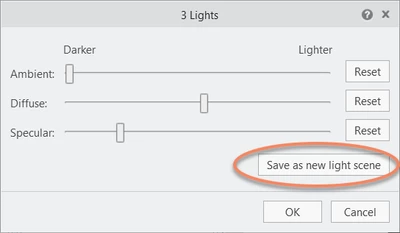
To be honest I always recommend using the 'Save as new light scene" option in the edit light scene dialog rather than editing the xml.

Save as new light scene.png 


Hope this helps.

1 reply

24-Ruby III
December 1, 2021
AndreaT14-AlexandriteAuthor
14-Alexandrite
December 1, 2021

Thank you, that's exactly what I'm reading.

But in some cases I don't find it that complete.

For example, as I was writing before, the difference between some fields and how they actually appear in Illustrate.

We can see the definition of ambient_adjust and then adj_ambient..

I assume the first reflects on the values of the sliders in the illustration (and those fields control all the lights) instead the others control the single light?

It's not so immediate to understand and it takes a lot of time to check the single settings and how they change in the illustration.

AndreaT_0-1638346345699.png


24-Ruby III
December 4, 2021

@agarland Could you please take a look?