I love this question and I wish CAD companies would put more emphasis on this topic!
Our models are extremely large and the number one thing that slows us down is complex models. We use Creo and Solidworks but Solidworks wins in terms of performance evaluation for sure. It can show you open time, rebuild time, graphics triangle count.. all the good things.
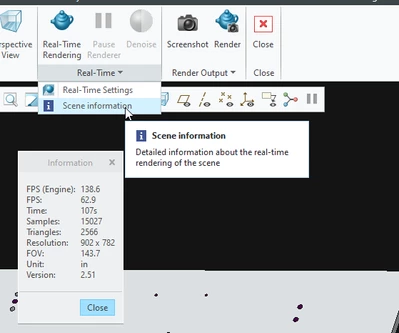
If you look on the applications tab, you may have the render studio option. If you launch that, you can find a graphics triangle count in the Real-time overflow menu, under scene information. I can't say with 100% confidence that this is what I think it is or what I use it for lol. That said, when performance sucks, this number is high. After simplification, this number goes down. This is the best equivalent to the SolidWorks functionality that I've found and it took some real digging to find it.

My company designs and builds automated machinery for just about any industry. Some of our models are absolutely gigantic so we put lots of focus on simplification. Here are a few pointers from one of the presentations I gave our users.
- Heavy models directly impact performance of commands in Creo. (Edit definition, open, close, drawing commands...)
- Heavy models slow down the speed at which you are able to zoom and pan within a model.
- Saving an assembly as a part doesn’t reduce the level of detail (LOD). Reducing the number of lines and surfaces does.
- Solidifying models should always be a priority. Non-solid models are the biggest offender in terms of performance degradation (for us).
- Drawing performance is directly related to model performance and LOD.
- When importing assemblies, you should remove internal components or components that don’t add value to the design. (Hoffman enclosures...)
- LOD matters! The fewer lines and surfaces, the better.
- Making parts transparent has a negative impact on performance.
- Some shapes impact performance more than others. Helical shapes like threads and springs require huge amounts of graphical resources.
- Model geometry that doesn’t add value should be simplified or removed.
- Simplifying your models will save you and your project team time and money!

