
12-Amethyst
February 6, 2026
Solved

Bug in specific situations when selecting a pattern of points in Creo simulate?

  • February 6, 2026
  • 1 reply
  • 153 views

Hello,

My motivation was to create a pattern of points to be used as measurements (in this case the rotation of these points in relation to a selected CS in the main assembly)

As rotation cannot be used in solid elements, I created a pattern of point to points linked by rigid links to do the job. This is after imported in the main assembly and finally patterned. My hope was to not have to define rotation measurement manually from each point later. With measurements in a pattern, this would be made automatically by Creo Simulate.

However, I cannot select this pattern using the “pattern” option for anything – but I can use other patterns – and this does not make sense.

Is there a bug or a limitation that is not clear? Is there any work around?

I am avoiding manual solutions, as it may involve hundreds of points.


Here the explanation:

Pattern 1 cannot be selected for any feature that has “Pattern” as option.
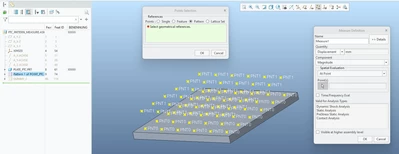
rrabe_0-1770373880085.png


However, I can select another pattern made in the same assembly
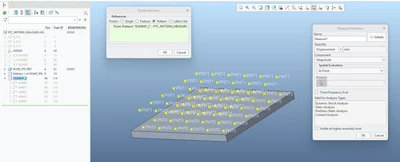
rrabe_1-1770373880098.png


And I can even select a pattern that belongs to the pattern that cannot be selected!
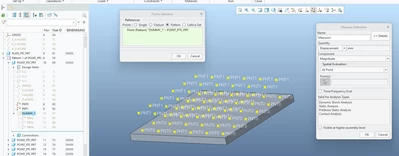
rrabe_2-1770373880108.png


Without many details, I need to pattern rigid linked points and read the rotation of each of these points. However, this final pattern is not recognized as a valid pattern reference for anything. This means measurements, hard points for meshing, etc.  


This does not make sense, as Creo Simulate accepts similar patterns.

My first thought is that this is a bug. I am using Creo 10


Looking forward for any feedback!

Thanks!

Best answer by SweetPeasHub

There is not a bug. It only allows a pattern of points. Dummy_1 and Dummy_2 meet this criteria.

The pattern that does not work is not a pattern of points, it is a pattern of parts.


If you do not need non-linear analysis, just place a thin shell element on the surface where you put the measure points and it will report rotation.


On your overall goal for getting rotations I think yours is a difficult approach. Probably the best approach involves outputting an array of node coordinates XYZ, and displacements XYZ, then using a script or excel to do the math to estimate the rotation about csy of interest. Or you can request a Creo feature enhancement to results that will estimate rotations from displacement gradients.


Also, it is hard for the community to understand what your true goal is. Why do you need an array of rotations over a plate?


1 reply

17-Peridot
February 9, 2026

There is not a bug. It only allows a pattern of points. Dummy_1 and Dummy_2 meet this criteria.

The pattern that does not work is not a pattern of points, it is a pattern of parts.


If you do not need non-linear analysis, just place a thin shell element on the surface where you put the measure points and it will report rotation.


On your overall goal for getting rotations I think yours is a difficult approach. Probably the best approach involves outputting an array of node coordinates XYZ, and displacements XYZ, then using a script or excel to do the math to estimate the rotation about csy of interest. Or you can request a Creo feature enhancement to results that will estimate rotations from displacement gradients.


Also, it is hard for the community to understand what your true goal is. Why do you need an array of rotations over a plate?


rrabe12-AmethystAuthor
12-Amethyst
February 10, 2026

Thanks!

Yes, it makes sense from this point of view. Although, in theory, the part in the assembly fulfills the requirement to be “points”, it is still flagged as a “part” and thus a pattern of parts.

I do not know why, but it immediately made to remember a paint of René Magritte “This Is Not a Pipe”, but showing a pipe…

I tried first the points over the shell, but I was converting my plate in a shell (shell pair). This was having nasty meshing issues with the structure below the plate (what I sent to the Community is simply a simplified example). There was no way to make the mesh to work. I will explore more this shell option because is easy and elegant.

I am now using links (weighted or rigid) – connecting an offset point to a small circle in the surface. It worked to read rotation. The “point to point” connection – even the point in the surface being part of the mesh – was not letting the simulation to finish. The error message was not clear but related to unconstrained model/element. If the point to point rigid link was removed the simulation finishes, but I cannot read rotation.

PTC support also pointed out that an assembly of points is still a part but suggested to use the “single point” option and to use a “box selection” to select all the points. Could be indeed an option if the points are easy selectable.

Finally, the rotation points over a plane are only a simplified version of the part being simulated. In this case I must take out information from parts of a structure and exporting points would be the easier way to get any kind of information like rotation, displacement, temperature, etc. All this information is inside Creo Simulate, but to get them out from the files is a nightmare and only using scrips. Using measurements is easier.

Thanks again everybody for the feedback!

rrabe12-AmethystAuthor
12-Amethyst
February 13, 2026

Applying a shell over the surface that the control point will be created finally worked (instead creating shell pairs).
Now I can have more deformation results from the surfaces ( rotation).. I can display the shell in terms of displacement but also rotation.