17-Peridot
September 4, 2018
Solved

Mechanism: function from graph for torque-motors and force

  • September 4, 2018
  • 1 reply
  • 9164 views

Hello everybody,
I wonder how can I make a function (for torque motors and others) like this:
f(theta) = g(theta) * theta
where

  • theta = an input from the analysis (in my case the angle of a shaft) that I take from a measure,
  • g() = a points/graph with theta for x-coordinate.
I have the file with points but I don't know how to insert the datas )points from file) in the function f(x).
 
Thanks
Bye
This topic has been closed for replies.
Best answer by gfraulini

Once we understand "the flywheel inertia mystery", I returned on the main question in a more general overview.

Cattura.JPG


If one have the function g expressed in a closed form [eg: g(x,y)= f(x)*exp(4y-5); f(x)=sin(x) ] you don't have problems. One can insert the expression inside the "function type: user defined" tab.

One has problems when you have the function f(x) not in a closed form, but with a dots graph. You can't multiply a graph for a function.

I found a workaround:

  1. add to the assembly a "fake component" with its own motion axis,
  2. attribute to that one a torque motor defined with a table and on the domain you want,
  3. make a netload measure on the fake torque motor,
  4. now you have the function f(x) that you can insert in a user defined fuction,
  5. make attention to the units! Inside the definition of g you may adjust with some constant the value of f.

I use this method to calculate the J and the J' of the motion equation.
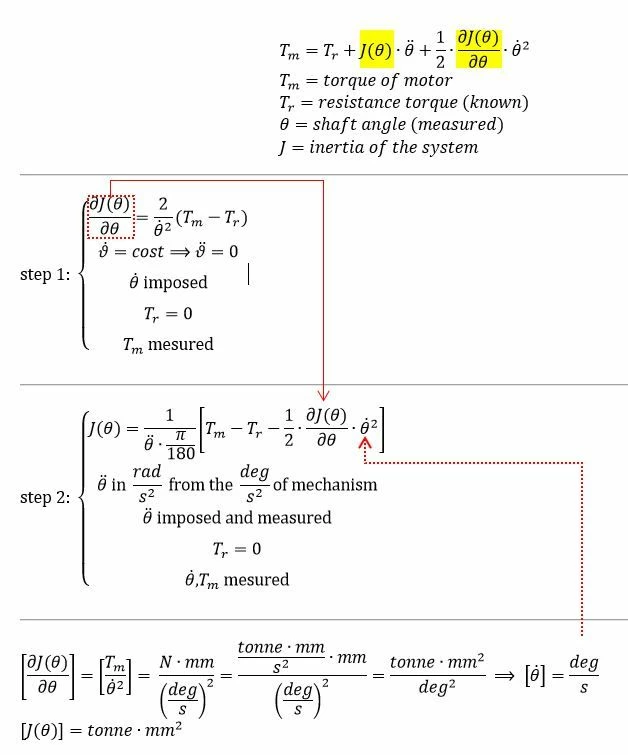
 Cattura3.JPG

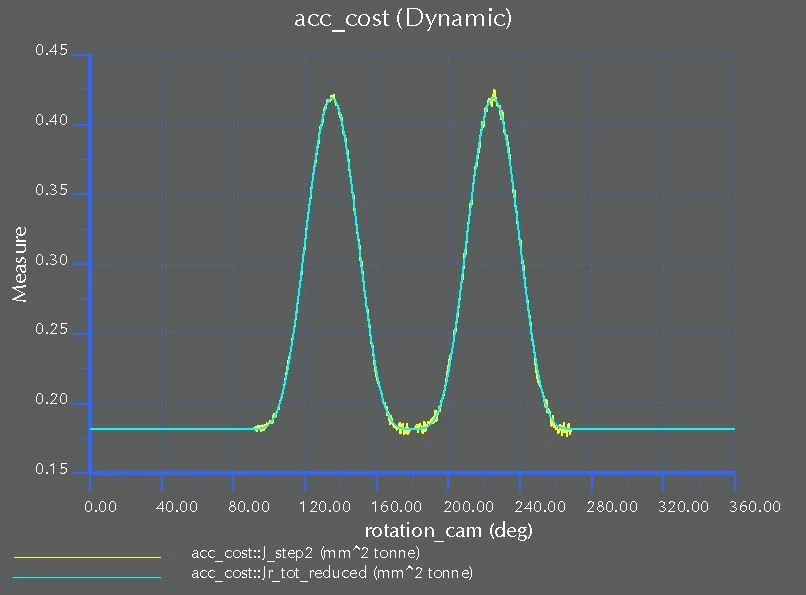
Here are two curve of J(theta): the yellow one comes from the simulation with "my method", the ciano one comes from an algebraic calculus.
Cattura4.JPG
The differences are small and decrease with the number of points growing (the simulation time step).

 

1 reply

17-Peridot
September 4, 2018

You must

instead of (g(theta) from external file) * theta

use (g(theta)*theta from external file)   = make new external file with the math done.

because no additional math allowed on external file and only one primary variable allowed.


Make new external file using data generated as such.

torque_Servo.PNG


Example use of external file.

torque_Servo2.PNG


And here is format for .tab file shown using Notepad++ with LINE #s showntorque_Servo3.PNG


gfraulini17-PeridotAuthor
17-Peridot
September 5, 2018

I explain better what I would to to.
I'm studying a mechanical system moved by a brushless motor.
The system is periodic and it can run at a max speed of 140 rpm.

I want to study the initial transitory where the system starts from zero velocity and reaches the max speed.
The brushless motor doesn't have an operation curve, but "a operation field", where the limits are the max speed and the max torque.


I've thought to use the rotating systems equation but I've the inertia and its derivative only like "graph points" and not in closed form like a function.

How can I do?

17-Peridot
September 5, 2018

Great this is good information from you.

I suggest the max torque vs speed as shown. (note x, y axis reversed from your chart)

The operation curve is forced by the controller and so I choose the fastest startup operation.

In simulate use a torque motor with independent variable of speed (not position)


torque_Servo4.PNG


Your rotating systems equation is not for the output torque of the motor, it is for the Load torque the motor must overcome.

Simulate will use mass/geometry/joints to get J(theta) terms and will automatically calculate the inertia based load for you.  (I assume you model entire mechanical system and just apply the motor with its proper inertia to it)

You will need to add a constant resistance  Tr (bearing drag load) somewhere in your model if you have not already done this.


Note: when simulation reaches operating point (140rpm)  then you may need to stop the analysis.

Or make this part of curve slightly sloped like (139.5RPM,Local-Tmax & 140.5RPM,0 ).

This should make it find the constant operating torque Tr.


Also a tip, use the speed units of default (deg/s) for the independent variable.  This means your curve must be in terms of deg/s not rpm.  You can use a "user defined" measure to convert to RPM but it is best that this is only as final output, not used in equations for motors, forces, etc.  (less math during simulation = better)