1-Visitor
October 11, 2018
Solved

Shaft FEA simulation torque and constraints

  • October 11, 2018
  • 2 replies
  • 15197 views

Hello everyone,

I am trying to perform a fea on a shaft with 2 inputs (10000 lb*ft), supported by 2 bearings.

Instead of putting a constraint at the output gear I thought it would be better to apply a torque

opposite to the input torque, in this case -20000 lb*ft.

The stress and deflection I obtain don't seem correct. The shaft rotates in the direction of

the input torque (more than one full rotation, the output torque doesn't seem to have any effect), it shrinks and on the output gear it

is showed a high localized stressed area, which I cannot justify.

If I substitute the output torque with a constraint that fix rotations the result seems to be correct, but

I would like to investigate the reason why applying opposite torques doesn't work.

I add that if I run the model with only input torques the fea still runs, even if I should get an error because the system is not isostatic and the shaft can rotate on its axis.

I hope someone can help me on this.


Thank you

Daniele
Best answer by skunks

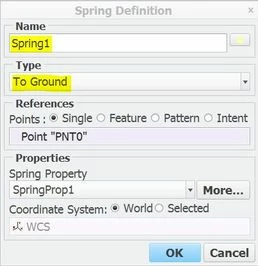
spring.JPG

2 replies

skunks
skunks19-TanzaniteAnswer
19-Tanzanite
October 12, 2018
Dnsworld11-VisitorAuthor
1-Visitor
October 12, 2018

I checked your model. The torques you applied are not balanced, if I balance them I get a result

really similar to mine, with a concentrated spot on the central gear and extremely high stresses. From the deflections I see that the shaft is spinning even if torques are balanced.

skunks
19-Tanzanite
October 15, 2018

???

loading.JPG

17-Peridot
October 12, 2018

Your problem is that Input_left and Input_right are not applied to the model.  They are applied to surfaces that are not part of the model from Extrude1 and Extrude2.  You need to instead create surface or volume regions on the simulate side to split the regions on the ends of the part.  In effect the full 20000 ft-lbf was applied to skunks spring instead of the small residual.


Finally, two choices to remove the small residual. (EDIT -choice A requires no constraints, only loads like a free body diagram so the constraints would have to be replaced with their reaction loads)

A. turn on Inertia relief in your analysis definition.  This will account for small numerical discrepancies that cause rotation.

B. use skunks spring to arrest these small forces.


I believe the reason it did not error out as underconstrained may be because of the gravity load you applied, but I did not test this theory.  I say this because inertia relief is also a type of automatic gravity load.


-regards

Dnsworld11-VisitorAuthor
1-Visitor
October 12, 2018

Actually, the applied input torques always generate stresses in the shaft, meaning they're being applied by the software. I will  try anyway to apply the input torques to volume regions.

I don't want to use the "inertia relief" feature because the shaft is subjected to gravity and, most importantly, there are radial loads which are not balanced (left and right torque comes from belts, hence a radial load is generated. The central gear as well has a radial load to transmit torque)


What do you mean by "In effect the full 20000 ft-lbf was applied to skunks spring instead of the small residual"?


Thank you