
10-Marble
December 30, 2025
Solved

String replace function working in command line but not in .acl

  • December 30, 2025
  • 2 replies
  • 167 views

I am using Arbortext 8.3.  Here is the simple function in question:

replace("ʼ", "’", 0x2000);

The user has a file that contains a mix of apostrophes.  We want a consistent character used.  The first apostrophe is the U+02BC : MODIFIER LETTER APOSTROPHE {apostrophe} and the second (the desired one) is U+2019 : RIGHT SINGLE QUOTATION MARK {single comma quotation mark.

Using the following text, the last apostrophe is the one we want swapped.

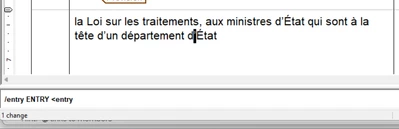
la Loi sur les traitements, aux ministres d’État qui sont à la tête d’un département dʼÉtat

Using the replace function above, if I run from the command line in Arbortext Editor it works perfectly.
AP_13279061_0-1767121455643.png


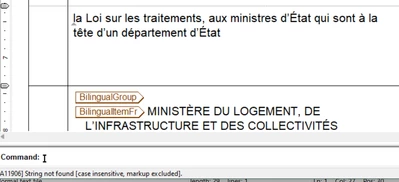
However, when I save that one line of code, as its own ApostropheSwap.acl file, and do a "source ApostropheSwap.acl", it does not find a match.
 

AP_13279061_1-1767121664726.png


I have tried saving the .acl file as UTF-8 and ANSI, and both get the same result.


Any ideas would be greatly appreciated.

Thanks

Best answer by ClayHelberg

It is probably an issue with the special characters you're using. It may help if you use the chr() function instead of the literal character, something like this:

replace(chr(0x02bc), chr(0x2019), 0x2000)

I did a quick test from an ACL script file and this seems to work for me.

2 replies

18-Opal
January 5, 2026

If you open the map as a resolved document for editing (edit, edit resolved document) you can also do a find and replace that way.


Bryon

10-Marble
January 5, 2026

Yeah, the regular Find/Replace dialog works, but I really wanted a solution that doesn't require the user to have to do much.  The users are lawyers and dont want to be copying different apostrophes into text boxes.  At this point the simplest solution is for the user to paste the function in the command line.   And that is not a very polished solution.  

I am hoping someone knows how to get that little command to work from within .acl

18-Opal
January 14, 2026

It is probably an issue with the special characters you're using. It may help if you use the chr() function instead of the literal character, something like this:

replace(chr(0x02bc), chr(0x2019), 0x2000)

I did a quick test from an ACL script file and this seems to work for me.

3-Newcomer
January 15, 2026

Thank you.    The chr() function did the trick.