Let's instead use Ron's image from below:
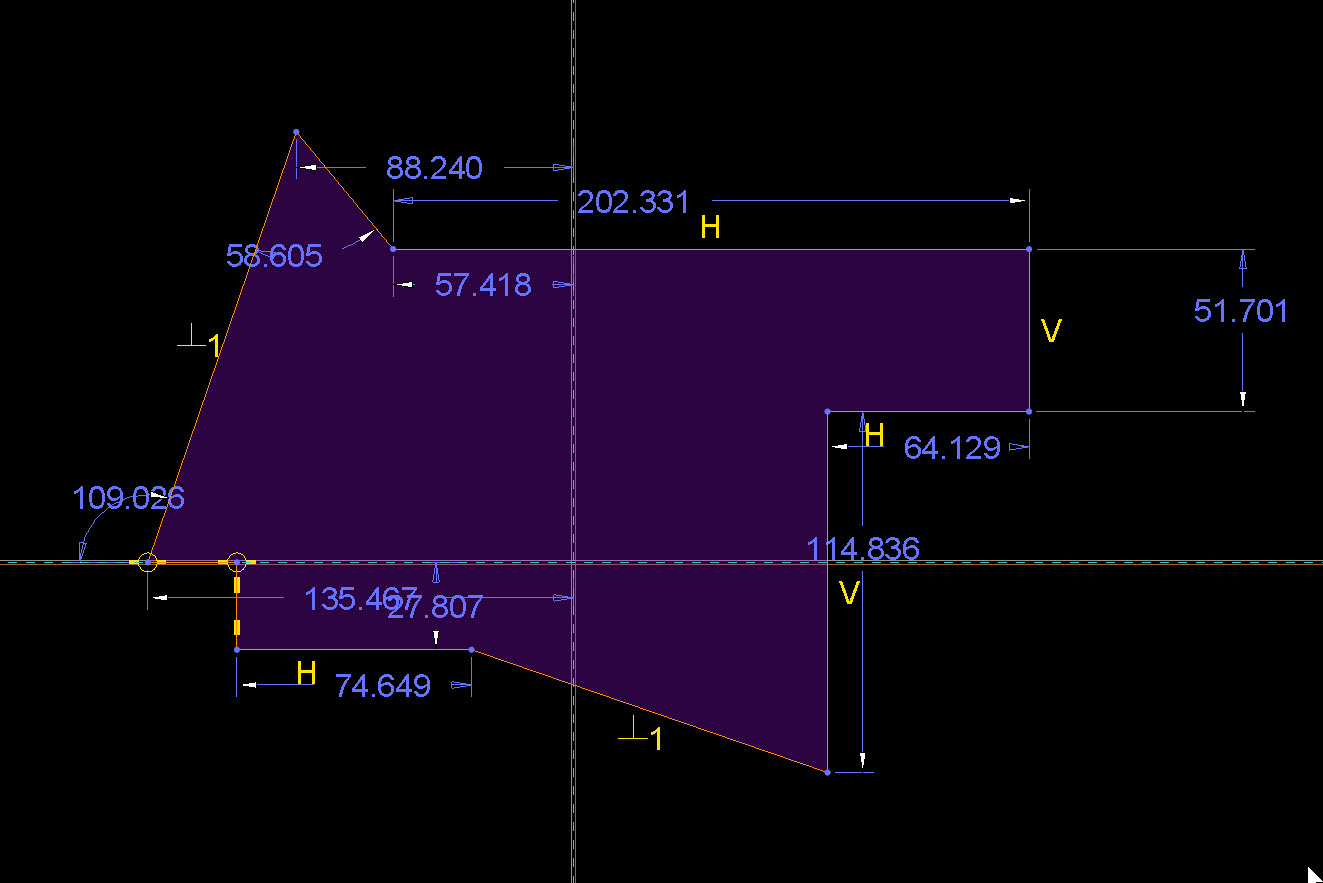
All weak dims.
Let's say I change the 202.331 dim to be 300.000. This is what will happen:
- The left end is constrained to the reference and therefore won't move. So, the right hand vertical line will move to the right.
- The vertical line below it is tied to it so it will move right too.
- The length of that second vertical line is fixed (114.836) so it will not change.
- That will drag the bottom angled line to the right as well. It will not change angles because it is constrained as normal to the leftmost angled line.
- Because the bottom most horizontal line has a fixed length (74.649), it and the short vertical line at the left will move right as well.
- The far left bottom point is constrained to the reference and will not move.
I also know that if that vertical reference moves right or left, this entire sketch will move with it because there are no other vertical references.
Now, if I grab a line and drag it, Creo will allow the values of the weak dims to change. It also allows the values of string, non-locked dims to change, I believe, so no difference there.
All predictable because Creo tells me what till happen. Now the default scheme here creates a lot of cascading effects, but it's fully constrained and predictable.
If we sketched the same thing in SW all the lines would be lue and there would be no dims or constraints. I could grab and drag any line pretty freely and usually, only that line moves. What isn't clear, however, is what happens to the sketch if the rest of the part moves.
You mentioned below that Creo's weak dims and SW's blue sketches are the same. The above is why I say they are not. My point was not to critique SW (which I guess I did), but to answer the original question. The two sketchers do not behave the same, there are differences in methods that are important to understand if you are coming from one and want to bake robust designs in the other. There isn't really an equivalent of the "blue sketches" of SW, but I guess the image above is as close as it gets. It still provides a lot of info on how this sketch will behave, the default SW sketch provides almost nothing. Different ways of doing it and I strongly prefer Creo's.
In either tool you need to master it and put in the right inputs to get good results. Each tool, however, requires different inputs to get there.

