
10-Marble
July 14, 2025
Solved

Profile Milling with Tool Compensation and Ramp Entry for Internal Profile

  • July 14, 2025
  • 1 reply
  • 1815 views

Profile Milling with Tool Compensation and Ramp Entry or helical for Internal Profile


Hello CREO Users,

I am working on a milling operation for an internal profile (similar to a valve seat geometry) in Creo Manufacturing. My objective is to machine the internal contour using tool radius compensation (CUTCOM) and to ensure smooth ramp transitions between Z-level passes or using helical folling the profile to avoid marks on the final surface.

I have tried the following approaches:

  • The Cut Line strategy allows helical movements and smooth transitions between passes, but it does not support tool radius compensation (CUTCOM). This is a requirement for my process.

  • The Profile Milling strategy does support CUTCOM, but it does not offer ramp or spiral entry between Z-level cuts. As a result, the tool plunges vertically at each level, which causes unwanted marks and steps in the internal diameter of the part.

  • I've tried to explore all the SCAN_TYPE parameters. LEAD_IN and LEAD_OUT approach but nothing works well.

I need a solution that allows:

  • Internal profile milling

  • Tool radius compensation (CUTCOM)

  • Smooth ramp or helical transitions between Z-level passes

Is there a way to achieve this in Creo? Can you suggest any workaround or configuration that enables ramped transitions with CUTCOM enabled in Profile Milling or another equivalent strategy?
Best answer by CRIS_AFARELLI

Hello everyone,

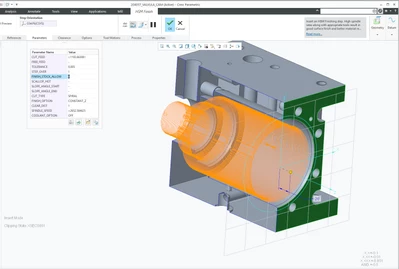
I’d like to share that I achieved very good results using the HSM Finish strategy - CUT_TYPE SPIRAL / FINISH_OPTION CONSTANT_Z in Creo for a complex surface profile.
The surface finish quality significantly improved compared to other approaches we had tried before.

Thanks again to those who suggested this method — it definitely made a difference.

Hope this helps others facing similar challenges!


CRIS_AFARELLI_0-1753964482298.png


1 reply

21-Topaz II
July 15, 2025

A way to maybe get what you want is through the use of an older type of toolpath

Classic NC Steps -> Custom Trajectory 

This type of toolpath is something I use a lot for crazy contour-following rougher cuts and lots of other weird geometry situations. It isn't available within the manufacturing module unless you set the hidden config.pro option

enable_classic_nc_steps yes

It is a very simplistic cutter path definition. With this you could define a path that has nice circular lead-ins and that should avoid the terrible vertical z-motion "scribe line" effect.

A helical z transition I've not seen, but would really like to. I could define a helical surface, but that's useless for machining because it won't know how to follow the surface, unless you can use the surface edge as the path? You'd have to try it, but I don't have much confidence in it...

10-Marble
July 15, 2025

Hi Ken

Thanks for the insights and suggestions.


I’d like to share that I found a workaround using the Volume Milling strategy with the PROF_ONLY option and SCAN_TYPE = SPIRAL_MAINTAIN_CUT_DIRACTION. It supports internal profile machining and by adjusting the scan type and entry/exit parameters, I was able to create smooth transitions between Z-level passes, very similar to a helical or ramp entry.

The only limitation I noticed is that CUTCOM is not applied.


Also, regarding your suggestion on the legacy toolpath: I checked my configuration, but I couldn’t find the enable_classic_nc_steps parameter in my config.pro.


CRIS_AFARELLI_1-1752597726362.png

The image below is the profile that I want to machine. I use a ramp angle to connect each slice, this way avoid tool marks at the internal profile.

CRIS_AFARELLI_2-1752597973344.png


21-Topaz II
July 15, 2025

Because the config.pro setting is hidden, it does not show up in the typical options editing interface. You have to manually add it to your config.pro with a text editor. For some reason they seem to feel that this toolpath type is not needed anymore, which I wholeheartedly disagree with. I want the level of control that this type of path provides, because I find that many of the "simple" path generation methods are lacking in some aspects.