
1-Visitor
October 12, 2017
Question

Assigning a variable name to the output of a solve block in Prime (inputs are vectors)

  • October 12, 2017
  • 4 replies
  • 5638 views

Hi, I'm trying to assign a variable to the output of a solve block but there vector inputs and the output from the 'find' function is a series of 2x1 arrays, in one long array.  Sorry - it's hard to describe but an image is attached.

I've created two blocks to show the problem - the last one showing the error when I want to assign the output to a variable.

Thanks
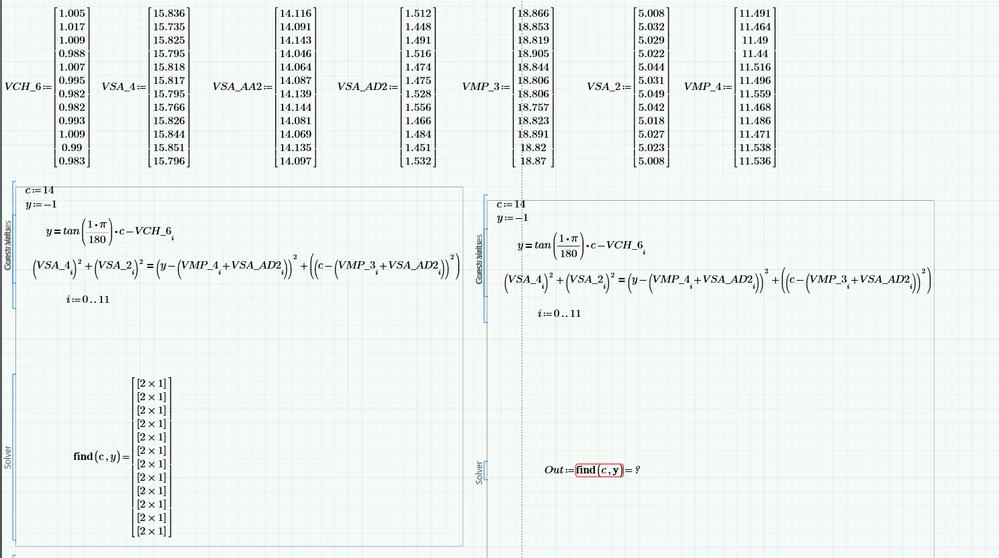
 image.png

4 replies

23-Emerald I
October 12, 2017

Your sheet is not attached.  (May need to "zip" the file to attach it.)  Consider including an "XPS" file for those of us with older versions.

1-Visitor
October 12, 2017

Take a look at the labels of "c" and "y" in the find function of both solve blocks.  They appear to be different.

Note that if "c" is labeled as a constant in either solve block, Mathcad is using the speed of light.

25-Diamond I
October 12, 2017

The problem is that you are not dealing with vectors when you make your reault dependent on a  range i. The result of your left solve block is NOT a nested vector and so you can't assign it a variable or access a single element of it.


A possible solution might be the following:


Delete the definition of the range i


At the end of the solve block use


Solution(i):=Find(c,y)


below the solve block define your range i:=0..11 and use


Out[i:=Solution(i)


This should do the job. "Out[i" means you use variable "Out" with vector index "i"


24-Ruby IV
October 12, 2017

May be so

Out-i.png

25-Diamond I
October 12, 2017

Hi Val!


I guess that turning the solve block into a function of i is exactly what I sugested, isn't it??

With the exection that you did not assign the result to a variable, as demanded.


In fact with your approach you have the same problem as Boyd experienced - you can't assign Out(i) to a variabe because the result still is not a true nested vector.

Only way without changing too much seems to be to write something like FinalOut[i:=Out(i) as I sugested.


The better way in my opinion (requires a bit more changes) would be to turn the solve block into a function with six arguments (representing the values of the six array used) and so get rid of the index i altogether Then this function would be called vectorized with the six arrays as argument.


Here is a Pic of a simplified expamlple which hopefully clarifies what I am talking about:

Bild.PNG

Boyd1-VisitorAuthor
1-Visitor
October 13, 2017
Thanks for the input.
Unfortunately I'm having laptop issues so am unable to make adjustments until Monday.
I had already tried the vectorised version and as I recall it was taking forever to solve because my input vectors are going to be about 10000 elements long.
The other option (right hand) looks like it might work other than I would prefer two separate arrays (one for x and other for y) but I guess I can do that after?
Thanks again