23-Emerald V
September 19, 2024
Question

Bug Report - (?) Can't assign UnimathPrime font to a Text Style

  • September 19, 2024
  • 2 replies
  • 2800 views

As part of my standard(ish) formatting principles,  I like to use UniMath Prime (or another mathematical font, such as IBM Plex Serif or TeX Gyre Schola) to highlight variable/function names in Text Regions.


To make life simpler, because I'm inherently lazy and prefer to put less effort in than I need, I created a Text Style named Variable that allows me to select a variable or function name and apply an italic maths font to that name.
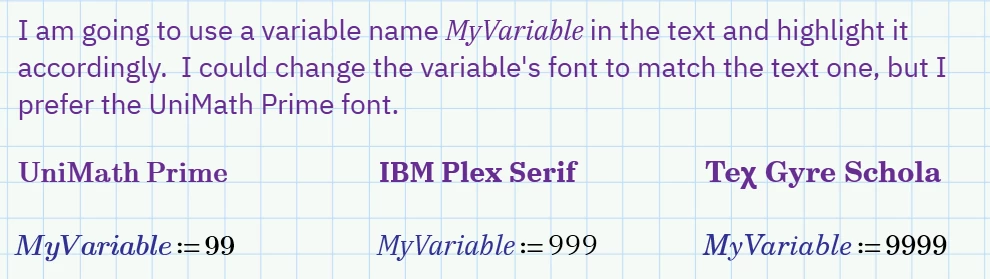
 

2024 09 19 D.png


I want to use UniMath Prime for that font, but Mathcad's Text Style editor won't allow me to use it in any style.   


UniMath Prime Bad.
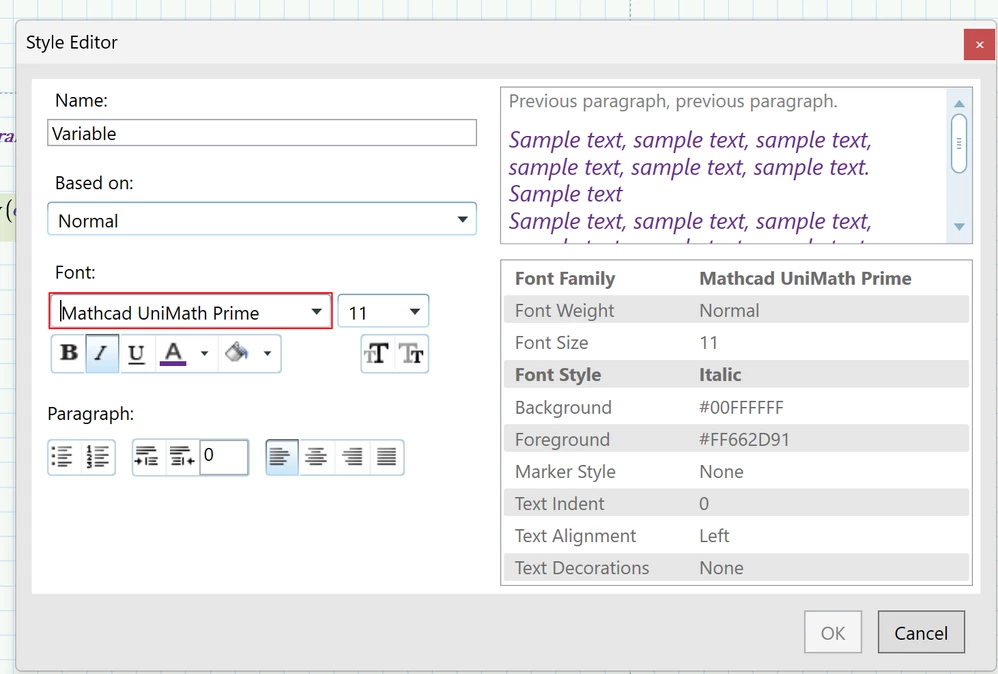
2024 09 19 B.png


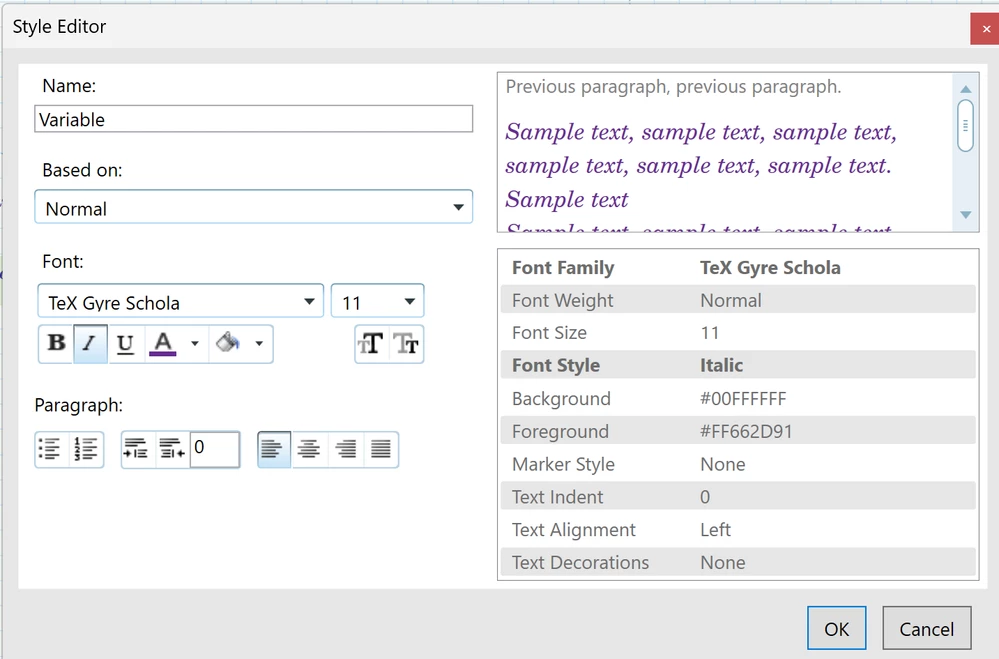
Tec Gyre Schola Good

2024 09 19 C.png


I'm not sure if this is a bug or deliberate, but it's a bug from my point of view, and I'd be grateful if PTC could fix it.


Stuart

2 replies

25-Diamond I
September 19, 2024

I don't experience any problem defining that very style

Werner_E_0-1726758419976.png


23-Emerald V
September 19, 2024

Interesting, Thanks, Werner.  


I wonder why I can't assign UniMath Prime to a Text Style? I get the same problem with trying to edit any Text Style to change the font to UniMath Prime.


Hmm.  Give me a minute ...


2024 09 19 E.png


Even more interesting.  On my PC, at least, the UniMath Prime font is shown in the Mathcad font menu as being in the Ptc.Controls.Core DLL.  It's not in the Windows Font folder.


AFAIAA, my Mathcad install went without a hitch, as did the licensing.  Do you have the UniMath Prime font in your Windows Font folder?  Should it be there?


Stuart


23-Emerald IV
September 19, 2024

I have these in the Windows/Fonts directory:

LucMeekes_0-1726767287557.png

Success!
Luc

16-Pearl
September 22, 2024

@StuartBruff - I do this as well, This doesn't answer your issue, but it is just as easy to insert a math region with <Ctrl><Shift>-M and type the name of your function/variable in it.  Since it is a math region, it will match the formatting of your math equations.  If you change the Math region default formatting, the text embedded variable with change with it.  I started doing this years ago when I couldn't get super, sub-scripts in the text and never looked back.

23-Emerald V
September 22, 2024

@JeffH1 wrote:

@StuartBruff - I do this as well, This doesn't answer your issue, but it is just as easy to insert a math region with <Ctrl><Shift>-M and type the name of your function/variable in it.  Since it is a math region, it will match the formatting of your math equations.  If you change the Math region default formatting, the text embedded variable with change with it.  I started doing this years ago when I couldn't get super, sub-scripts in the text and never looked back.


Nice one, Jeff.


I used to do that a lot, but the method had skipped entirely out of my memory and gone walkabout.


However, AFAICT, users can define their own Math ... sorry, Label Styles, so it's not possible to, for example, create a Matrix style and apply that to a variable name, whereas it can be done in a Text Style (for documentation purposes) - provided one has the Mathcad UniMath Prime font installed.


Swings and roundabouts as to whether text or math names are preferable in any given instance: it's easier to change the font size in a Text Box if everything is text, but it's easier to change Text and Math styles independently for mixed text/math.


Here's an example for other interested readers (Googling  "mathematics fonts" turned up the fonts shown below, other than UniMath, and I found many of them on the Tec CTAN website) ...


2024 09 22 C.png


It's hard to tell the difference:


2024 09 22 D.png


It's difficult to decide which fonts to use when you're a member of the 29th/31st King's Own Perfectionists (Heavy Pedantry Troop).


I like the Mathcad UniMath Prime font, but its subscript alignment and sizing are slightly inconsistent.  


Cambria is the best font that I've found for alignment and consistency and was allegedly designed as the serif counterpart to Calibri, but modern web designers turn their noses up at its archaic form and sniff in a most derogatory fashion when forced to gaze upon it ("It might have been good enough for teletype terminals and VGA, my dear boy, but heaven forfend that Cambria should pollute the pool of exquisite modern fonts on 5K monitor.").


Cambria Math is almost there: good alignment and consistency, but it's a slanted, not italic, font .... which is surprising given that it was designed for mathematics and italics (strongly) recommended for quantity names by many mathy journal style guides (eg, IEEE and AMS (the AMS guide tells editors to convert slant to italic).  


 Still, if Donald Knuth thinks the Tec Gyre fonts are fine for mathematics, who am I to argue?


Stuart