10-Marble
October 6, 2025
Solved

combine three matrixes to make 3d spline

  • October 6, 2025
  • 2 replies
  • 899 views

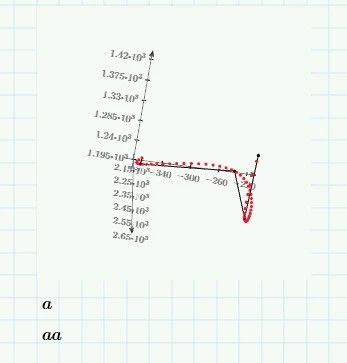
Hello, I'm trying to draw 3D spline go through 5 points defined by matrix "a" .

After defining matrix of x range, y and z, these three matrixes are not able to be combined by "augment" function.

Are there any way to combine these three xyz matrixes? or any other way to plot xyz?
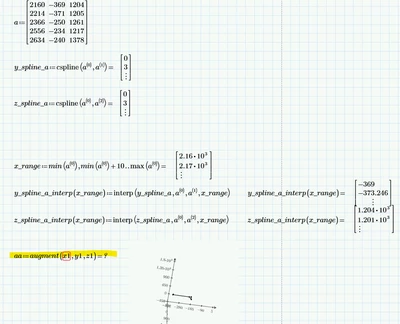
 

SK_13639906_0-1759732077635.png


Best answer by terryhendicott

Hi

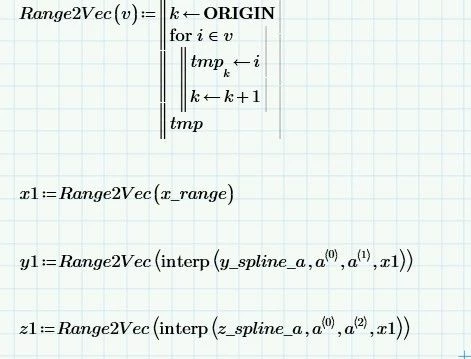
It is the age old problem  of turning a range to a vector that Prime 11 uses the vec() function.

As this is a Prime 10 worksheet I have used a Range2Vec() function from an @StuartBruff worksheet.  Thanks Stuart.

Capture.JPG

Capture2.JPG

Cheers Terry

2 replies

21-Topaz II
October 6, 2025

Hi

It is the age old problem  of turning a range to a vector that Prime 11 uses the vec() function.

As this is a Prime 10 worksheet I have used a Range2Vec() function from an @StuartBruff worksheet.  Thanks Stuart.

Capture.JPG

Capture2.JPG

Cheers Terry

21-Topaz II
October 6, 2025

As this forum is a learning opportunity have for Prime 10 or lower the following sheet that explains ranges and vectors:

Capture.JPG

25-Diamond I
October 6, 2025

What you did would have worked OK up to Prime 9 because an inline evaluation (the = right after the definition of the range) converted a range into a vector. As an evaluation should not change the data type, PTC decided to get rid of this undocumented trick of turning a range into a vector in Prime 10. It was not until Prime 11 that PTC provided a convenient alternative by implementing the new "vec" function.

So in Prime 10 you have to use a user-function to convert a range into a vector, as Terry had shown, or you could have created x1 as a vector right ahead.
BTW, in Terry's sheet its not necessary to use "Range2Vec" when you define y1 and z2. It does no harm but "interp" creates vectors right ahead anyway if the last argument (x1) is a vector, so its not necessary to turn the vector into a vector using "Range2Vec" 😉 .


Personally I would have chosen a different approach without defining a vector for the x-values.

You may define a function f(x) which returns a 3x1 vector with the coordinates of the corresponding interpolated point.

Werner_E_0-1759743658278.png

Now you have two option for plotting the curve.

1) define a range for x (! similar to what you did) and plot f(x)


Werner_E_1-1759743778661.png

or as I would prefer

2) use Prime's "CreateSpace" function to do the job

Werner_E_2-1759743869364.png


P.S.: I would suggest that for future questions you say which version of Prime you are using - especially if you are not using the latest. This prevents that the answers you get are with worksheets you can't open.


Prime 10 sheet attached


25-Diamond I
October 6, 2025

One additional remark: The method for a 3D interpolation of a couple of point you had chosen is limited. It only works if the x-coordinates of the points are strictly in ascending order.

A more universal approach would be to make x, y and z dependent on an (ascending) parameter t.

The choice of this parameter naturally also shapes the outcome! So you have to chose it depending on your needs.

In the pictures below you can compare the outcome if you chose the parameter as

1) the x-coordinate of the point (F, blue). this was your approach

2) a simple sequential numbering of the points (G, green)

3) the distance of the points (G2, orange); a quite common choice for the parameter

Werner_E_1-1759748744590.png


Prime 10 sheet attached