10-Marble
January 29, 2026
Question

Computing speed and CPU performance consumption with different combinations of "IF" statement

  • January 29, 2026
  • 2 replies
  • 429 views

Greetings
I have a rather strange question, with topic that some people might consider insignificant and unimportant, but this particular function that Im making will probably be used numerous times in a single worksheet. For that reason Im trying to optimize almost every function in my file as much as possible. Ofcourse I dont expect a detailed answer with testing results etc, but rather your thoughts on this topic.

In this case, I need to determine in which region of IAPWS-IF97 (formulation for thermodynamic properties of water) the point lies on a pressure-temperature plot.
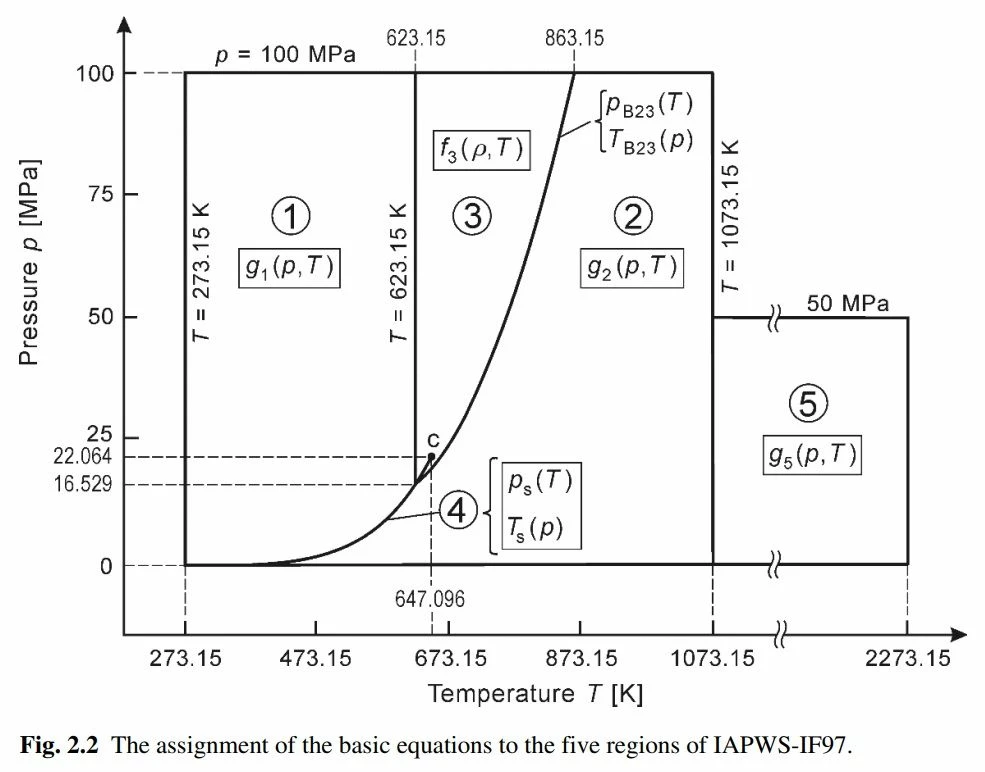
P-T Diagram, Validity range of IF-97P-T Diagram, Validity range of IF-97

So, here is the question itself: wich model of (p,T) function would be faster and easier to calculate (e.g. on a low-spec hardware), the one with separated IF`s, or the one where IF`s combined with usage of multiple "and (˄)" and "or (˅)"?
And will the result be different in Mathcad Prime?
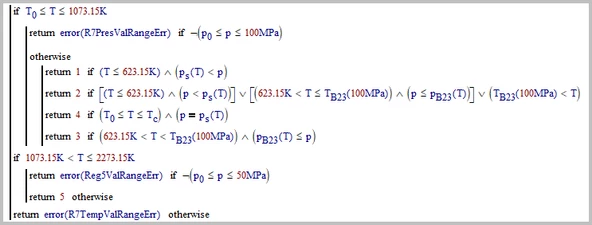
Model 1
Nickelynn_0-1769718415458.png

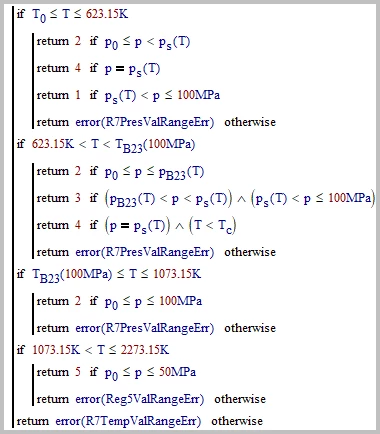
Model 2

Nickelynn_0-1769721891167.png

Functions and constants used (for clarification, in case you are interested)

  • ps(T) - saturation pressure at given temperature
  • pB23(T) - pressure-temperature equation for boundary between regions 2 and 3
  • TB23(p) - backward version of pB23(T)
  • T0 = 273.15 K
  • p0 = ps(273.15 K) = 611.213 Pa
  • Tc = 647.096 K
  • pc = 22.064 MPa
  • R7PresValRangeErr = "Error: Pressure is Out of the Validity Range (611.213 Pa ≤ p ≤ 100 MPa)"
  • R7TempValRangeErr = "Error: Temperature is Out of the Validity Range (273.15 K ≤ T ≤ 2273.15 K)"
  • Reg5ValRangeErr = "Error: Point is Out of the Validity Range of Region 5 (611.213 Pa ≤ p ≤ 50 MPa, 1073.15 K < T ≤ 2273.15 K)"

2 replies

25-Diamond I
January 29, 2026

Turn both calculations into functions of T, p  and perform timing tests (use the time(0) function) by calling each function multiple times using a series of predefined values of T, p or random created values.


What I notice is that your three functions p.s(T), p.B23(T) and T.B23(100MPa) are called multiple times and it may be beneficial if you calculate the values only once and assign the result variables which then are used in the comparisons. Especially T.B23(100MPa) is a constant value independent from T and so could be precalculated in front of the function in the worksheet.


Are you sure about the "AND" here? Shouldn't it rather be an "OR" ??

Werner_E_0-1769734083478.png


I am not sure if it would speed up the evaluation but you could omit the lower limit in all your comparisons. Just use if T<b instead of if a<T<b.
But you will have to add an additional "if T<To then return errormessage" at the front which may eat up the gain of speed by not having to check the lower bounds, You'll have to experiment with this.


If you set up a worksheet in Mathcad to time both functions you could post it here and we could convert it and test it in Prime.


BTW, I guess you  hardly will see the result "4" because of numerical inaccuracies due to tiny internal round-off errors.

So either omit that case completely and only distinct between area 1 or 2 or, If its important to check if point is near(!!) the line you may demand only approximate equality rather than exact equality. This means that instead of

Werner_E_0-1769732632921.png
you would use

Werner_E_1-1769732663059.png

It does not matter if you use <= or just < and you may adjust the 'level of equality' to your needs - maybe 10-3 Pa is too low.


Nickelynn10-MarbleAuthor
10-Marble
January 30, 2026

Hi Werner,
Sorry for delayed reply, had stuff to do.


@Werner_E wrote:

perform timing tests (use the time(0) function) by calling each function multiple times using a series of predefined values of T, p

Thank you for pointing out onto this time() function, didnt know about the existence of such.
I used it to test out my functions, file attached.


@Werner_E wrote:

functions p.s(T), p.B23(T) and T.B23(100MPa) are called multiple times and it may be beneficial if you calculate the values only once and assign the result variables which then are used in the comparisons. Especially T.B23(100MPa) is a constant value independent from T and so could be precalculated in front of the function in the worksheet.


Indeed, assigning function's value as a variable instead of calling it multiple times is beneficial, I didnt use it on my screenshots just because I wanted to show the IF's structure only.


@Werner_E wrote:

Are you sure about the "AND" here? Shouldn't it rather be an "OR" ??

Werner_E_0-1769734083478.png


Yes, my bad on this one, didnt notice it.


@Werner_E wrote:

I am not sure if it would speed up the evaluation but you could omit the lower limit in all your comparisons. Just use if T<b instead of if a<T<b.
But you will have to add an additional "if T<To then return errormessage" at the front which may eat up the gain of speed by not having to check the lower bounds, You'll have to experiment with this.


Yes, agree with you, so I cloned the 1st model with the applied modification and also tested it out.

In the end, the first model (untouched) is labeled α, its modified version - β, and the original second model is γ.


@Werner_E wrote:

BTW, I guess you  hardly will see the result "4" because of numerical inaccuracies due to tiny internal round-off errors.

So either omit that case completely and only distinct between area 1 or 2 or, If its important to check if point is near(!!) the line you may demand only approximate equality rather than exact equality. This means that instead of

Werner_E_0-1769732632921.png
you would use

Werner_E_1-1769732663059.png

It does not matter if you use <= or just < and you may adjust the 'level of equality' to your needs - maybe 10-3 Pa is too low.


Indeed, on general occasions, it has better to be exactly as you described. But in my situation, user would specifically get the saturated pressure value from temperature (or backwards) and input it in the function, and not "point finger into the sky and guess it right".


25-Diamond I
January 31, 2026

Here are the results of your timing tests on my (slow) machine.

Werner_E_0-1769822830818.png

I also added a test using slightly less than 1 Million evenly distributed in the whole area visible in your plot. Time shown is the total calc time, not divided by the number of points checked.

Werner_E_1-1769822988162.png

I would say that even though the third approach is slightly faster (in this run, pressing Ctrl-F9 you might see another 'winner') they all are equally well.

I converted the sheet to Prime 11.0.0.0 and recalculated it. Of course multithreading was turned off as otherwise timing would not work.

Here are the disappointing results running on the very same machine:

Werner_E_2-1769823193076.png

Werner_E_3-1769823231742.png


Just for fun I added the points differently colored to your plot (its no surprise that none of them is in 'region' 4). So there is a visual check for plausibility of the region test function(s).

Werner_E_4-1769823439409.png

I attach my modified MC15 sheet and also for whatever it may be worth the converted P11 sheet. The latter is quite a mess and the plots fail. I made no attempts to clean up or fix.


21-Topaz II
January 30, 2026

Hi,

Have you looked at the CoolProp wrapper for Prime.

https://coolprop.org/ for documentation

It complies with IAPWS-IF97


It looks like you are reinventing the wheel.  Web site to download two files

https://sourceforge.net/projects/coolprop/files/CoolProp/7.2.0/MathcadPrime/

CoolProp is compiled code so will run far faster than Primes interpreted programming.


The web site has two files, a Prime worksheet with examples, and a DLL file


Just put the DLL in C:\Program Files\PTC\Mathcad Prime 11.0.0.0\Custom Functions and hey presto you can use the functions.

After you put the DLL in the folder restart Prime to register it


Worksheet from the web has examples


They are fast


Capture.JPG


Cheers

Terry


21-Topaz II
January 30, 2026

Hi,

Looked into it a bit deeper and you need to specify IF97 like this

Capture.JPG

Cheers

Terry