
1-Visitor
January 2, 2013
Question

Constant of Integration? What am I missing?

  • January 2, 2013
  • 4 replies
  • 7972 views

I'm inputting some integrals that I had done by hand into Mathcad (Prime 2).

I noticed that the contants of integration are not added for symbollically integration equations, so I have been adding them. However, upon integration of one equation, I find Mathcad is inserting a constant term that falls out upon re-differentiation, and I cannot figure out where Mathcad is getting it from.
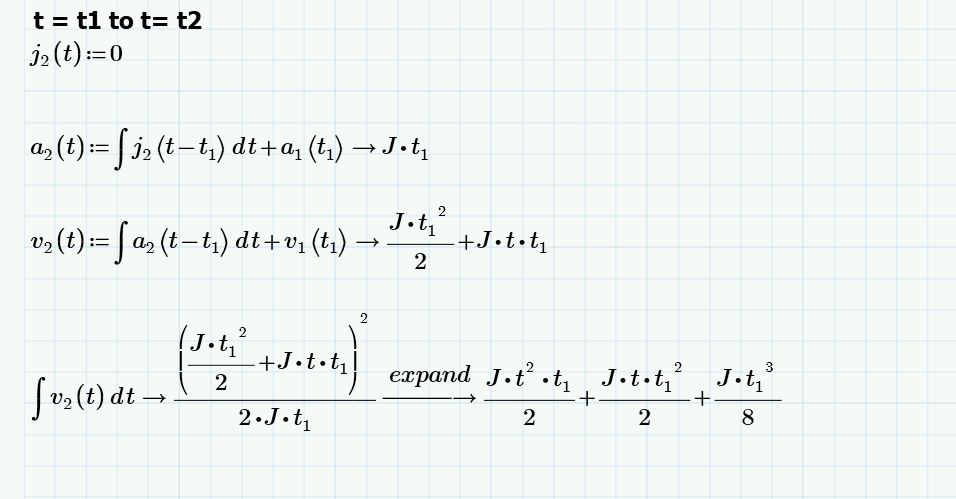
Capture.JPG

If you look at the definition for v2(t), v1(t1) is a constant term I entered manually. This term, which is supposed to represent a constant value at a point in time, correctly evaluates to 1/2 *J * t1^2 from a latter definition of v1. However, then I integrate and expand v2, I get this term which I do not get when I integrate by hand:

1/8 * J * t1^3.

When I differentiate this term falls out. Where is this coming from? Is it the constant of integration? I don't get this when I integrate by hand. Perhaps my integration is a bit rusty...I get the first 2 terms just fine.

I had initially thought that Mathcad was treating t1 like the integrated variable, but when I sbstitute the constant PI in for t1 I get the same results.

Any thoughts? I am new to Mathcad so any suggestions are appreciated. I have also included the worksheet.

For reference:

J, t1, and t2 are constant values which I was going to define later.

Thanks!

4 replies

1-Visitor
January 2, 2013

Wow, that's bizarre.... If you break it down into a summation of integrals, the extra term is (correctly) absent....

Untitled.png

25-Diamond I
January 2, 2013

There is nothing wrong with Mathcads answer. Mathcad's symbolic quite often delivers results which are different and sometime more complex as if you would have done it by hand.

Your function v2 basically has the form a+b*t and Mathcad treats it as (a+b*t)^1 and applies the appropriate rule. Thats the reason for the adding of the constant summand a^2/(2*b) which is irritating but mathematically correct. There is no such thing as THE integral constant and therefore you cannot demand Mathcad to supply the integral without _the_ constant of integration.

BTW, is there a specific reason for chosing J as constant for j1? As you can see by the way it is displayed, Mathcad treats it as the unit Joule. Thats no problem as long as you use the symbolic processor because it knows nothing about units and treats J as a constant.

int1.png

25-Diamond I
January 2, 2013

Does the following come close to what you are trying to achieve? I agree that its quite tedious having to add those constant summands manually.

Keep in mind that the indefinite Integral is not always necessarily the same as the integral from 0 to t!

int2.png

1-Visitor
January 2, 2013

Thanks Werner, the latter example is closer to what I am trying to acheive.

I will substitute J with another variable name to prevent confusion with Joule and refrain from using variations of t.

Some back story in case you are interested:

The equations (if you haven't deduced) are for Jerk (rate of change of Acceleration), Acceleration, Velocity, and Displacement. We have a vendor that produces motion servo drives and have supplied from (murky) documentation regarding the equations they use for a trapezoidal acceleration profile (thus a piecewise function across 3 sub-regions: 0 to t1, t1 to t2, and t2 to t3). The amount of time that the end regions (regions where acceleration is changing and Jerk is non-zero) can vary depending on how smooth one would like the movement to be.

Specifying Jerk to occur 100% of time will result in a triangular profile (where t1 = t2, and there is no middle sub-region).

The vendor supplied an equation that supposedly gives the Jerk the servo drives come up with based on the Acceleration, Velocity, and % of the total time Jerk is supplied (0 to t1, and t2 to t3), however upon investigation I determined the equation they supplied is non consistant with what is actually occurring. I managed to correct their equation but I want to derive it myself for documentation purposes, and also have a better understanding of the effect of changing certain parameters.

Thanks for the help and clarification.

25-Diamond I
January 2, 2013

Maybe the attached is of some help.

WE

25-Diamond I
January 4, 2013

Kris, are you still out there?

I had a closer look at your screenshot and it seems, that the percentage Time of Jerk is taken in relation to the total amount of acceleration (without the time of zero accel in the middle).

I have refined my worksheet, added the input of the end position to calculate the time of constant velocity in the center of the segment and as you can see, all the values calculated fit more than perfect compared to those in your screenshot.

So the equation for J1 you had in mind has to be multiplied by (1 - percentage / 200)^(-2) to get the correct results.

Test7.png

1-Visitor
January 4, 2013

Werner,

Sorry, wasn't ignoring you! Tied up the past couple days on other issues. That looks spot on. I actually had some free-time to spend on my worksheet today and came up with similar results, which gives me a bit of a confidence booster.

Would you be able to post your modified worksheet?

Thanks for the help.

Kris

25-Diamond I
January 4, 2013

Would you be able to post your modified worksheet?

Sure - here you are.