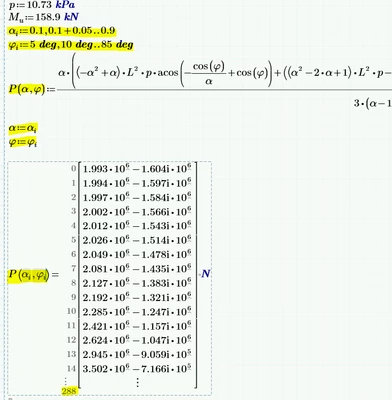
I also tried typing M and then press "[" but that creates a little bracket below M:
And thats exactly whats needed! To create a matrix you have to use matrix indices. The small bracket or rectangle is only visible as long as the cursor is within the region.
BTW, in your attempt you are NOT seeing a 289x1 vector even though it looks that way. What you see is kind of an invalid object which just looks like a vector. You can tell so if you try to assign it a variable for later use. XYZ := P(alpha, phi) will throw a strange error message ("this value must be a scalar"). 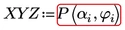 Reason is that alpha and phi are defined as ranges - they look like vectors, but aren't.
As you are looking for a 17 x 17 result matrix and you left ORIGIN at its default value zero, you first define as Luc had shown two ranges r and c running from 0 to 16. Based on these ranges you have to calculate the desired alpha and phi values and feed them into the function P.
alpha = 0.1 + 0,05*r and phi = 5° + 5° * c.
Using r and c as matrix indices you thus create the desired matrix:
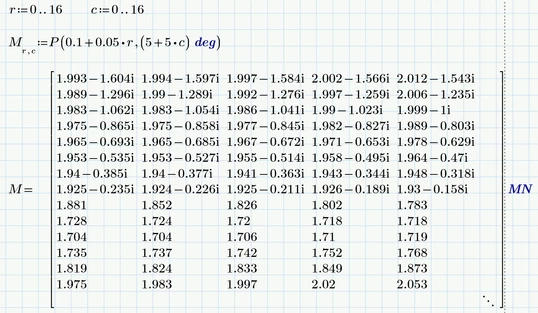
I have chosen unit MN for a clearer display.
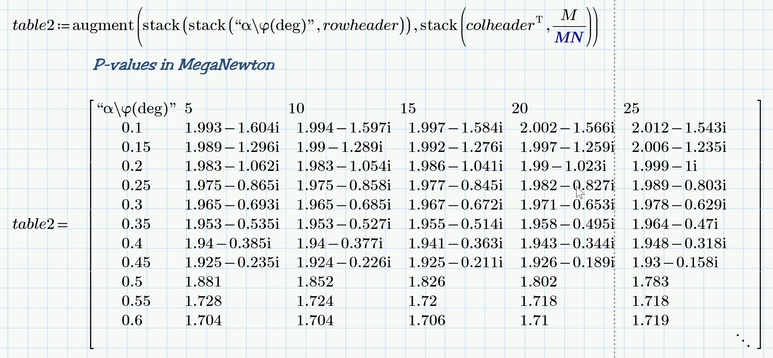
You may also add row- and column-headers:
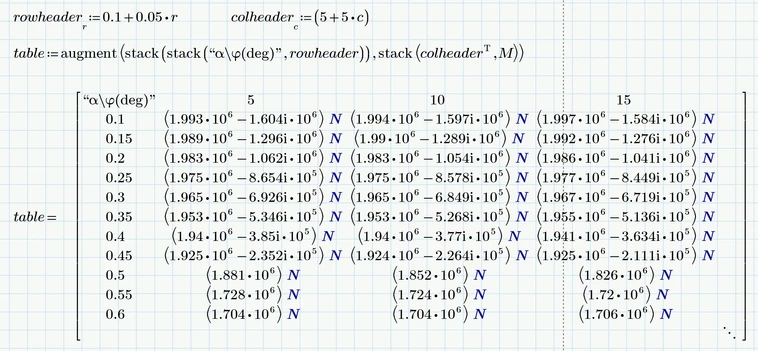
But Prime does not allow to change the unit N to MN for the matrix elements.
So sometimes its more appropriate to get rid of the unit altogether and add a legend telling the reader that the values are to be read as values in MN.
Prime 9 sheet attached