10-Marble
June 28, 2023
Solved

Define symbolic variable and solve it Mathcad 8

  • June 28, 2023
  • 2 replies
  • 3244 views

Hi!

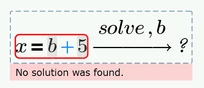
Assume the following simple equations, which I want first to define x=b+5 and later solve the second equation for b.

How can I do that?
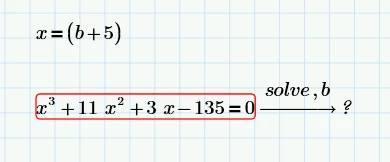
 

S1_0-1687960416809.png


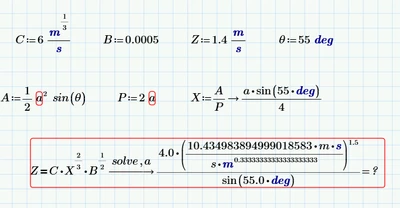
The same question when we add units as well. Here, I think I need a symbolic variable (a) defined first and then solve Z for a to find the a.

Any help is much appreciated.
 

S1_1-1687960841082.png


Best answer by Werner_E

You should always attach your sheet as well, not just the pictures and it makes sense to say which version of Prime you are using (I tend to overlook the info in the subject ;-)!


Here are a few ways to deal with your first example:

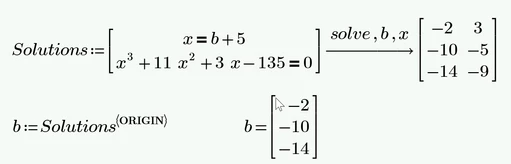
  1. Solve it as a system of equations in x and b
    Werner_E_0-1687967173832.png
  2. Use the symbolic "substitute" command/modifier
    Werner_E_1-1687967223829.png
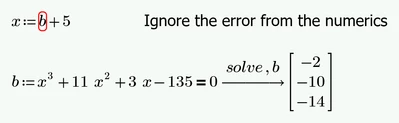
  3. This one comes close to what you tried. The error stems from the numeric engine as it doesn't know what to do with the unknown variable b. The symbolic engine will happily respect this definition, though
    Werner_E_2-1687967384432.png
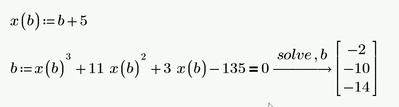
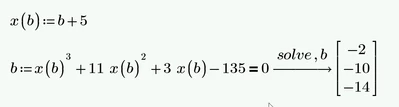
  4. If you want to avoid the error, you would have to turn x into a function of b
    Werner_E_3-1687967461848.png
  5. And of course you can always calculate b after having Prime find the solutions for x
    Werner_E_4-1687967572827.png

    Unfortunately

    Werner_E_6-1687967617983.png
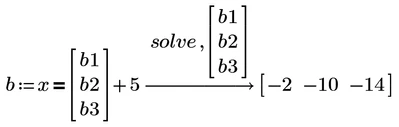
    does not work as Prime isn't really good at solving vector equations 😞
    You would have to use something like
    Werner_E_7-1687967923772.png

    which is prohibiting!


By the way, questioners here are expected to come back and close the threads they opened.
-> Solve equation with/without units - PTC Community

2 replies

Werner_E25-Diamond IAnswer
25-Diamond I
June 28, 2023

You should always attach your sheet as well, not just the pictures and it makes sense to say which version of Prime you are using (I tend to overlook the info in the subject ;-)!


Here are a few ways to deal with your first example:

  1. Solve it as a system of equations in x and b
    Werner_E_0-1687967173832.png
  2. Use the symbolic "substitute" command/modifier
    Werner_E_1-1687967223829.png
  3. This one comes close to what you tried. The error stems from the numeric engine as it doesn't know what to do with the unknown variable b. The symbolic engine will happily respect this definition, though
    Werner_E_2-1687967384432.png
  4. If you want to avoid the error, you would have to turn x into a function of b
    Werner_E_3-1687967461848.png
  5. And of course you can always calculate b after having Prime find the solutions for x
    Werner_E_4-1687967572827.png

    Unfortunately

    Werner_E_6-1687967617983.png
    does not work as Prime isn't really good at solving vector equations 😞
    You would have to use something like
    Werner_E_7-1687967923772.png

    which is prohibiting!


By the way, questioners here are expected to come back and close the threads they opened.
-> Solve equation with/without units - PTC Community

25-Diamond I
June 28, 2023

Your second problem has to do with Primes buggy and faulty auto-labeling. As can be seen in your screenshot, some of the units (m, s) are not blue which means they are not considered being units. This makes the numeric evaluation at the end fail because this s and m are considered unknown variables. The wrong different labeling of the two "s" is also the reason why Prime does not cancel the seconds.

So far there is no fix for this known bug, just a few workarounds which you can try - they may help or may not 😞

In the calc options you should check the option to use units and constants in symbolics.

Sometimes it helps to manually re-label the units in the definitions as being units.

Sometimes it helps to retype the one or other expression

You may also try to add "substitute, m=m" in the symbolic evaluation. The first m should be labeled as "Variable", the second as "Unit".

Good luck!

Werner_E_0-1687969470998.png

In case you wonder why the sine is not numerically evaluated - this is because Primes symbolics does not know anything about units and treats them as unknowns. If you want the symbolics to evaluate the sine, you have to define deg:=pi/180 somewhere at the top of the sheet (deg should be labeled as unit).


And in case you wonder why Primes symolics automatically switch to float mode and show 0.6666666.. instead of the exact 2/3. This is because of the number 1.4 you used in the definition of Z and the 0.0005 for B. As soon as just one single floating point number is involved, the symbolics switch completely in float mode. A nasty habit. You can avoid it in your example if you use 14/10 (or 7/5 of course) instead of 1.4 and 5/10000 instead of 0.0005.


S1_0110-MarbleAuthor
10-Marble
June 28, 2023

Thank you so much for your swift reply.

I tried your suggestions for the second problem, but couldn't manage!

would you please attach your sheet please?


Thanks again.

ttokoro
21-Topaz I
21-Topaz I
June 30, 2023

image.png

If you have this error, Put the two definitions before it.

image.pngimage.png

Then you can get.

image.png

t.t.