
Solved

While you may think that both variables are of exact same value, that's not true.
You can see that there is a difference of slightly more than 10^-15 in and t.provided is actually smaller than t.required for that tiny amount. Hence you get "Not OK" as the answer.

These round-off errors or numerical inaccuracies are normal and to be expected. Tiny round-off errors when doing calculations or unit conversions (Prime stores internally in SI unit meter) are the cause.
Its a golden rule never to check float values for equality but rather for approximate equality.
So don't use "if a=b ..." but rather "if |a-b| < 10^-10 ...". You decide for the level of accuracy and it does not matter if you use < or <=.
In your case you could cope with the problem by doing it that way:
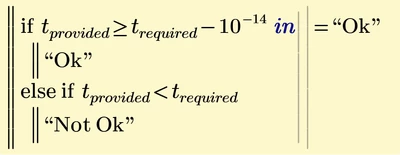
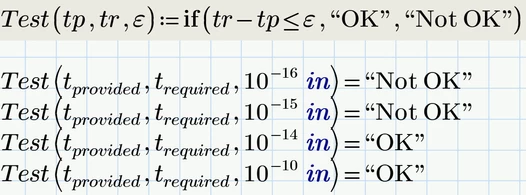
10^-14 in might be too small for other values. You have to decide if an accuracy of 10^-6 in or 10^-8 in wouldn't be al you need.
To turn it into a function you could make the accuracy level a third function argument:
Or you may use
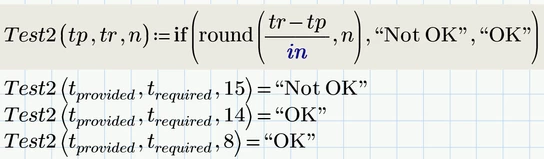
Here the third function argument represents the number of decimals needed as accuracy.
The division by the unit in does not affect the variables. Its just needed for the usage of "round".
You may also use the "Round" function (note the capital "R") to again provide the tolerance in inches as third argument:
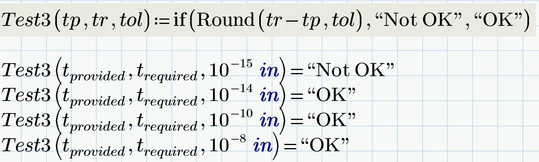
A float value usually is said to be accurate up to 15 to 16 decimals. Given that 10^-15 meter is roughly 4*10^-14 inches, I would not expect a higher precision than 10^-14 inches. And round-off errors can accumulate if the value is derived by a series of calculations.
So demanding a precision of 10^-10 inches might be considered realistic but nonetheless ambitious. Normally I guess a much larger precision might suffice.
Enter your E-mail address. We'll send you an e-mail with instructions to reset your password.