Best answer by Werner_E

Here is the file attached.

Actually its just a modification from the one I posted earlier with the other definition of "loop".

According the animated GIF: Mathcad can make animations using a system variable FRAME. I just used that to show the 15 loops and their area. Mathcad saves the  animation in an avi container using a very old and inefficient codec (this forum won't accept those files). I converted the AVI into an animated GIF using one of the many online converters available (https://www.onlineconverter.com/avi-to-gif).
Werner_E_0-1603855190012.png


4 replies

24-Ruby IV
October 27, 2020

Point, please, this area on the plot!

25-Diamond I
October 27, 2020

Maybe this one?

Werner_E_0-1603798712433.png


16-Pearl
October 27, 2020

Others have already asked the relevant questions.  To reach the end I think you have two basic methods.  

1.) Integrate the area between curves. (need mathematical representation)

2.) Shoelace theorem.  (using point data)


This thread might have some clues for the later.

https://community.ptc.com/t5/PTC-Mathcad/Ploting-an-elliptical-curve/m-p/619614#M186563

25-Diamond I
October 27, 2020

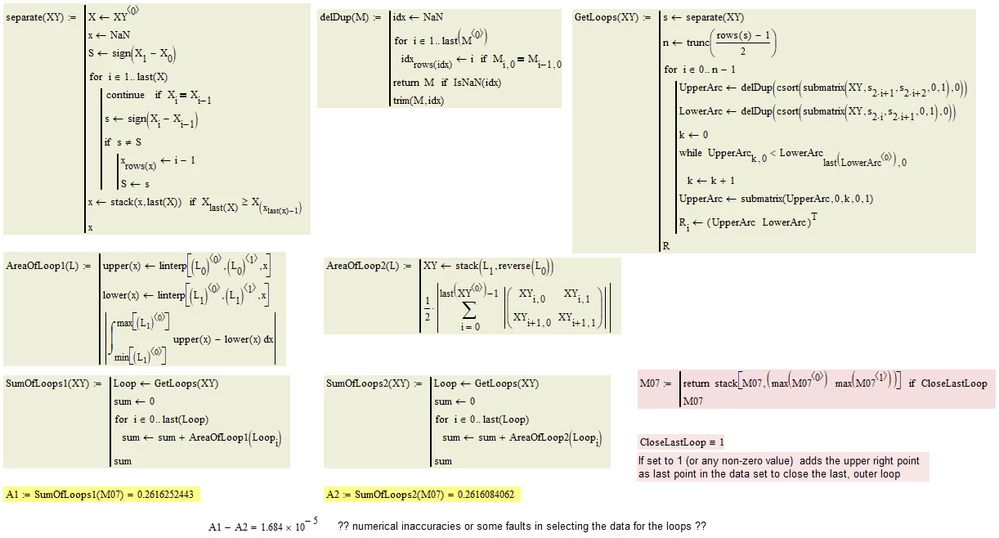
Here is my approach.

I settled on my third interpretation of loop/Cycle.

I also implemented two different ways to calculate the area, the first one uses a functional approach using linear interpolation and the second one is based on the trapezoid method (I guess its what DJF refers to as "shoelace")

Werner_E_0-1603826424025.png


25-Diamond I
October 28, 2020

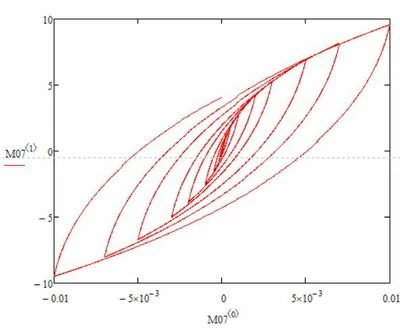
The first loops are so tiny - they don't add anything worth mentioning to the total. The first two even give a negative area when calculated with the first method (linear interpolation functions). Not sure why, maybe numerical inaccuracies. I used the absolute value to be on the safe side 😉

But the last loop (where its still unclear we should use it by closing it in some way) of course is the most important one and it will double the result if it is used.

Hysteresis.gif


mzarrabi1-VisitorAuthor
1-Visitor
October 28, 2020

That's great @Werner_E. I wonder how you have made a gift out of it?

Would you mind attaching the files corresponding to these gifs?

The thing for the last loops is correct. Honestly, I had to continue the last loop. I cut the data just to not make it too big.

Werner_E25-Diamond IAnswer
25-Diamond I
October 28, 2020

Here is the file attached.

Actually its just a modification from the one I posted earlier with the other definition of "loop".

According the animated GIF: Mathcad can make animations using a system variable FRAME. I just used that to show the 15 loops and their area. Mathcad saves the  animation in an avi container using a very old and inefficient codec (this forum won't accept those files). I converted the AVI into an animated GIF using one of the many online converters available (https://www.onlineconverter.com/avi-to-gif).
Werner_E_0-1603855190012.png

