1-Visitor
March 24, 2014
Solved

How can I tell symbolic expression solver to output the result as a function or a particular set of variables?

  • March 24, 2014
  • 1 reply
  • 18316 views

Hi all,

I am new to Mathcan and I am trying to solve a matrix equation A = B*C symbolically. I would like to have the output written using only a set of primary variables.

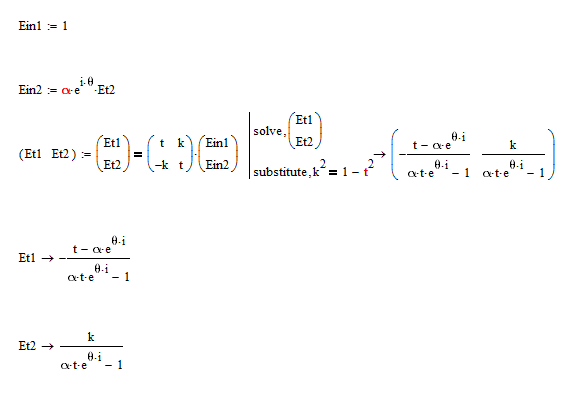
I attached the equation. The output Et1 and Et2 contains Et2. What I would like to have is Et1 in terms on alpha, theta, k and t only.

Can anybody suggest something?

Many thanks in advance!

Newin

Best answer by AlanStevens

Like so?

Symbolic.PNG

Alan

1 reply

19-Tanzanite
March 24, 2014

Like so?

Symbolic.PNG

Alan

1-Visitor
March 24, 2014

Hi Alan,

Many thanks for your quick reply. That is exactly what I would like to do, but could you explain me how you get that to work? In other words, what does the statement mean, i.e. why do we need to put (Et1 Et2) vector on the left, and what is the thick equal signs to the right of (Et1 Et2)' vector? And how did you insert the long vertical bar next to solve and substitute?

I am completely new to Mathcad and your suggestions will be very helpful.

Newin

19-Tanzanite
March 24, 2014

why do we need to put (Et1 Et2) vector on the left,

When you solve for more than one variable using the symbolic solver it gives the result as a row vector, so you need to assign the result to variables in a row vector (odd really, as Mathcad normally prefers column vectors!).

...what is the thick equal signs to the right of (Et1 Et2)' vector?

There are a number of different "equals" signs in Mathcad! The thick-lined = (obtained by Ctrl= or from the Boolean Logic menu) is used for logical testing of equality of both sides of the equation, and is needed for the symbolic maths (since you are stating both sides of the equation are equal, you are not assigning the right side to the left side). (There is also the normal =, which evaluates an expression numerically, and the right-arrow which evaluates symbolically).

And how did you insert the long vertical bar next to solve and substitute?

You choose solve and substitute from the symbolic menu (the one with the mortar board hat). After you put solve, and the vector of variables you want to solve for, just select substitute from this menu before clicking outside the expression, or pressing enter - the bar is inserted automatically by Mathcad.

Hope this helps.

Alan