11-Garnet
September 4, 2022
Solved

How to only get one value from the answer

  • September 4, 2022
  • 4 replies
  • 7590 views

Hi experts,

I would like to know how to only get one value from my answer.

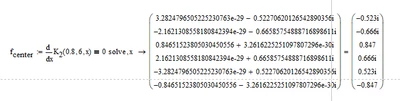
I mean I only need 0.847, but there are 6 answers in there. does anyone know how to do it.

_9593174_1-1662301462471.png


Best answer by Werner_E

OK. here are two possible solutions to the problem and personally I don't like any of the two.


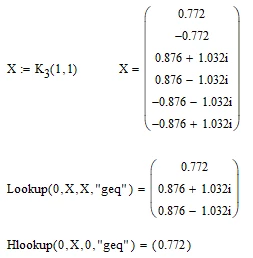
The first one is based on a strange difference in behaviour between "Lookup" and "Hlookup". I have no idea why "Lookup" returns the non-real values with a positive real part as well, but "Hlookup" only returns the real values.
Werner_E_1-1662381912715.png

I don't know if its a bug or if there is a special reason for this difference. But we can take advantage of it and use "Hlookup" to get the largest real solution (and hope that its a positive value, too 😉

Werner_E_2-1662381994134.png


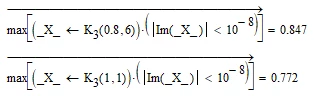
Another approach uses the "max" function along with a vectorized evaluation. Because the result vector has to be used twice in this approach and I don't want to call K.3 two times, the function result is stored in a local variable "_X_".
Werner_E_3-1662382097949.png

The comparison for "approximate zero" with |....|<10^-8 was necessary because of numerical inaccuracies the real solutions sometimes come along with a very tiny imaginary part.


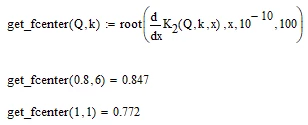
I guess I already wrote it once or twice that I feel that a pure numeric approach without using the symbolics would be more appropriate and much cleaner and hassle free. I already suggested elsewhere something like
Werner_E_4-1662382525096.png


4 replies

25-Diamond I
September 4, 2022

Its always better to attach the worksheet as well, not just a pic.

You may try the modifier "assume" to narrow down the solutions you get. I guess that you are interested in the positive solution only, so you may try "assume,x>0".
Unfortunately the symbolics quite often ignores the"assume" modifier.


You may also consider using one of the two numeric methods. Either a solve block with "find" or one of the two flavors of the "root" function.

Here you can provide an appropriate guess value, add a constraint or provide a range (e.g. from 0 to 5) where Mathcad should look for a solution.


21-Topaz II
September 4, 2022

Hi,

Simply index the required single answer.

Capture.JPG

J_power11-GarnetAuthor
11-Garnet
September 5, 2022

Hi, terry,


Thanks for your help.


According to your method.

you just need to know where the root is located and then you can use the index to get the answer.

But I would like to use Mathcad to find the positive value in these results, is any possible could do that?

21-Topaz II
September 5, 2022

Hi,

But I would like to use Mathcad to find the positive value in these results, is any possible could do that?

Use the maximum of real values to get positive result.

Capture.JPG


25-Diamond I
September 4, 2022

Normally an "assume, x>0" should do the job, but as already written, the symbolics in Mathcad is in no way perfect and ever so often ignores an assume modifier or interprets it not exactly the way we would like it to do.

In your case for some reason we get both real solutions

Werner_E_0-1662334880279.png

In case you use the symbolic "solve" on purpose and need the exact expression - you get them if you avoid floating point numbers

Werner_E_1-1662335781733.png


If you can't say which element in the result vector is the positive, real value (I guess real and positive are the properties you are interested in), you may let ;Mathcad find the appropriate value for you.

Werner_E_1-1662335355828.png

Note the capital "L" in "Lookup" and make "ORIGIN" a vector/matrix index (you may replace it by 0 (zero) if you use Mathcads default values).


But I still think that a pure numeric approach might be more appropriate. See an example here

https://community.ptc.com/t5/Mathcad/Math-equation-solving-problem/m-p/821567/highlight/true#M202440


23-Emerald IV
September 5, 2022

You could substitute x^2 for y, like:

LucMeekes_0-1662390940346.png

LucMeekes_2-1662390998734.png

LucMeekes_1-1662390948951.png

Then solve for y:

LucMeekes_5-1662391128188.png

Now only positive values of K2'x will give you positive roots:

LucMeekes_6-1662391163310.png


Success!
Luc


J_power11-GarnetAuthor
11-Garnet
September 6, 2022

Hi @LucMeekes ,


Thanks for your help.


Your method also can help in my equation.