

1-Visitor
September 25, 2016
Question

How to properly use unknown variables in an equation?

  • September 25, 2016
  • 2 replies
  • 6314 views

I'm sure this is pretty simple but for some reason I can't make sense of the help files.  I'm not sure what the proper terminology is so here's an example of what I'm trying to do: 
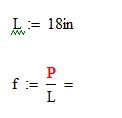
I would like to have Mathcad tell me that f = .055P  (i.e. P/18).  How do I do that?  Right now it tells me that P is undefined; do I just need to define it, and if so, how do I do that?

Thanks in advance!

2 replies

23-Emerald IV
September 26, 2016

The short answer is: you can't, because your statement is not true.

The true answer is (assuming that you wanted L to represent a length of 18 inches):

f = 2.187 * P / m, or f = 0.556 * P / in.

But with P unknown, mathcad does not know how to calculate the numeric value of f

Unless you define f as a function of P, like:

You can have mathcad work with unknown variables such as P, using its symbolics. But the symbolics of mathcad don't know units. So it will treat 'in' as an unknown variable. Then what you get is this:

Hope this helps.

Success!

Luc

25-Diamond I
September 26, 2016

Here are some other ways to get something similar to what you demand.

But if you intend to evaluate f later in your sheet, probably with different values of P, I would chose the function f(P) as shown by Luc. You can display f(1) as 1/18 instead of 0,056 if you change the number format for this region to "Fraction" (as in my second example below).