11-Garnet
April 5, 2023
Solved

Mathcad 15 integrate function

  • April 5, 2023
  • 3 replies
  • 9813 views

Hi Experts,


I have one question about Mathcad 15 integrate function.

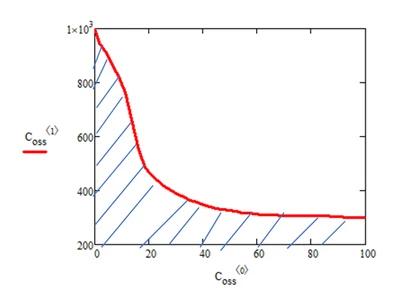
I want to calculate the area of the blue line, but I don't have any idea how to do it.

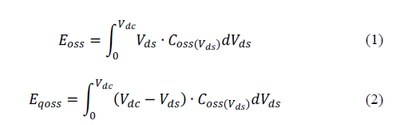
I have the data for the red curve.  and I want to use this data to calculate equations (1) and Equation (2).

Could you please give me some suggestions on it, thanks.
Jason_power_0-1680694201484.png

Jason_power_1-1680694301929.png


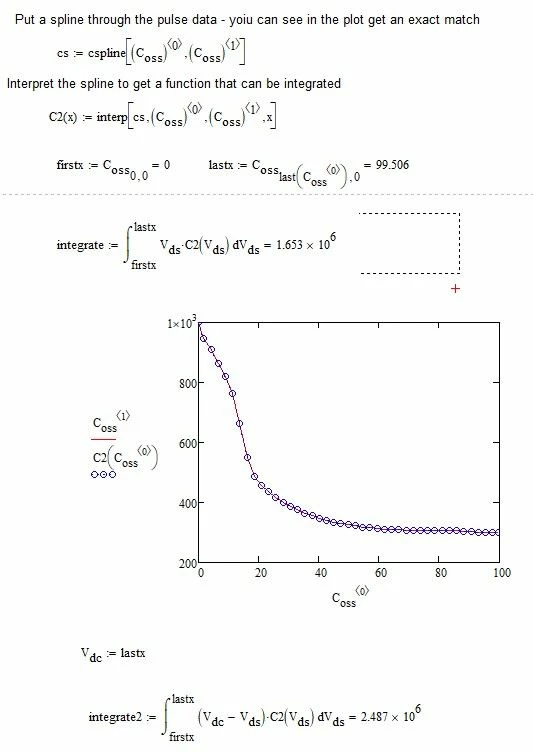
Please see my attached file.


Best answer by terryhendicott

Hi,

Here it is:  You will need to reset the data filename.

Capture.JPG

3 replies

23-Emerald IV
April 5, 2023

You have the data for the red trace (in the array C.oss ) , and want to calculate the (blue hatched) area underneath the curve.

With (only) this given, a fair approximation you can make for that area is:

LucMeekes_0-1680697465957.png

under the assumption that the array C.oss contains only the values that correspond with Vds running from 0 to Vdc, this is equivalent to:

LucMeekes_2-1680697599562.png


I see now that your C.oss is a matrix.

The area under the curve is approximated with:

LucMeekes_1-1680699113530.png

Now your first integral would be:

LucMeekes_4-1680699606815.png

The second:

LucMeekes_5-1680699616902.png

under the assumption that the last value of the first column in C.oss actually holds Vdc.


Success!
Luc


J_power11-GarnetAuthor
11-Garnet
April 5, 2023

@LucMeekes 
I try to use your method to calculate the value.

but Mathcad can't calculate it.

Jason_power_0-1680700631767.png


21-Topaz II
April 5, 2023

Hi,

Try this.

Shows how to integrate a function.

Shows how to integrate if you have two column of data as j and H variables..

Capture.JPG

21-Topaz II
April 5, 2023

Hi,

You need to send the data file for the pulse:- EPC2045.txt

We can then use your data.

Cheers

Terry

J_power11-GarnetAuthor
11-Garnet
April 5, 2023

Please see the data in attached file


25-Diamond I
April 5, 2023

I am not sure that spline interpolation is that good an idea in case of the functions involved here.

I guess that simple linear interpolation would do the job at least equally well if not better because the splines often tend to overshooting/oscillating . probably not in case of your function as the points are quite close and regular.
I would use spline interpolation if i definitely know that it would be a suitable fit, otherwise a simple linear interpolation would have to suffice as everything else would add "details" which simply aren't there.

An linear interpolation means that we don't necessarily need to define an interpolating function (of course we could) but rather could resort to simple trapezoid integration:

Werner_E_0-1680716150651.png


Of course using a linear interpolating function the calculations may look more familiar:

Werner_E_1-1680716178171.png


EDIT: I added the units you had provided

You wrote "When Vds = 0V, Coss = 1000F." Is it sure Farad and not rather something like microFarad?


MC15 file attached


21-Topaz II
April 5, 2023


Hi Jason,

Just to answer all your questions:

Do you have any document about spline and interp function can provide to me?

cs=cspline(vx,vy).

vx is a column vector of the x values, vy is the column vector of the y values,

the cubic spline solution sets up a cubic function y=a.x^3 + b.x^2 +c.x + d for each interval between adjacent points.

it then solves for all the a,b,c,d values using the following constraints at the ends of each interval:

each cubic must pass through the end points.

the first derivative of adjacent cubics are equal at the meeting point

the second derivative of adjacent cubics are equal at the meeting point to give smooth curves either side off a point

the first and last equation can be cubic cspline(), a polynomial in second degree pspline() or simple linear equation lspline()

what is returned as cs is all the a,b,c,d's in a long column vector.

y=linterp(cs,vx,vy,x) allows you to use all the stored a,b,c & d in cs and choose the correct set.

it the uses the appropriate a,b,c &d equation for the x value entered and finds the value of y=a.x^3 + b.x^2 +c.x + d

Because I don't very understand what's the function of the spline and why you need to interpret the spline.

As above cs is just a list of a,b,c,d values. You need to use the interp function to determine which a,b,c,d to use for y=a.x^3 + b.x^2 +c.x + d at the point desired.

if I don't interpret the spline I can't do the integrate?

Werner and Luc have shown you can do it without using splines.

Above explanation explains why you need to use linter(cs,vx,vy,x) to get a y value at the right x for integration of a spline.


In this example cspline does a good job with no oscillations and the resulting integrations are close in value with whatever method you use.

terryhendicott_0-1680728645684.png

Cheers

Terry

25-Diamond I
April 5, 2023

the first and last equation can be cubic cspline(), a polynomial in second degree pspline() or simple linear equation lspline()


Not exactly.

Actually the "equations", the polynomials used for interpolations, are not linear or quadratic in case of "lspline" or "pspline".

Its all about the second derivative of the interpolating cubics at the endpoints
E.g. using "lspline" results in what usually is called the "natural" spline and means, that at the end points the second derivative of the interpolating cubic should be zero. It does NOT mean that a linear function is used for interpolation at the end points!


Some further in-depths informations could be found in a document which used to be at the mathsoft site in former times (which I could not find an online source for now). As a replacement you may have a look at

https://www.researchgate.net/publication/236029592_Cubic_spline_interpolation_using_Mathcad