
1-Visitor
October 28, 2013
Question

Mathcad 15 startup problems

  • October 28, 2013
  • 4 replies
  • 12909 views

Hi guys.

I really need some help with this, before my exams.

I've been using mathcad 14 for a year or so, and recently upgraded to 15 on a student license.
I had no problems installing it or running it for the first month or two.
But recently when using mathcad 15 (AT HOME) it takes mathcad 5 minutes or so, to start up, and freezes instantly for 2 minutes if I use ctrl. + c.
BUT when im in SCHOOL, it start up perfectly and doesn't freeze at all (wierd).
I thought it might be my wireless internet card on my pc, that was the problem - so i deactivated it when working at home - and then it worked fine!

IT SHOULD BE SAID, THAT EVERYBODY ELSE AT SCHOOL, USING MATHCAD 15, HAVE THE EXACT SAME PROBLEM AS ME!!

I went talking to our IT Manager at school - he said it might have something to do with the license, so he gave me a new license (code format).
Using a new license did not solve my problem, it still takes 5-6 minutes to start up mathcad - but now when deactivating my wireless internet card i get this message:
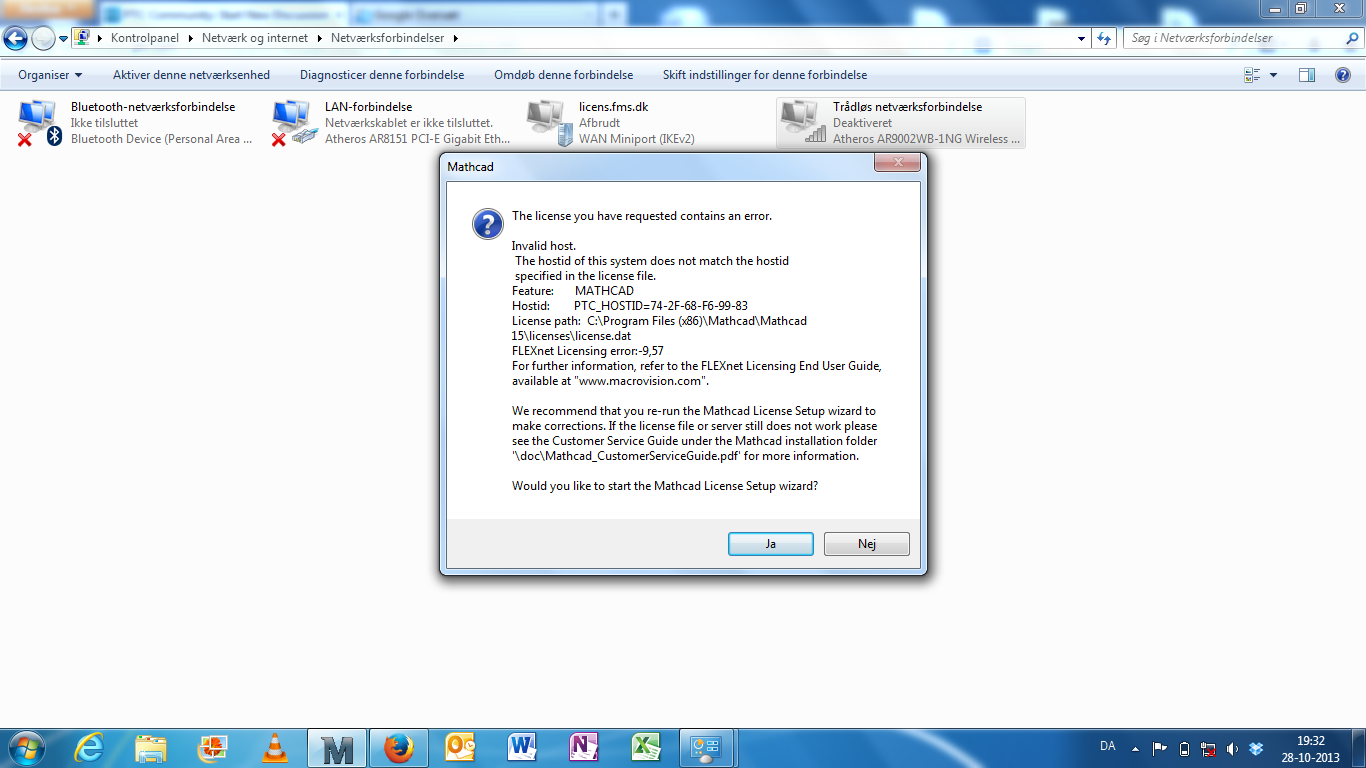
Mathcad+lort.png

I would think that mathcad is a program, independent off the internet?? I might be wrong after all??
Can someone please help me? Exams approaching!

Best Regards
Simon Laigaard

4 replies

25-Diamond I
October 28, 2013

The Mathcad license is bound to the MAC address of one of yor network interface cards (NICs). During installation Mathcad checks all NICs present and choses one (don't ask me how, I don't know) to be the "primary" NIC and requests a license file for that MAC address of this NIC from the PTC license server which is copied to your machine. When you start Mathcad it will read the license file and looks, if a NIC with the specified MAC address is present or throw the error message you showed otherwise. So Mathcad won't use the NIC to connect to the net (unless you have to use a floating license from a license server).

It looks like you had your wireless card activated during installation and Mathcad decided this to be the primary card. So when you deactivate the card - no Mathcad.

Do you have a NIC for cable in your machine and have the possibility to connect via cable during installation? Then you can try to get a new license file while you deactivate the WiFi Card. Probably you will need a new product code from your IT manager to be able to do so. You may also consider contacting PTC support and requesting a license file for the MAC of your cable bound NIC, but this can get rather tedious.

slaigaard1-VisitorAuthor
1-Visitor
October 28, 2013

I will borrow a NIC cable at school tomorrow and then try - but still - it doesn't make any sense that i worked perfectly for the first couple of months?

19-Tanzanite
October 28, 2013

Things on computers change. You install and uninstall software, new drivers, etc. Windows installs updates. Other software installs updates.

19-Tanzanite
October 28, 2013

Try deactiviating the wired connection instead.

slaigaard1-VisitorAuthor
1-Visitor
October 28, 2013

Tried - no change 😕

19-Tanzanite
October 28, 2013

Is this your software, a copy that belongs to the school?

slaigaard1-VisitorAuthor
1-Visitor
October 28, 2013

OKAY, this is strange!!!

I went back to my old key. Which did not have any effect.. So i tried something else - changing from dynamic IP-adress, I changed it to static, and with the IP-adress I have on the school..
This resulted in mathcad starting up after 30 sec... But still, it freezes using ctrl. + c and my internet is not connected.

I have no clue of what's going on!

25-Diamond I
October 28, 2013

Strange indeed. Changing the IP address to the same you have at school would normally cut you off the internet (unless your scholl is your provider and allowas for that).

Can you see if the old license is bound to the same MAC as the new one or, as I understood, to another one (the cabled one).

slaigaard1-VisitorAuthor
1-Visitor
October 28, 2013

Hmm, if I deactivate the NIC again, and start up mathcad now, i get the exact same message as I showed in the orginal post, with identical host ID and all.
I don't know how else to check which MAC adress it's connected to

slaigaard1-VisitorAuthor
1-Visitor
October 28, 2013

Okay, new development.

If disconnected internet (just disconnected from my connection) = PERFECT start of mathcad, no freeze, no problems. But if i connect to internet after the startup (while MC is running) it starts freezing, very strange!?

If deactivated NIC = Nothing works!

If connected to internet = startup after 5+ min. freezing if ctrl. + c.

I guess i just have to work with no internet connection when working at home! DAMMIT!

Checked firewall - can't find anywhere, that mathcad has been stopped, and MC is allowed all over!