7-Bedrock
May 9, 2022
Solved

Mathcad Prime 8.0.0.0 Symbols

  • May 9, 2022
  • 3 replies
  • 7866 views

How do you create dot variables? One dot on top of the variable indicates first derivative, two dots, the second derivative. I'm using Mathcad Prime 8.0.0.0.

Thanks!

Jack Smith

Katy, TX

Best answer by LucMeekes

Prime does not 'support' dots on top of a symbol, but it does support the prime operator. You'll find it as one of the operators:
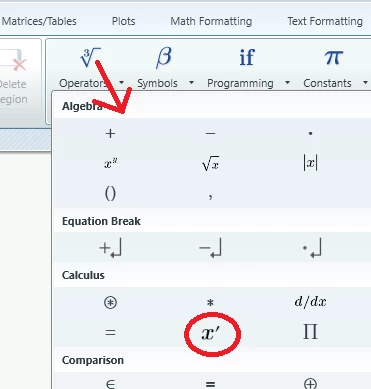
LucMeekes_0-1652128564867.png

And here's how it works:

LucMeekes_2-1652128668204.png

Now I said that Prime doesn't support dots on a symbol, but you will find letters with a dot on top in the character map.

To make a symbol of them is a bit tedious, but possible in Prime. So you can define ḟ (with a dot above it), and assign f' to it:

LucMeekes_3-1652128961067.png

(First create a string, by typing a quote (") then insert your ḟ and then remove the quote.)

And that actually works, as you can see:

LucMeekes_4-1652129026421.png

Now I haven't found f with a double dot on it in the character map, yet.

I suppose you'll agree that f' is simpler, especially because you can equally easily have f'', f'''' and f''''''''''''.


Success!
Luc


3 replies

LucMeekes23-Emerald IVAnswer
23-Emerald IV
May 9, 2022

Prime does not 'support' dots on top of a symbol, but it does support the prime operator. You'll find it as one of the operators:

LucMeekes_0-1652128564867.png

And here's how it works:

LucMeekes_2-1652128668204.png

Now I said that Prime doesn't support dots on a symbol, but you will find letters with a dot on top in the character map.

To make a symbol of them is a bit tedious, but possible in Prime. So you can define ḟ (with a dot above it), and assign f' to it:

LucMeekes_3-1652128961067.png

(First create a string, by typing a quote (") then insert your ḟ and then remove the quote.)

And that actually works, as you can see:

LucMeekes_4-1652129026421.png

Now I haven't found f with a double dot on it in the character map, yet.

I suppose you'll agree that f' is simpler, especially because you can equally easily have f'', f'''' and f''''''''''''.


Success!
Luc

 

Tooljoint7-BedrockAuthor
7-Bedrock
May 9, 2022

Thanks for your quick response!

Jack

16-Pearl
May 10, 2022

Actually, it's not that hard.


This works best if you are using the Mathcad UniMath Prime font as your default math font.


JeffH1_0-1652144153334.png

JeffH1_1-1652144176952.png

JeffH1_2-1652144233937.png

In addition to the over-dots, there are over-bars, carats, tildes, arrows (nice for vectors), and a number of other creative diacritical marks.  The nice think is that they can be place over any character, aforementioned character height issue withstanding.


16-Pearl
May 10, 2022

Ok.  Since there are 8 steps to paste that mark on the variable, maybe it is that hard.


But it works and you only have to do it once and then copy and paste the variable wherever you want it.

25-Diamond I
May 10, 2022

While Prime does not support dots on top of variables out of the box, you can create that kind of variable names using the diacritical marks taken from CharMap (included in Windows).

To create the variable name in Prime start by typing double quotes as if creating a string, type the variable name (in the example an "x" and then copy and paste the appropriate diacritical mark from the charmap window. The last step is to delete the double quotes and you have created a valid variable name.
For further actions its easier to copy and paste it rather than creating it from anew every time you'd like to use it.
Unfortunately I couldn't find a symbol for three dots in form of a triangle which is more common than the three or four dots in a row.

Werner_E_0-1652145070057.png

Werner_E_1-1652145102634.png


Sorry, only after posting my reply I see that Jeff had beaten me in time 😉


Tooljoint7-BedrockAuthor
7-Bedrock
May 10, 2022

Doesn't matter.  It's a good suggestion.  Thanks!
