14-Alexandrite
June 23, 2025
Solved

Nested loop won't work

  • June 23, 2025
  • 1 reply
  • 1013 views

Hi,

I have a nested loop where I wish to calculate crack growth under a block of stress range data and then continue the calculation for multiple blocks to see how many blocks of data it takes until failure (crack is half diameter of shaft).I am sure there is a simple fix, but I cannot seem to find it!

Any assistance would be appreciated. 

Ross

Best answer by Werner_E

Using "trace error" we see where the overflow actually happens:

Werner_E_0-1750737197316.png


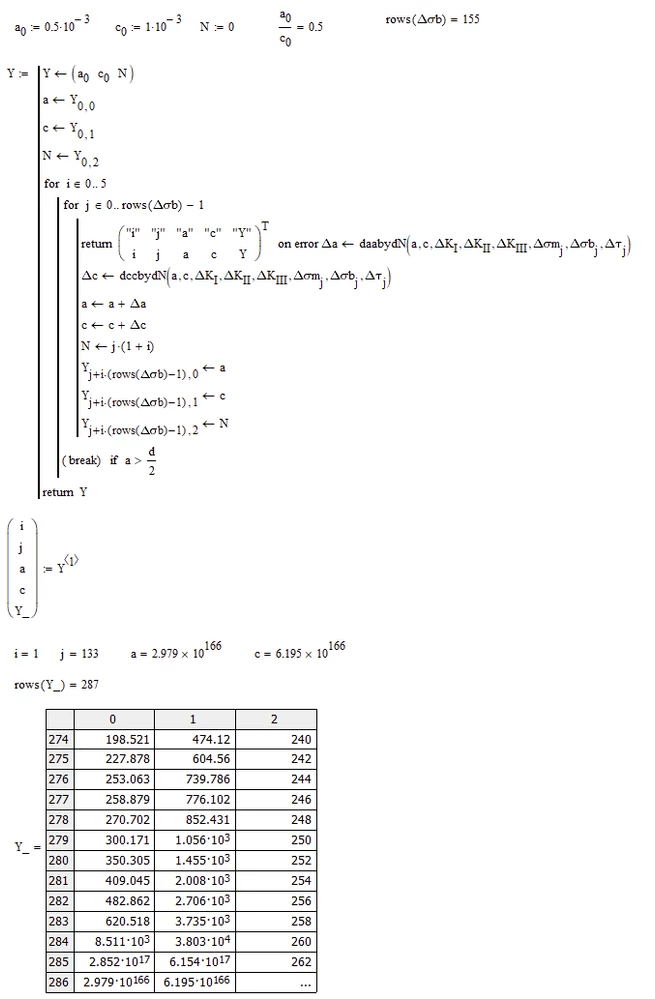
Trapping the error using "on error" and returning the vital values just before the error would occur shows that it happens in the second loop of "i" and we also see that variables "a" and "c" are already very large and so the above calculation obviously exceeds the IEEE limit of approx. 10^307.
Werner_E_0-1750738753881.png

Looking at the last values of the vector Y which you create in the program shows that the values (first column is "a") increases very quickly after your limit of 315 is exceeded.


I don't know if "a" is supposed to grow that fast. At the end of the outer i-loop you have a break command if a exceeds 315 but obviously variable "a" is lower than 315 after the first loop (i=0) and 'explodes' within the inner j-loop when i=1.


Not sure what exactly you are trying to achieve. You may put the break command at the end of the inner loop, so this loop stops when a exceeds d/2, but the outer loop continues.

Or you may rather replace the "break" command by "return Y" so the whole program is ended when a exceeds d/2 in the inner loop.


Find both "fixes" in the attached file. I guess the second may be what you are looking for.

 

1 reply

25-Diamond I
June 23, 2025

Your sheet can't be tested because all the data files you read in are missing.

But I guess the problem is that the statement "return Y" is at the wrong position. It should be BELOW the "for i..." loop and not the last statement IN the loop.

Werner_E_0-1750651051843.png


remslie14-AlexandriteAuthor
14-Alexandrite
June 24, 2025

Werner,

Thanks again for your assistance. Apologies for omitting the input files.

I did try the "return Y" below  the "for i..." loop but it gives a floating point error.

I have attached the input files and Rev 1 with  "return Y" positioned as you suggest.

Werner_E25-Diamond IAnswer
25-Diamond I
June 24, 2025

Using "trace error" we see where the overflow actually happens:

Werner_E_0-1750737197316.png


Trapping the error using "on error" and returning the vital values just before the error would occur shows that it happens in the second loop of "i" and we also see that variables "a" and "c" are already very large and so the above calculation obviously exceeds the IEEE limit of approx. 10^307.

Werner_E_0-1750738753881.png

Looking at the last values of the vector Y which you create in the program shows that the values (first column is "a") increases very quickly after your limit of 315 is exceeded.


I don't know if "a" is supposed to grow that fast. At the end of the outer i-loop you have a break command if a exceeds 315 but obviously variable "a" is lower than 315 after the first loop (i=0) and 'explodes' within the inner j-loop when i=1.


Not sure what exactly you are trying to achieve. You may put the break command at the end of the inner loop, so this loop stops when a exceeds d/2, but the outer loop continues.

Or you may rather replace the "break" command by "return Y" so the whole program is ended when a exceeds d/2 in the inner loop.


Find both "fixes" in the attached file. I guess the second may be what you are looking for.