1-Visitor
December 8, 2021
Solved

Only outputting single point when trying to plot a function

  • December 8, 2021
  • 1 reply
  • 3097 views

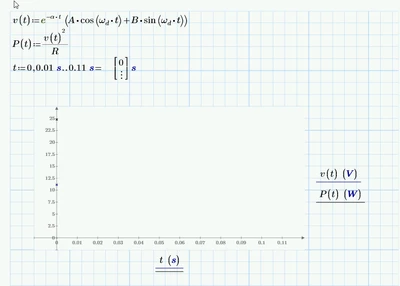
Heya, I've been looking everywhere, I've been following basic plotting tutorials, but I cannot for the life of me find a way to plot my function. Each time I try I just get a single point on the y-axis. Any help would be incredibly appreciated. 
WP_10142165_0-1639007525364.png


Best answer by StuartBruff

@WP_10142165 wrote:

Heya, I've been looking everywhere, I've been following basic plotting tutorials, but I cannot for the life of me find a way to plot my function. Each time I try I just get a single point on the y-axis. Any help would be incredibly appreciated. 
WP_10142165_0-1639007525364.png


2021 12 09 a.png


2021 12 09 b.png


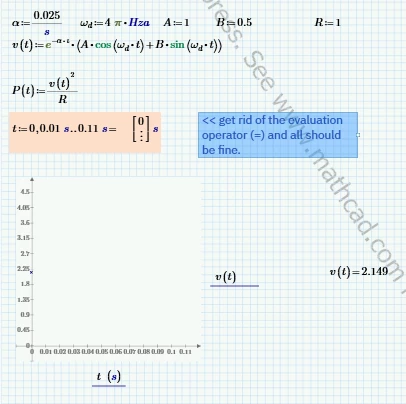
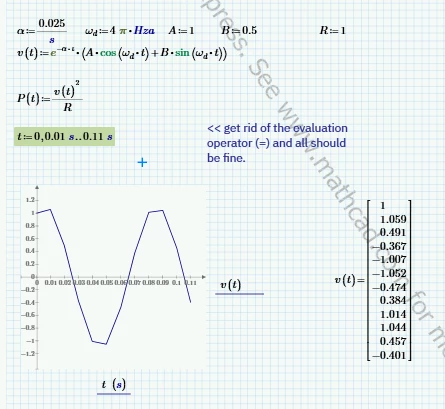
If you put an evaluation operator at the end of a definition involving a range variable, Mathcad has a (nasty/useful) trick of converting the range to a vector.   There are some who find this a useful thing as a means of creating vectors.  I generally avoid the practice like the plague as it can catch even the experienced out and, apart from vectors, the output can bear little resemblance to what's stored in the defined variable.


BTW, it's good practice to post your worksheet when asking for assistance with problems.   Sometimes, the source of the problem can be difficult to pin down without having the worksheet to look at (constant/variable definitions are a good example!).   🙂


Stuart  

1 reply

23-Emerald V
December 9, 2021

@WP_10142165 wrote:

Heya, I've been looking everywhere, I've been following basic plotting tutorials, but I cannot for the life of me find a way to plot my function. Each time I try I just get a single point on the y-axis. Any help would be incredibly appreciated. 
WP_10142165_0-1639007525364.png


2021 12 09 a.png


2021 12 09 b.png


If you put an evaluation operator at the end of a definition involving a range variable, Mathcad has a (nasty/useful) trick of converting the range to a vector.   There are some who find this a useful thing as a means of creating vectors.  I generally avoid the practice like the plague as it can catch even the experienced out and, apart from vectors, the output can bear little resemblance to what's stored in the defined variable.


BTW, it's good practice to post your worksheet when asking for assistance with problems.   Sometimes, the source of the problem can be difficult to pin down without having the worksheet to look at (constant/variable definitions are a good example!).   🙂


Stuart  

23-Emerald V
December 9, 2021

@StuartBruff wrote:

2021 12 09 a.png


If you put an evaluation operator at the end of a definition involving a range variable, Mathcad has a (nasty/useful) trick of converting the range to a vector.   


Forgot to add ...


The reason you are seeing a single point is that squaring a vector returns its dot product (single value).  If you want to use vectors, it's generally a good idea to check the numeric values and use the vectorize operator to apply functions/expressions to each element of a vector (or matrix).


2021 12 09 c.png


2021 12 09 d.png


Stuart