6-Contributor
July 27, 2025
Solved

Perform arithmetic within a Mathcad Table

  • July 27, 2025
  • 2 replies
  • 569 views

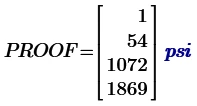
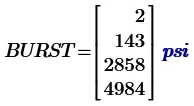
Is there a way to incorporate the arrays MEOP, Proof, and Burst directly into Table 1 rather than do the Math outside the Table? See attached Mathcad sheet.


I use Mathcad Prime 10.0.1.0.


I appreciate your feedback.

Best answer by LucMeekes

No.

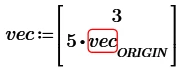
Tables in Prime are just for input of static data. You cannot use them for output, and any expression you use must use defined data (numbers or variables), Note that while defining a vector, the vector itself is unknown. Means you cannot define:
LucMeekes_3-1753626065888.png

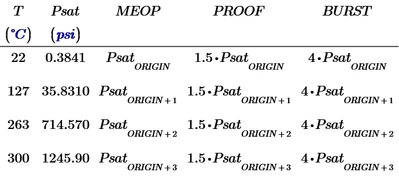
But fortunately, the vector Psat is known at the definition of MEOP, etc. so you can:
LucMeekes_8-1753626328852.png

Note that MEOP, PROOF, and BURST are now based upon Psat, so they inherit their units from it and you shouldn't type a unit in their placeholder.

(Note also that I use ORIGIN, to make the indexing independent from the actual value of ORIGIN, which you set to be 1).

Now you have:
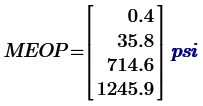
LucMeekes_5-1753626208335.png,   LucMeekes_9-1753626408568.png  and LucMeekes_10-1753626425568.png


What else you can do is the following:

LucMeekes_11-1753626502436.png

LucMeekes_12-1753626512028.png

LucMeekes_13-1753626543486.png

But here the problem is that you cannot change the display of the units inside the matrix.


Success!
Luc


2 replies

LucMeekes23-Emerald IVAnswer
23-Emerald IV
July 27, 2025

No.

Tables in Prime are just for input of static data. You cannot use them for output, and any expression you use must use defined data (numbers or variables), Note that while defining a vector, the vector itself is unknown. Means you cannot define:

LucMeekes_3-1753626065888.png

But fortunately, the vector Psat is known at the definition of MEOP, etc. so you can:

LucMeekes_8-1753626328852.png

Note that MEOP, PROOF, and BURST are now based upon Psat, so they inherit their units from it and you shouldn't type a unit in their placeholder.

(Note also that I use ORIGIN, to make the indexing independent from the actual value of ORIGIN, which you set to be 1).

Now you have:

LucMeekes_5-1753626208335.png,   LucMeekes_9-1753626408568.png  and LucMeekes_10-1753626425568.png


What else you can do is the following:

LucMeekes_11-1753626502436.png

LucMeekes_12-1753626512028.png

LucMeekes_13-1753626543486.png

But here the problem is that you cannot change the display of the units inside the matrix.


Success!
Luc


25-Diamond I
July 27, 2025

As Luc has already explained, a table in Prime is only intended for entering and defining vectors. It is difficult to perform calculations within a table and impossible to display the results neatly.


While I would prefer to perform the calculations outside the table as you have done, Luc has shown a way to define the vectors MEOP, PROOF, and BURST within the table. I found out that it also works this way:

Werner_E_2-1753630669223.png

This was a little surprising, because I would have expected MEOP and the other vectors to come out as a nested matrix (a 1x1 matrix with a vector of values as its only element).


If your actual goal is just  to present results clearly in tabular form, you can create a matrix in Prime with all values and a header row. Luc demonstrated this and pointed out the problem with units that cannot be changed.
This could be circumvented by showing unitless values in the table and noting the corresponding units in the header.

Werner_E_0-1753630257448.png


Another option (which I don't particularly like) would be to integrate an Excel component. Here, you could transfer the Prime matrix and then format it as desired using the many options available in Excel.

Werner_E_1-1753630600463.png

Inserting an Excel component bloats the worksheet, makes it slower, and unfortunately also more unstable (I just had Prime crash because of the embedded component).
Of course, you could also just transfer the first two columns of your table and have the remaining calculations performed directly in Excel.
And, no, I am not at all in favor of using Excel for any engineering calculations as long as there is software like Prime that allows natural mathematical notation and knows how to handle units.


Prime 10 sheet attached


thodij6-ContributorAuthor
6-Contributor
July 27, 2025

Werner,


I appreciate your feedback, tips, and insights. This solution and insights are equally good.

Since I am in the "learn Mathcad as you go" phase, this is very much appreciated.

Glad to have folks like you, and Luc respond so quickly, even with alternative approaches to solving a problem at hand.


Regards,

Joseph T.