
1-Visitor
July 10, 2025
Solved

Plot line has missing segments

  • July 10, 2025
  • 2 replies
  • 554 views

Hi all, 


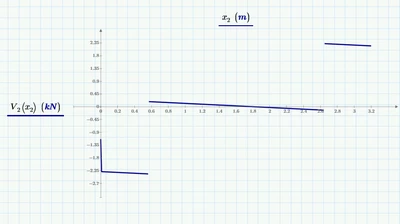
I have an issue with plotting a function on Mathcad Prime 11. For some reason there are missing segments in the plots of my shear-force diagrams. I'm not sure why this is happening, other plots I have made seem to work fine - any guidance would be much appreciated. 


The plots and respective functions are on pages 9 and 17 of the attached document. Thanks in advance
 

LH_13783026_0-1752149373039.png


Best answer by terryhendicott

Hi,

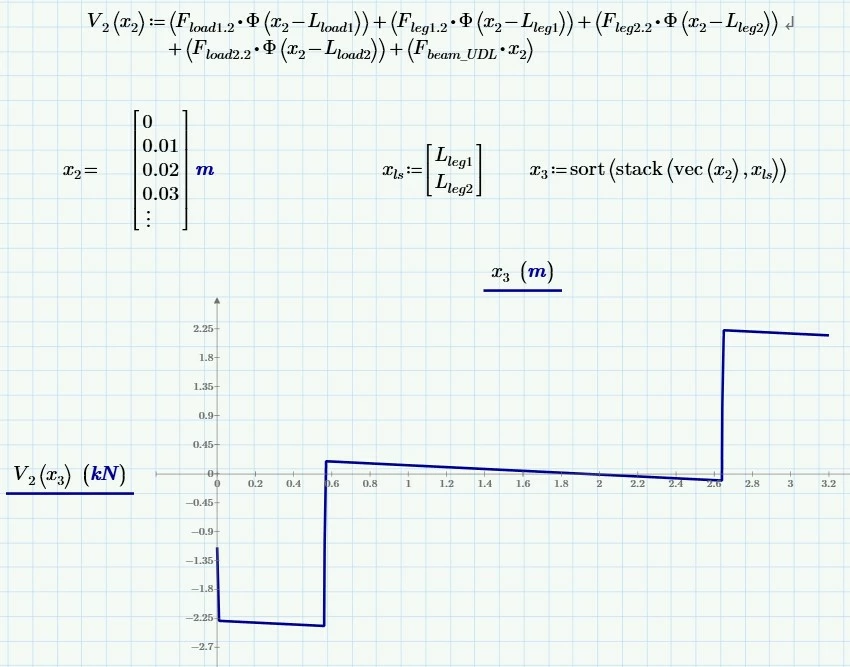
Include the two points of legs in the vector of x2.  In the following worksheet have done this.

Capture.JPG

Cheers

Terry

2 replies

21-Topaz II
July 10, 2025

Hi,

Include the two points of legs in the vector of x2.  In the following worksheet have done this.

Capture.JPG

Cheers

Terry

1-Visitor
July 17, 2025

Hi Terry, 

Thanks for your response, I now realise that the increments I had used for x and x2 were too large, effectively skipping the points where those loads were applied. 


Many thanks

LH

25-Diamond I
July 10, 2025

What Prime is doing is mathematically correct - a vertical line can never be the graph of a function. A step means that there is nothing inbetween.

But I understand that you are used to see that vertical line segment.

Solution is to use a vector for the abscissa values instead of a range. In Prime 11 you can use the convenient "vec" function to convert a range into a vector.

Using the vectors solves your problem.

It depends on the way the functions V and V2 are defined if vectorization when calling them with a vector argument is mandatory. In your case it would not be necessary as Prime would apply automatic implicit vectorization, but I consider it good style to explicitly apply vectorization.

Werner_E_0-1752160321823.pngWerner_E_1-1752160334906.png


1-Visitor
July 17, 2025

An interesting solution. I'll have to give this a try, seems like a nice clean way of handling this issue. 


Many thanks

LH

25-Diamond I
July 17, 2025

@LH_13783026 wrote:

An interesting solution. I'll have to give this a try, seems like a nice clean way of handling this issue. 


Many thanks

LH


Yes.

Actually Terry also used vectors instead of ranges in his solution. I just wanted to show that its not necessary at all to add the two special values.