Hmmm, why do you let us to jump through loops and make it so tedious for us to help?
We have to load all 3 sheets, have to find out the hard way which one is the main sheet calling the other two, We have to change the paths to the included files and finally are presented with a lot of irritating errors! Thats annoying.
It was just the pdf you posted which showed the array and explained what you actually want to achieve.
It would have been so easy if you just would have set up one small and simple demo worksheet: Define a new unit like Ohm_new : = 3* Ohm.
Define a matrix includíng text strings, values in Ohm_new and also values which are either unit less or have applied other units. Display this matrix and explain that you would like see Ohm_new instead of Ohm. That's all that's needed.
The short answer to your question is "You can't do it!".
Prime still does not allow to change the units for values inside a matrix.
You can change the unit for the whole matrix by using the unit place holder right after the matrix. But this would affect ALL entries of the matrix. So the unit-less 600 would show as 180 S - even worse, the matrix would not display at all as the unit you apply for the whole matrix would also be applied to the text strings in the matrix. And because you can't apply a unit to a string, you would get an error and nothing would be displayed.
To get at least approximately what you want to achieve you have to resort to workarounds and none of them are really satisfactory.
First workaround is to use unit-less values in the table by dividing the quantities by the desired unit and state the unit in the header of the appropriate column or row. Will only work OK if a whole column or a whole row as in your case consists of quantities of the same unit.
And, no, you can't use subscripts in strings.
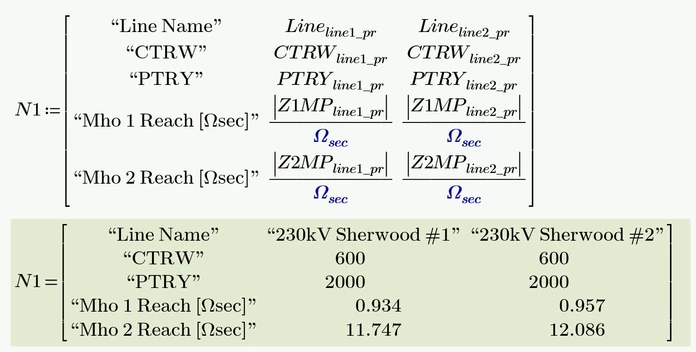
A second workaround I could think of is turning the number to be presented into a string which includes the unit.
You may use a small utility program to do the job. Unfortunately Prime does not provide a function which would convert a variable or unit name into a string and so we have to provide both unit and name as function arguments, You also may consider making the precision (her fixed to 3 decimals) a fourth function argument:
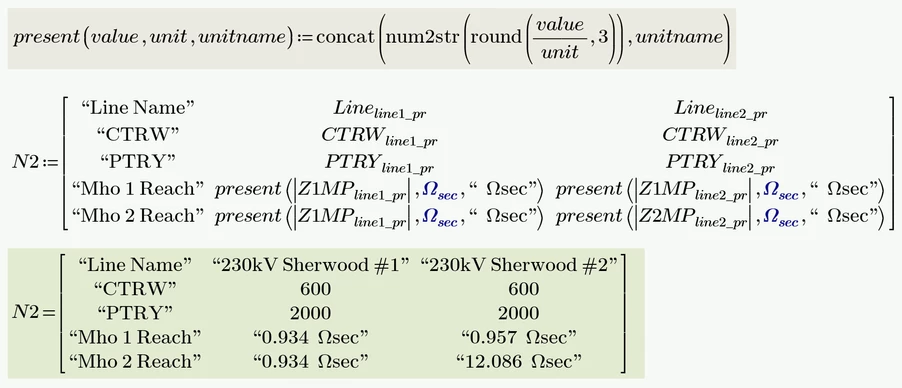
As already mentioned - both workarounds are inadequate crutches and by no means provide a satisfactory result.
And splitting up the individual matrix areas is hardly an alternative that will be seriously considered here.
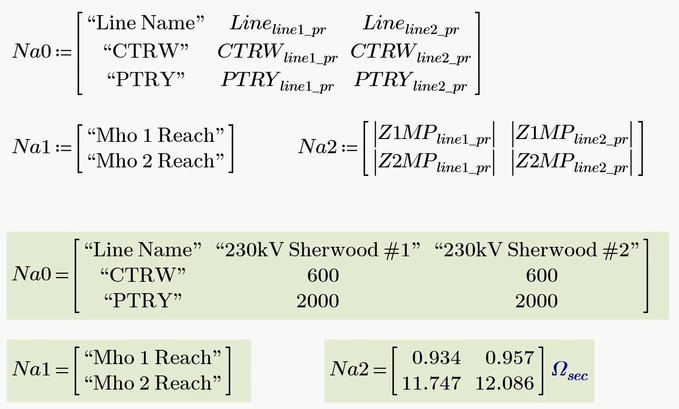
Prime 11 sheet attached

