

1-Visitor
August 25, 2016
Solved

Problem in Matrix Row addition

  • August 25, 2016
  • 8 replies
  • 9128 views

Hi Everyone

Please help me to add row of any Matrix array. I am able to add individual but in my example case I am unable to do so. Please help in this regard.

Find attached sheet for your reference.
Best answer by sgarg-2

Hello Everyone

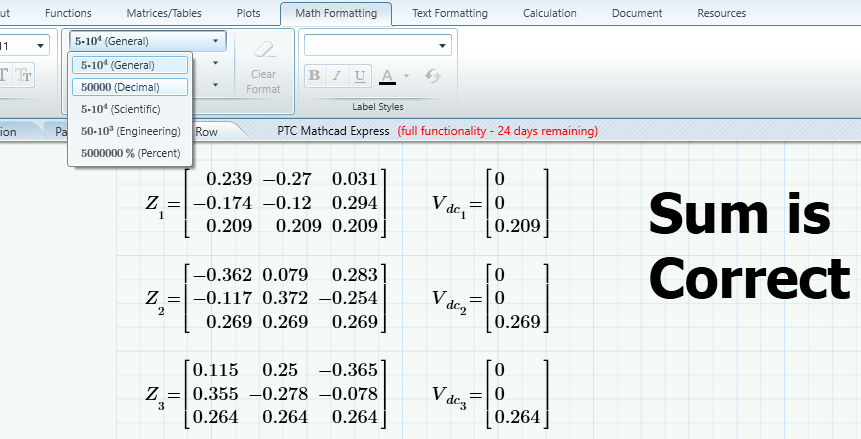
Thanks for your kind response. Finally I have solved the problem. All solution provided by you are correct. The addition of row was correct but my interpretation was wrong( I apologize !!)  and I was treating the result as a wrong result. In  "MATH FORMATTING" option on changing result format from general to Decimal solved my problem. The result was showing exact zero instead of some higher power of 10.

Thanks again for your kind support.

Untitled.png

8 replies

25-Diamond I
August 25, 2016

I can't open Prime 3.1 files, but maybe these two approaches can help

23-Emerald V
August 25, 2016

... Noting, en passant, that Prime has a row operator as well as a column operator, which makes life much simpler for extracting and operating on arrays (avoids all that nasty transposition to get at a row!).

Stuart

25-Diamond I
August 25, 2016

Ooops, I confused column sum with row sum!

This is what it should have been

23-Emerald V
August 25, 2016

An alternative to programming is to use Mathcad's matrix maths capability.

Stuart

25-Diamond I
August 25, 2016

Here is an ORIGIN independent variation of your method:

Werner

sgarg-21-VisitorAuthor
1-Visitor
August 25, 2016

Hi Werner

Your response was in comfort zone but unfortunately it doesn't work for me. Please do the needful. Find attached sheet for your reference.

Untitled.png

23-Emerald IV
August 25, 2016

You mean, to add a row to the matrix in the P(t) formula?

Do as shown here:

That is, place your cursor on the matrix element below or above which you want to add a row, then choose either 'insert below' or 'insert above' from the ribbon, and a row will be added (below or above respectively).

Success!

Luc

sgarg-21-VisitorAuthor
1-Visitor
August 25, 2016

Hello All

Thanks for your response. I made some more clarification on problem. Please find attached sheet for your reference as well.

Problem.png

Thanks

23-Emerald IV
August 25, 2016

So with:

You get V.dc[1 to contain a vector with as first element the sum of all values on the first row of Z[1, the second element of V.dc is the sum of all values on the second row of Z[1, etc.

It shows as:

It tells you that V.dc[1 is an array with a single element, that element is a 3-element vector. It's nested.

To see the actual values, you can ask to display the first element of this vector:

Or you can select the expression and use the option Collapse Nested Matrices from the Matrices/Tables ribbon in 'Result format' at the far right. Then it shows like:

(A vector, nested in a vector).

Now if you do this for all k, you get:

or, expanded:

Does this help?

Luc

sgarg-21-VisitorAuthor
1-Visitor
August 26, 2016

Hi LucMeekks

The main problem is result. If you observe that the sum of row for Z1 is not correct as it would be.The same solution works well with other example but in my example case it is not giving correct result? 

25-Diamond I
August 25, 2016

I am not sure if I understand correctly what you are after.

You have a vector Z with 49 elements and each of those elements is a 3 x 3 matrix.

Your goal is to do what I had done for 1 matrix with all 49?

So the result would be a vector of again 49 elements but each element would now be a 3 x 1 matrix consisting of the sums of the three rows in the corresponding 3x3 matrix.

Is this correct?

What you show 9:20 PM should work that way. Simply get rid of the vector brackets on the RHS of the definition of V.dc_k.

You should also turn on the feature to display nested matrices like Luc had shown if you want to see the whole vector V_dc at once.

If you would like the results in a differnt format like a simple 3 x 49 matrix or something else, you should say so.

If we misintrepeted you intention completely you should  probably better provide a sample, complete with the exact output (which you would have to type in manually) you expect.

Werner

25-Diamond I
August 25, 2016

Here are some useful functions, if our guess concering your goal was correct.

This time the functions expect a vector of matrices as argument.

In rSums2 all those matrices must concist of the same number of rows.

Werner

sgarg-21-VisitorAuthor
1-Visitor
August 26, 2016

Hello Everyone

Thanks for your input. I am surprised to see, all above suggestions are giving correct result for any arbitrary matrix but in my example case it is giving wrong result. Again I am trying to explore my problem statement in detail (Find attached sheet for your reference) . Hope it help. Please do the needful. Tons of thanks in advance.

Untitled.png

23-Emerald V
August 26, 2016

Hi Sameer,

Unfortunately, I don't have Prime available, so cant' check what's going, but using displayed values for Z, Mathcad 15 seems to give the expected results using the formula you use in an earlier thread (Werner's variation of the matrix method):

Try importing the attached Mathcad 15 into Prime and see if you get the same results in Prime as in M15.

Stuart

sgarg-21-VisitorAuthorAnswer
1-Visitor
August 27, 2016

Hello Everyone

Thanks for your kind response. Finally I have solved the problem. All solution provided by you are correct. The addition of row was correct but my interpretation was wrong( I apologize !!)  and I was treating the result as a wrong result. In  "MATH FORMATTING" option on changing result format from general to Decimal solved my problem. The result was showing exact zero instead of some higher power of 10.

Thanks again for your kind support.

Untitled.png

23-Emerald IV
August 28, 2016

While the results of your equations might give results of exactly 0 when analysed exactly, I'm afraid your interpretation is not correct.

In choosing a different display format for your results, you've limited their accuracy. Choosing 'decimal' means that exponential notation will not be used, and you are limited to 15 decimals.

That means that any smaller results are discarded, hence you get 0.

Suppose you had calculated exp(-x) with x large enough:

In the first evaluation, the general display method is used, the second is limited to decimal.

Would you argue that exp(-37) is exactly 0?

Now in your case the results may actually be exactly 0 when analysed analytically, but the numeric calculation that you did resulted in (some) values close to 0, but not exactly 0 because of the limited numerical accuracy.

If you want proof that they actually are 0, you should use symbolic evaluation of your equations.

Success!
Luc