
7-Bedrock
December 7, 2022
Solved

Problem with Global Definition

  • December 7, 2022
  • 2 replies
  • 1343 views

Hello all, I am having some issues with Global Definitions.  I am trying to define the following: 

kJ = 1000J

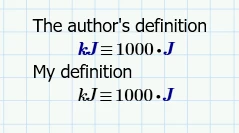
When I do this, Mathcad (7.0) accepts the input, but the "kJ" stays black.  It doesn't turn blue like other definitions I have used in the past.  I am using a wrapper for REFPROP, and the author has the same definition in his worksheet.  If I copy that into my worksheet, it works fine.  But creating my own definition from scratch doesn't seem to function properly.  Thus, when I make function calls for fluid properties in kJ/kg, i.e. enthalpy, the units are not correct.  See the screenshot below.
 

gshockxcc_0-1670383939680.png

What's the difference between these two?  How do I make my global definition like the one above?

Best answer by Werner_E

You have to label the newly defined kJ as being a unit. The easiest way to do this is to put the cursor in the "kJ" and then press Ctrl-U.

I found that its often better to avoid global definitions. You may consider using a normal assignment (with ":=") and put this (and maybe others) in a collapsed region at the top of the worksheet. You may setup a worksheet that way and make it your default template or you may copy this region easily from one worksheet to another. That way you would have your user-defined units, favorite user-written utility functions, etc. always available when you create a new worksheet.

2 replies

Werner_E25-Diamond IAnswer
25-Diamond I
December 7, 2022

You have to label the newly defined kJ as being a unit. The easiest way to do this is to put the cursor in the "kJ" and then press Ctrl-U.

I found that its often better to avoid global definitions. You may consider using a normal assignment (with ":=") and put this (and maybe others) in a collapsed region at the top of the worksheet. You may setup a worksheet that way and make it your default template or you may copy this region easily from one worksheet to another. That way you would have your user-defined units, favorite user-written utility functions, etc. always available when you create a new worksheet.

gshockxcc7-BedrockAuthor
7-Bedrock
December 14, 2022

Werner_E, thanks.  This helped a lot.  I can already see some pitfalls of global unit definitions.  In this case, I'm using them to check my work and verify the right units in the solution.


What drawbacks are there, from  your perspective?  

ttokoro
21-Topaz I
21-Topaz I
December 7, 2022

image.png

t.t.