24-Ruby III
April 27, 2016
Solved

sinus function - unexpected behaviour

  • April 27, 2016
  • 2 replies
  • 1334 views

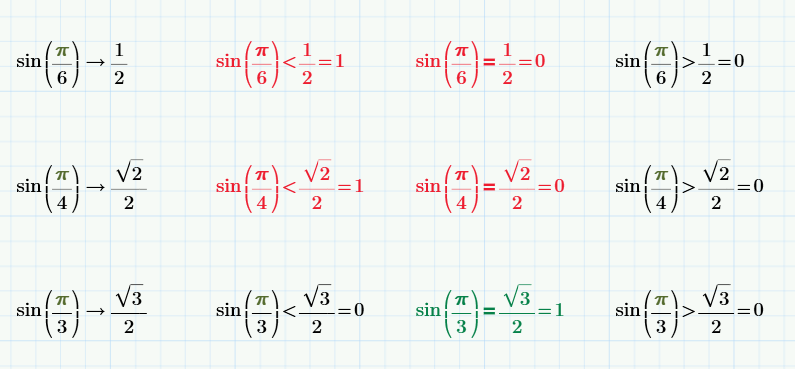
I tested sin function in Mathcad 3.1 and get the following results. Can anybody explain sin function behaviour ?
sin.png

MH

Best answer by MJG

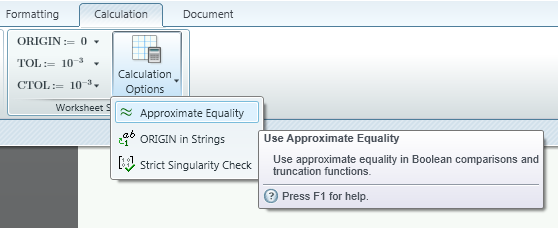
Mathcad 15 (& prior) had an option in Worksheet Options -> Calculation called "Use exact equality for comparisons and truncation."  I'm not sure if this option is available in Prime.  If it is, uncheck the option and you should get the expected results.

Edit:

Prime has this option, but presented slightly different:

2 replies

23-Emerald V
April 27, 2016

MartinHanak wrote:

I tested sin function in Mathcad 3.1 and get the following results. Can anybody explain sin function behaviour ?

sin.png

MH

Probably due to the limitations of the 64-bit (internal 80-bit) floating point arithmetic that Mathcad (and many, many other applications) uses.  This means that most calculations has some least significant digit errors because (for example) transcendental numbers have no exact 64-bit representation. The symbolic processor gives the expected results.

Stuart

MJG1-VisitorAnswer
1-Visitor
April 27, 2016

Mathcad 15 (& prior) had an option in Worksheet Options -> Calculation called "Use exact equality for comparisons and truncation."  I'm not sure if this option is available in Prime.  If it is, uncheck the option and you should get the expected results.

Edit:

Prime has this option, but presented slightly different: