3-Newcomer
June 24, 2025
Solved

Solver not Simplifying Units

  • June 24, 2025
  • 2 replies
  • 674 views

Hello,

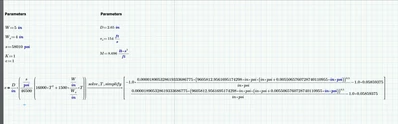
I am having issues with the solver not simplifying the units of my equation (file attached)- does anyone know what may be causing the issue?

I'm using Mathcad Prime 9.0.0.0
DB_13699250_1-1750790644141.png


Best answer by Werner_E

The problem is that Prime's auto-labelling is doing wrong by labelling some of the used units as unit and some as variable (you can tell so by the typeface and color). The symbolics does not know anything about units and treats them as undefined variables. And a unit "in" and a variable "in" are seen as different and can't be cancelled.


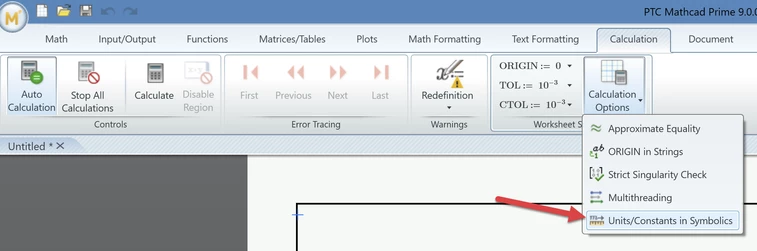
You should turn on the option "Units/Constants in Symbolics" in the Calculation options and then recalculate the worksheet.
Werner_E_0-1750792590773.png

In your case this solves the problem

Werner_E_1-1750792677427.png

Nonetheless the symbolics still does not know anything about units.  In your case these 'variables' cancel and so you get the result(s) you expect.

Normally you would have to follow with a numerical evaluation to simplify the units.

Here in the example I replaced psi by 144 psf and you can see that the symbolics is not capable to simplify:

Werner_E_2-1750792945908.png


But usually when you are just looking for numerical results you are better off using Primes numerical ways to solve equations. These are either solve blocks with "find" or the "root" function.


Is there any reason why you tried to get rid of the units you had defined initially?

Your equation could be made unit consistent if e is given the unit psi*in.

Here is a way to use the "root" function

Werner_E_3-1750793137252.png

Werner_E_4-1750793220950.png


2 replies

Werner_E25-Diamond IAnswer
25-Diamond I
June 24, 2025

The problem is that Prime's auto-labelling is doing wrong by labelling some of the used units as unit and some as variable (you can tell so by the typeface and color). The symbolics does not know anything about units and treats them as undefined variables. And a unit "in" and a variable "in" are seen as different and can't be cancelled.


You should turn on the option "Units/Constants in Symbolics" in the Calculation options and then recalculate the worksheet.

Werner_E_0-1750792590773.png

In your case this solves the problem

Werner_E_1-1750792677427.png

Nonetheless the symbolics still does not know anything about units.  In your case these 'variables' cancel and so you get the result(s) you expect.

Normally you would have to follow with a numerical evaluation to simplify the units.

Here in the example I replaced psi by 144 psf and you can see that the symbolics is not capable to simplify:

Werner_E_2-1750792945908.png


But usually when you are just looking for numerical results you are better off using Primes numerical ways to solve equations. These are either solve blocks with "find" or the "root" function.


Is there any reason why you tried to get rid of the units you had defined initially?

Your equation could be made unit consistent if e is given the unit psi*in.

Here is a way to use the "root" function

Werner_E_3-1750793137252.png

Werner_E_4-1750793220950.png


3-Newcomer
July 7, 2025

Thank you, this worked!

23-Emerald IV
June 26, 2025

In general, when you want to solve a system symbolically, you should use only symbols and numbers without units.

you can write your system as:

LucMeekes_0-1750927675074.png

To see that it has two solutions.

But what is this number 46500, and what are 16000 and 1500?

I should guess that 46500 is another pressure, lets call it ss, then it solves as:

LucMeekes_1-1750928085681.png

But for evaluation we need e.g. to give e a unit of in:

LucMeekes_2-1750928156908.png

But do you expect the value of T to be unitless?

You could continue and provide proper symbols for the values 16000 and 1500, and define them with their respective units when calculating the result.


Success!
Luc


3-Newcomer
July 7, 2025

Thank you, got it now 🙂

