Main problem, as Terry already said, is that you did not realize that "lookup" ALWAYS returns a matrix, because there could be more lines in the vector "field" with the same name. So as just one value could be found, the result nonetheless is a 1x1 matrix - hence the square brackets.
So you could add a vector/matrix index "ORIGIN" to select only the first (and only) entry of that vector/matrx. Of course if you always use ORIGIN=1 you can replace ORIGIN by the number 1.

But if you do so with a field name whose corresponding value is not a number in a string, you get an error and the variable remains undefined.

A possible solution is to wrap a "try ... onerror ..." around to catch that error

But doing so for every variable you want to assign a value is very tedious.
So you may use a different path.
One way could be to turn ALL the values in your value-column into numbers - of course only if that's possible, if the string represents a number (otherwise leave it unchanged).
We can use a small utility function to do the job:

This function is now called vectorized (mandatory!) with the whole data column as its argument:

Now all the entries in "value" are ordinary numbers, if possible and you can use "lookup" the normal way (still using vector index ORIGIN or 1 to avoid getting a 1x1 matrix.

If you make a typo and use a field string which does not exist, you get an error and the variable remains undefined

This error could also be trapped using a "try...onerror...".
So here is a second approach to your problem. Its using a small utility function and does without the vector variables "field" and "value".
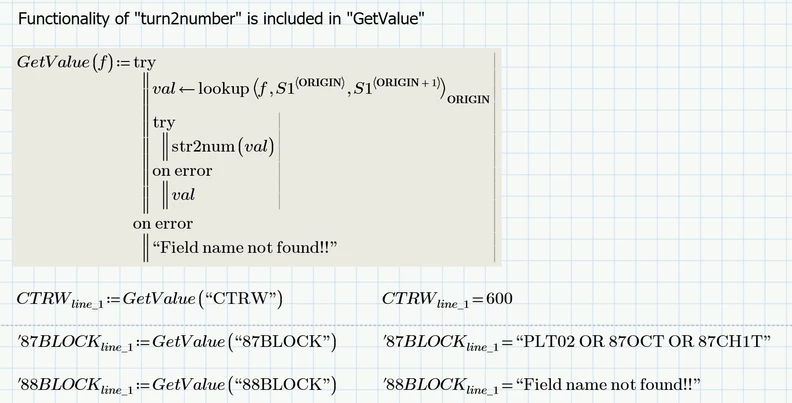
"GetValue" is very similar to Terry's "function". The difference is that is does not make use of the vectors "field" and "value" but rather uses your data matrix S1 right away and "GetValue" also additionally catches the error which you would get in case the argument string provided does not exist.
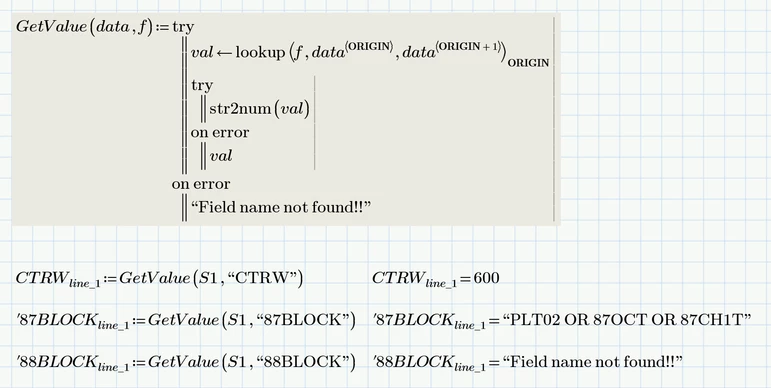
In case you have more two-columns data matrices to deal with, not just S1, you can make the data matrix an additional argument of the function, so you can use the very same function to extract the values from any data matrix you have to use:
So Chose you weapons . good luck!
And before you ask - no, there is no way to turn a string into a variable name. So its not possible to assign all 253 variables in one go. You will have to do it on a one by one basis.
But maybe you don't need all those variables. You could make use of the "GetValue" function instead, like
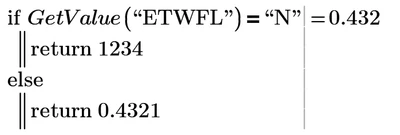
or
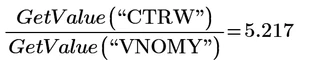
Depends on your needs.
Prime 11 sheet attached

