
4-Participant
January 22, 2025
Question

This value must be a scalar or a matrix - Mathcad Prime 10 issue

  • January 22, 2025
  • 3 replies
  • 2889 views

Hi,


I am getting the following issue on Mathcad 10:


"This value must be a scalar or a matrix"


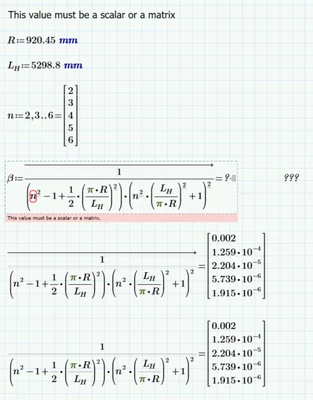
I am looking to define the output matrix as β. It seems to work on its own but not when I try and assign it as β.
JB_10745469_1-1737562549368.png

It isn't an issue when run on Mathcad Prime 8 or 9.


Help would be appreciated.


Thanks

3 replies

23-Emerald V
January 22, 2025

The behaviour of the evaluation operator (=) changed in Mathcad Prime 10.


Previously, when defining a range, using the = operator converted the range into a vector.  In Mathcad 10 it no longer does so; hence the error message when you try to use n.


You will have to explicitly define n as a vector, or create a function to convert a range variable to a vector.  Try the vec function defined in this link:


https://community.ptc.com/t5/Mathcad/The-vec-function/td-p/170273


Stuart

12-Amethyst
January 22, 2025

You should not use a range - use n as a vector !


regards Owe

25-Diamond I
January 22, 2025

Looks like you attached the wrong file - its the same as the original posted one.

12-Amethyst
January 22, 2025

Sorry Werner_E


here it is !


25-Diamond I
January 22, 2025

Stuart already explained why this problem occurs in P10 and how to solve it.

Inline evaluation does not convert a range into a vector starting with Prime 10. So even though you use inline eval, n remains to be a range and so the assignment to variable beta fails.

PTC's decision to make the (admittedly illogical and inconsistent) option of converting a range to a vector impossible without providing a more sensible inbuilt alternative is regrettable.


In case you are still unsure here your file in a working variant.

I used a simpler variant of a range-to-vector function, for more capable and sophisticated versions follow Stuart link.

Werner_E_0-1737571898653.png

Of course you could also define n as a vector right away. Either using a  global range variable

Werner_E_2-1737572039576.png

or using a programmed for-loop

Werner_E_3-1737572083853.png


In some threads in this forum you will also find user-defined functions to create a vector by providing first, second and last value (similar to the definition of a range) or also by providing first value, step value and either last value or number of entries.


23-Emerald IV
January 22, 2025

I should like to add a more concise method to create a simple vector with successive values:

LucMeekes_0-1737578189306.png

(The matrix function creates a vector (5 elements vertical, one column in the above case), with values 0, 1, 2... then 2 is added;. the inline evaluation is not necessary, but used here to show the expression creates the correct vector.)

Success!
Luc