1-Visitor
February 9, 2021
Solved

Using Mathcad to solve a system of non-linear equations using Newton's method

  • February 9, 2021
  • 4 replies
  • 7094 views

Hello,

I am struggling in implementing a problem that  implements Newton's method to solve a system of two non-linear equations:

𝑥^4𝑦𝑥^3=1

6cos(𝑥+1)𝑦=2

I am trying to implement 

𝑥^(𝑛+1)=𝑥^(𝑛)−𝐽(𝑥(𝑛))−1∙𝐹(𝑥^(𝑛))with 𝐽(𝑥^(𝑛))^−1is the evaluation of the inverse of the Jacobian matrix and 𝐹(𝑥(𝑛))is the output of the equations.

I have done most of the iteration work I believe in the function but I am stuck on how to manipulate the values to come up with the intersection points of these two functions.


Here is my code:

Best answer by Werner_E

If you are just looking for a solution, you sure would use Primes built-in methods ("root" function or a solve block)
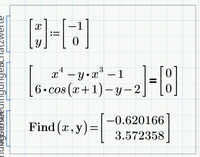
Werner_E_0-1612869705660.png


But I guess this is an exercise in programming and implementing an algorithm in Prime.
You also want the whole series of iteration steps as the result.


I spotted a couple of errors in your sheet:


1) The guess values 0;0 result in a non-invertible Jacobi-Matrix and so your function must fail


2) You defined f as a function with two arguments (x and y) but in your Newton function you used the function argument f as a function with just one vector argument. You should rewrite your input function f to accept a vector as its argument and do the very same with your function J. That way you may also be able to deal with more than two variables, using the very same function "Newton". You may just redefine J(x):=J(x[1,x[2) to save typing the definition from anew.x


At the top you are collecting the current variable values and the number of the iteration step in a matrix "result"
3) You forgot about the second matrix index (should bi "i") in result
4) When writing x_i you used the literal index instead of the vector index (Thats what the error message is trying to tell you)
Furthermore "result" in the for-loop is accidentally labelled as "function" - it must be manually re-labelled as "Variable"


5) You completely missed the correct iteration step using J(x), etc. You simply calculated the new x-value being the result of f(x).


If you correct those errors and you provide meaningful guess values, your routine should work OK (I renamed you function f to F, so I can use the previously defined function f (and g) to check the result using Primes root-function.
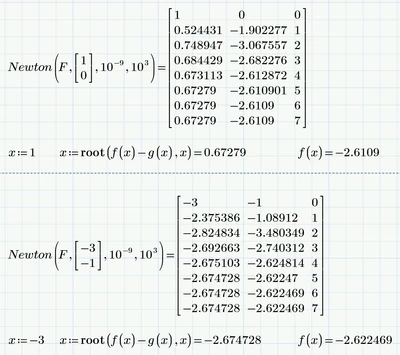

Werner_E_0-1612865728855.png


4 replies

ttokoro
21-Topaz I
21-Topaz I
February 9, 2021

image.pngimage.pngimage.png

t.t.
24-Ruby IV
February 9, 2021

Sorry, the root with 2 arguments is not the Newton Method

The Newton method for two equation is

Moscow Power Engineering Institute: Mathcad Calculation Server (mpei.ac.ru)

Newton-2.png

23-Emerald IV
February 9, 2021

What is the main purpose?

1. Solve the set of equations.

2. (Learn how to) implement the method.


One solution of the set is easily found with Mathcad, without programming.

x is close (within a %) to 2/3, y=6*cos(1+x)-2


Succes!
Luc


symbolic solution:

LucMeekes_0-1612870876491.png


19-Tanzanite
February 9, 2021

Here's one way of doing it (I've used M15, but you should be able to use the method in Prime)::

NonLin.jpg


Werner_E25-Diamond IAnswer
25-Diamond I
February 9, 2021

If you are just looking for a solution, you sure would use Primes built-in methods ("root" function or a solve block)

Werner_E_0-1612869705660.png


But I guess this is an exercise in programming and implementing an algorithm in Prime.
You also want the whole series of iteration steps as the result.


I spotted a couple of errors in your sheet:


1) The guess values 0;0 result in a non-invertible Jacobi-Matrix and so your function must fail


2) You defined f as a function with two arguments (x and y) but in your Newton function you used the function argument f as a function with just one vector argument. You should rewrite your input function f to accept a vector as its argument and do the very same with your function J. That way you may also be able to deal with more than two variables, using the very same function "Newton". You may just redefine J(x):=J(x[1,x[2) to save typing the definition from anew.x


At the top you are collecting the current variable values and the number of the iteration step in a matrix "result"
3) You forgot about the second matrix index (should bi "i") in result
4) When writing x_i you used the literal index instead of the vector index (Thats what the error message is trying to tell you)
Furthermore "result" in the for-loop is accidentally labelled as "function" - it must be manually re-labelled as "Variable"


5) You completely missed the correct iteration step using J(x), etc. You simply calculated the new x-value being the result of f(x).


If you correct those errors and you provide meaningful guess values, your routine should work OK (I renamed you function f to F, so I can use the previously defined function f (and g) to check the result using Primes root-function.

Werner_E_0-1612865728855.png


1-Visitor
February 9, 2021

Hey, I'm just wondering if this finds the intersection points of these two functions which gives 4 different sets of values. Sorry, I'm pretty new to Mathcad so I'm still learning how to implement all these things.

25-Diamond I
February 9, 2021

@JA_9803374 wrote:

Hey, I'm just wondering if this finds the intersection points of these two functions which gives 4 different sets of values. Sorry, I'm pretty new to Mathcad so I'm still learning how to implement all these things.


Prime is not able to find all four solutions automatically.

You have to provide either appropriate guess values or ranges, as ttokoro's picture had shown.

You can use the "root" or a solve block with "find".
In the example below I turned the solve block into a function of the guess value for x (the guess for y is constant 0).

Given the estimates you provided its possible to find all four points of intersection:

Werner_E_0-1612903079009.png

But of course you can find the same values using your own "Newton" function.
I assume you already corrected the above mentioned errors.
