
1-Visitor
March 6, 2017

MBD: Standalone Annotations vs. Annotation Features

  • March 6, 2017
  • 34 replies
  • 19343 views

In Creo 4.0 one of the significant enhancements was to provide advanced capabilities for standalone annotations of the following types: Geometric Tolerance (GTOL), Datum Feature Symbol, Datum Target and Dimension. In this blog post, I'll provide a little bit of background to explain the differences (up through Creo 3.0) between standalone annotations and annotation elements owned by an annotation feature. Then I'll explain in more detail the enhancements in Creo 4.0 and I'll finish up with some advice on when you might want to consider using either standalone annotations or annotation elements owned by annotation features.

What is a standalone annotation and how is it different from an annotation element inside an annotation feature?

A standalone annotation is an annotation that is not "owned" by some other feature in the model. These annotations are listed in the model tree under the Annotations node.
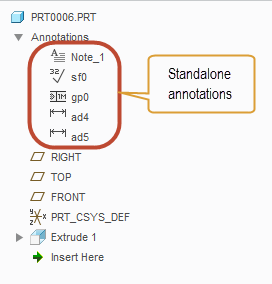
Annotation elements, by contrast, are owned by another feature in the model. Typically this feature is an annotation feature, but it can also be general modeling feature (such as Extrude or Hole).
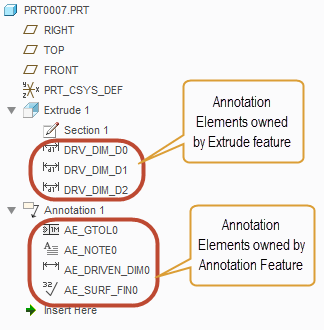
Generally speaking, standalone annotations have the same graphical appearance and the same basic properties as annotation elements. For example, the dialog box for configuring a GTOL is identical whether that GTOL is a standalone annotation or an annotation element.

What sets standalone annotations apart from annotation elements are a number of advanced capabilities that annotation elements have as a result of being part of an explicit feature in the model. Those advanced capabilities are:

  • Reference handling and regeneration
    • Annotation elements can support multiple references of various types (to support the semantic definition of the annotation) and they regenerate at a specific point in the regeneration sequence determined by their owning feature. If something goes wrong during regeneration, annotation elements will provide either a failure or a warning in the Notification Center and the model tree.
  • Support for parameters
    • Annotation elements can have parameters and some types have a number of system parameters that get automatically created for the various properties of the annotation element.
  • Ability to Designate and mark as Control Characteristic
    • Annotation elements may be designated and made visible to Windchill and also identified as a control characteristic and have a Windchill model item that gets passed to MPMLink.
  • Support for feature operations
    • The annotation feature, which owns the annotation elements, may participate in feature operations, such as pattern, suppress, copy, etc...

For companies moving to Model-Based Definition, these advanced capabilities make annotation elements within annotation features the preferred choice in Creo 3.0 and earlier.

Enhancements to standalone annotations in Creo 4.0

In Creo 4.0 we have enhanced the standalone annotations for GTOL, Datum Feature Symbol, Datum Target and Dimension to include most of the same advanced capabilities that were previously only available for annotation elements inside annotation features. So, these types of annotations will now support:

  • Reference handling and regeneration
    • The contextual ribbon tab for the enhanced standalone annotations will have a References button available at the far left side of the ribbon where you can select the references that you would like to have as the semantic definition of that annotation
  • Parameters
    • You can access the parameters of the enhanced standalone annotations from the right mouse button menu
  • Designation as Control Characteristic
    • You can access the options to designate and set control characteristic from the Options button in the contextual ribbon tab for the enhanced standalone annotations

The only capability not available to standalone annotations is the ability to support feature operations, which will still only be possible when annotation feature is used.

It is important to note that these advanced capabilities are only available in Creo 4.0 for the standalone annotations of the four types noted above. Other types of standalone annotations (such as Notes, Symbols, Surface Finish Symbols) do NOT have these advanced capabilities and the standalone annotations of these types will behave as they currently do in Creo 3.0. We plan to provide the advanced capabilities for these remaining annotation types in Creo 5.0.

When to use standalone annotations or annotation features in Creo 4.0

Given that most of the advanced capabilities of annotation elements will be available with standalone annotations (for GTOL, Datum Feature Symbol, Datum Target and Dimension), there is less of a need to use annotation features in Creo 4.0. Here are some criteria that can help you decide which method to use.

Reasons to use annotation elements and annotation features:

  1. If you are using an annotation type that has not been enhanced in Creo 4.0
    • Remember, the only annotation types that were enhanced are GTOL, Datum Feature Symbol, Datum Target and Dimension, so if you're using symbols, notes, surface finish, etc... you'll still likely want to use annotation features for these
  2. If you want to perform some kind of feature operation on the annotations
    • Standalone annotations are not contained inside an explicit feature in the model tree, so you cannot include them in feature operations, such as pattern, copy, suppress, UDF, etc... If you intend to do some kind of feature operation, then you'll still want to use annotation features
  3. If you want to organize your model tree using annotation features
    • Standalone annotations appear in the model tree under the Annotations node at the top. They are presented in a flat list grouped by type. If the model contains a large number of annotations, it might become a little hard to manage such a long list of annotations in Creo 4.0. Using annotation features would allow you to group and structure the annotations in the tree.

Besides the three reasons above there generally aren't any other advantages to using annotation elements over the enhanced standalone annotations. Most importantly, you can capture the full semantic definition while using the enhanced standalone annotations and it is this ability to define fully semantic GD&T that many companies are considering the major benefit to a Model-Based Definition.

If you have any questions, please let me know in the comments below.

-Raphael

UPDATE: 2017-03-06

Moved this blog from Creo Sneak Peek group to the Model Based Enterprise group.

Also edited slightly to reflect the fact that Creo 4.0 is now shipping

    34 replies

    1-Visitor
    June 23, 2016

    Thanks you for this clear explanation. I was one of the first to have to start using MBD in a company I am contracting with, without any prior training, and have been using standalone annotations exclusively. Some other users in our company use the Annotation Features and Elements and I was struggling to understand why. After some Q&A with PTC reps, I understood these AE and AF to be phased out in the future, so thought I was on the right path, but was suprised when the company published a MBD standard that relies very heavily on AE and AF. One of my biggest struggles was in annotating part level features at a "next assembly" level (for an overmolded subassembly). I had to show the annotation in the .prt file first so that they were accessible to show in the sub-assembly. I use model/driving dimensions only. If I didn't like the placement in the assembly file's annotations, I had to adjust them in the .prt file. Very cumbersome. I wonder if this behavior is easier with AE?

    1-Visitor
    June 23, 2016

    I'm glad you found this post useful.

    A few comments...

    • Annotation Features are not planned to be phased out at any time in the future. As noted in the post above, AF's have some distinct capabilities that are not available with standalone annotations (even the newly enhanced ones in Creo 4.0). Most companies are using AF as part of their MBD standards because of the ability to define additional semantic references, which is just not available for standalone annotations in Creo 3.0 and earlier, so it's no surprise to me that the company you're working with had that in their standard.
    • The current behavior of having to show the dimension in the part first before showing it at the assembly level is still present in Creo 4.0. We haven't updated that workflow yet, although we might think about that in Creo 5.0
    • Similarly, adjustments to the position of annotations can still only be made at the part level in Creo 4.0. We might also look at making some changes to this in Creo 5.0 as well.


    1-Visitor
    December 21, 2016

    Hi Raphael,

    Thanks for the explanations,

    I had one particular case when standalone annotations are better than annotations features.

    i wanted to use combined views with annotations features to automate some specific drawings creation in my enterprise. When one of the annotations Inside the parent annotation feature loses her referencse, the annotation feature turns red and it fails. Which conduct in the drawing we lose visibility of all the other annotations Inside the parent annotations feature. In this case if i use standalone annotations, only the failed one will disappear in the drawing.

    One of the disadvantage of annotation features is that when you lose references the lost annotations dont turn purple like the old dimension created directly in the drawing mode. It this planned in futur Creo versions? When references are lost, annotations or Gtol turning purple either Inside the 3Dmodel or Drawing mode? same functioning than the dimensions created in drawing.

    12-Amethyst
    December 30, 2016

    Hi Debbie, can you swing a link to your MBD standard to me via the GE internal email (-). We in GEHC are toe dipping with MBD and right now for sure we've made the advice too dam hard/slow. I'm wanting to champion something a little more balanced in the coming months. What is your logic with forcing yourself to only use model/driving dimensions btw? You'd hate it here LOL we advise keeping model dims for model changing and created dimensions for the manufacturing scheme.

    8-Gravel
    February 10, 2017

    Hi Raphael, is possible add to a text note in annotation feature, or stand alone, in Creo2 Parametric assembly?

    How to add and correcct show in Creo View with Windhcill?

    Please send me a datasheet guide. Thanks!

    1-Visitor
    February 13, 2017

    Hi Fahd,

    Sorry for the delayed response. Somehow I missed your comment when it was added and only noticed it now after another comment was added...

    In any case, annotation features in Creo 4.0 will still continue to behave the same way as Creo 3.0 with regard to failure if one of the annotation has a missing reference.

    We do have some plans to enhance failure notifications in the future - possibly Creo 5.0 - and at that time we will look to improve the consistency of failure behaviors such as changing the color of the annotation that has missing references, etc...

    1-Visitor
    February 13, 2017

    Hi Salvatore,

    Yes, it is possible to create a note in an assembly in Creo 2.0.

    It can be done either as a standalone annotation using the command in the Ribbon or from within an Annotation Feature using the command in the Annotation Feature dialog.

    I believe to get the notes to publish to Creo View, you'll need to edit the recipe file for the Creo View adapter to ensure that the publishing of notes is turned on.

    I don't have specific instructions for that right here, but there is a topic in the PTC Help system that covers how to set up and configure the adapter. I'm sure that you can find the information you need from that Help topic. If not, the PTC Technical Support team can walk you through that process. The topic in the PTC Help system can be found here:

    PTC Creo View Help Center

    1-Visitor
    February 14, 2017

    Hi Raphael,

    Thanks for your feedback and explanations.

    1-Visitor
    February 17, 2017

    Raphael,

    Thanks for that summary of changes to functionality in Creo 4.

    I've been using annotation functionality in PTC's CAD system since Wildfire 1. I'm disappointed that improvements to the functionality are so slow in coming. Rather than having a single set of MBD functionality, Creo continues to have 4 generations of functionality, each with significant differences in interface, functionality and user interaction. As you see from at least one of the comments, this is a constant source of confusion for those who want to annotate models.

    The functionality for annotating assemblies is very cumbersome, as noted by another user above. That gives rise to two basic strategies for doing so. The first, what I refer to as the "Las Vegas strategy" is that "what happens in parts stays in parts. No 3D annotations are re-used at an assembly level. This is advisable due to the cumbersomeness of dealing with part shown dimensions (Driving Dimension Annotation Elements) at an assembly level and the "random" functionality of using the other types of annotations at a part level to be viewed at the assembly level. The outcome of this approach is that all annotations that appear in an assembly are created in that assembly: zero re-use of part-level annotations. The second strategy is a "multi-level" strategy in which part-level annotations are visible at an assembly level. This approach is very cumbersome due to "holes" in functionality that follow no particular logic - some things you can do, some you can't. It has been, in my experience the hard way of accomplishing annotation of assemblies.

    With the limitations of the types of annotations that can be shown (Driving Dimension Annotation Elements), as well as what can be done with them, particularly in terms of managing and organizing them, any potential advantages of using shown dimensions are offset by the difficulty in managing them, but in very simple models. Even if "shown" annotations are used, notes, symbols, etc. still must be created using one of the other sets (generations) of functionality, forcing the user to use different interfaces, with different functionalities to accomplish the task of annotating the model. The most "complete" of the functionality is found in the Annotation Features. As you have described, some of that functionality has now been added to Standalone Annotations in Creo 4, but only for the four types of annotations elements you mention.

    The practical result is that the best approach to using the annotation functionality in Creo is to use Annotation Features, particularly in a large organization with users of varying skill and experience levels. This provides, as much as possible, a unified set of functionality, user interface and user interaction. It also allows users to organize and manage those annotations in ways that Standalone Annotations and Driving Dimension Annotation Elements do not, which is critical in a large organization where a single model is often used by many people, beyond the person who originally created the model.

    Last, I find it very odd that the very thing for which one would want to use Creo View to view - the 3D annotations - is not "published" by Creo Parametric by default. That one must go through a complex "off-line" configuration of Creo View to publish annotations is a serious limitation of the interface between Creo Parametric and Creo View. It should "just work". It doesn't.

    While I appreciate PTC (slowly) adding functionality to the 3D annotation capabilities, in my opinion and experience, PTC really needs to re-think its entire approach to a model-based definition, specifically the annotation functionality it provides. Mostly, what we are seeing in Creo Parametric 1, 2, 3 and 4 are band aids to prop up poorly conceived functionality. Standalone Annotations, for example, go back to the earliest versions of Pro/ENGINEER, with only relatively minor changes to the functionality in all this time.

    1-Visitor
    February 17, 2017

    Hi Charles,

    Thanks for the feedback. I agree that it would be nice if everything related to MBD were unified and consistent, but unfortunately that's not the case right now and we kind of need to play the hand we've been dealt. As you noted, there is a fair amount of history here and I think it's probably not a stretch to say that MBD has historically been a lower priority relative to the other areas of Creo and there hasn't been much a strategic focus until recently.

    The good news is that MBD is now getting some strategic focus as evidenced by the sheer volume of improvements that have come in Creo 4.0. As a result, we are indeed approaching the MBD capabilities within Creo Parametric in a more holistic sense. In other words, there is a long-term vision for having a unified and consistent experience for the user (both within the MBD tools and between MBD and Detailing where appropriate - you'll notice that the UI and workflow is identical between 2D and 3D for the annotations we enhanced in Creo 4.0).

    There are constraints that we have to deal with often we have to make decisions such as enhancing 4 types of annotations (GTOL, Dimension, Datum Feature Symbol, Datum Target) in one release while leaving the remaining annotation types untouched (Notes, Symbols, Surface Finish) until we can enhance them in a similar fashion in a future release. There are essentially two ways in which we could do this. The first way is to work on the improvements across the board and not expose any of those changes to customers until all of it is complete. Essentially we would be working on upgrading all of the annotations during the Creo 4.0 cycle, but all of it would remain hidden until Creo 5.0 or Creo 6.0 when everything was done. The other way to do it (and the way we chose to do it) is to decide on some subset of the entire package that would offer meaningful improvements to the user base and ship that subset in the nearest release while we continue to work on the remaining parts until they are complete so we can ship them in a future release. I think there is a lot of merit to the second approach, which is why we went that way. The question essentially boils down to whether the new enhancements offer enough benefits to outweigh the inconsistency that would result from this staged approach.

    So, as I said, we do have a unified, consistent vision and are working toward that. It's just that it'll take some time to get there.