1-Visitor
March 24, 2015
Solved

Boundary Blend's not letting me make the surfaces tangent.

  • March 24, 2015
  • 5 replies
  • 8636 views

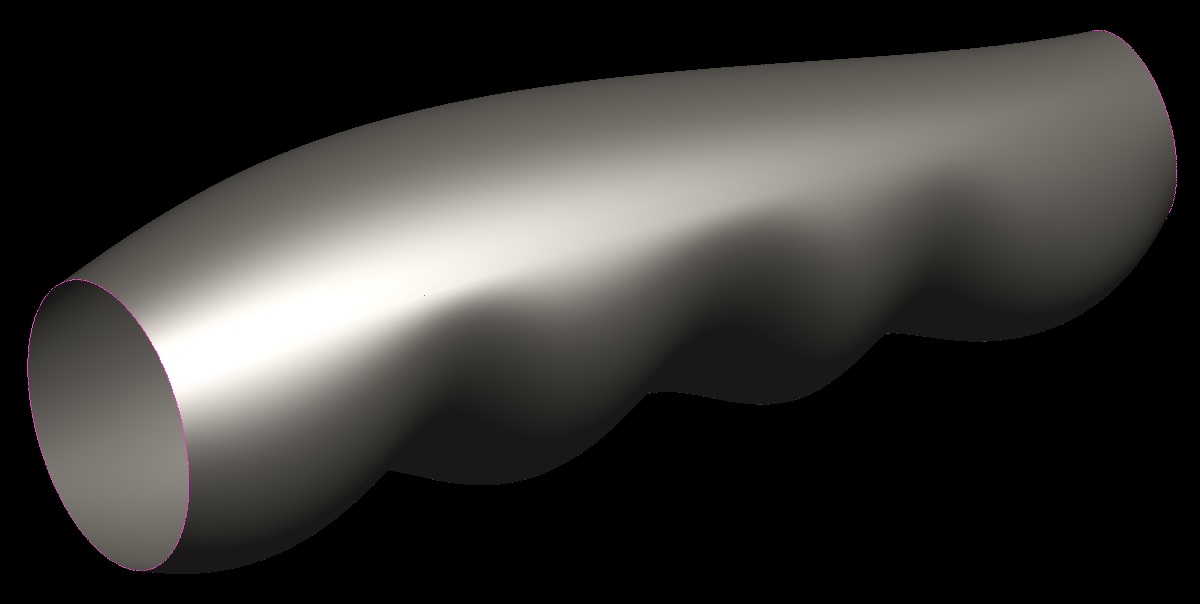
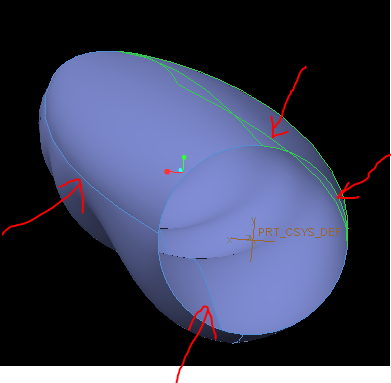
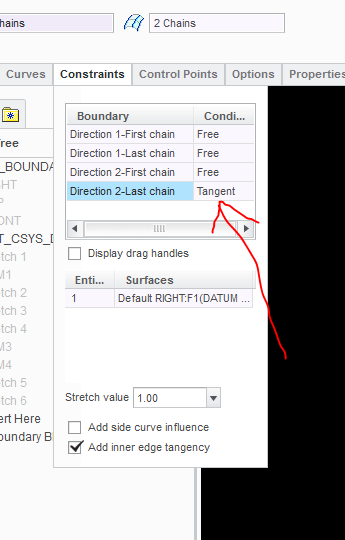
Hi guys. I am making this ergo grip "handle-wand". That will house some PCB electronics. I needed to keep the circle shape on one end while also keeping the "triangular-oval" on the other and still follow 4 trajectory lines, or else I would have used a Variable Section sweep or something other relevant tool. My question is this I have made my shape using boundary blends. I am wanting to make the Boundary Blends tangent to one another so there will not be any witness lines. However when I go into constraint settings on boundary blends and make set them to tangent, it will not rebuild properly. I have attached some pictures for reference. Any ideas on how to make them tangent to one another? The pictures below illustrate the witness lines and my tangency settings.Thanks in advance.
pic1.PNGpic2.PNG

Best answer by Patriot_1776

Ok, so, to use all 4 curves, you have to copy the first curve used as a separate feature, but it gives a weird result. So, I did the top half surf first (using the curves as references), with normal boundary conditions to the TOP plane on both edges. Then I did the bottom surf, but used the intent edges of the first surf, and then made a tangency condition at both of those edges to the top surf. I tried curvature continuous (which is better/more class "A"), but it didn't work, so I had to back it down to a simple tangency.

This took me maybe 5 minutes total, so it's actually pretty easy once you know the steps. Hope this helps.

4_frank_phelps.jpg

5 replies

Patriot_1776
22-Sapphire II
March 24, 2015

Check and see if the curves really ARE tangent. Sometimes, you just can't. Wish I had better news.......

fphelps1-VisitorAuthor
1-Visitor
March 24, 2015

‌Frank- Can you please explain how to do this?

Patriot_1776
22-Sapphire II
March 24, 2015

Can;t see the geometry that well, but you might be able to do it in one blend, with all the long curves in one direction, and the end curves in the other, that'll give nice surfaces, but may not be exactly what you want.

If not, for instance, the end curve. You can make sure that it's a circle that is exactly split on the centerline. OR, maybe use 4 conics, with the correct endpoints and a rho value of the (square root of 2) - 1 (approximately .414.

On the other curves, if they're planar, do the top half, and make the edges on the planar curve normal to the plane they're sketched on. then do the bottom half, and try curvature continuous first. If that doesn't work, try tangent. If not, make those edges normal to the plane as well.

Without the actual geometry, it's hard to tell what the issue is.

21-Topaz II
March 24, 2015

When you select "tangent", Creo will guess at what it should be tangent tot and it doesn't always guess well. In your screenshot above, it's trying to go tangent to the RIGHT datum plane. Is that what you want? It's hard to tell from your screen shot, I cant tell what curve you are defining as tangent adn your planes are off so I cannot see them.

fphelps1-VisitorAuthor
1-Visitor
March 24, 2015

Doug - Your right that is NOT what I want. I went in and changed that reference to one of the connecting boundary blends and still no luck. Am I doing something wrong? Any other ideas? Thanks.

Frank - I went in and tried to do it as one boundary blend but with no luck. I can only select 3 of the long curves. Never the fourth one. Also with the circular splines would I grab the whole spline or break it down.

Thanks again.

21-Topaz II
March 25, 2015

When it fails, if you click "cancel" you should get a dialog that may indicate where the problem is.My guess is that the cross curves are not tangent to the surface therefore Creo cannot make the surfaces tangent.

fphelps1-VisitorAuthor
1-Visitor
March 24, 2015

Sorry, but where do I post the Creo files on here so you guys can check them out. Thanks

24-Ruby III
March 25, 2015

Frank,

click Use advanced editor link (top right corner of Reply window). Then click Attach link (bottom right corner of Reply window). Select the file.

To be able to click Add Reply button, you have scroll down to the bottom of the web page.

Martin Hanak

Patriot_1776
22-Sapphire II
March 25, 2015

Ok, so, to use all 4 curves, you have to copy the first curve used as a separate feature, but it gives a weird result. So, I did the top half surf first (using the curves as references), with normal boundary conditions to the TOP plane on both edges. Then I did the bottom surf, but used the intent edges of the first surf, and then made a tangency condition at both of those edges to the top surf. I tried curvature continuous (which is better/more class "A"), but it didn't work, so I had to back it down to a simple tangency.

This took me maybe 5 minutes total, so it's actually pretty easy once you know the steps. Hope this helps.

4_frank_phelps.jpg

fphelps1-VisitorAuthor
1-Visitor
March 25, 2015

Martin - Thanks.

Frank- Your model helped point me in the right direction. The only difference in your model from mine was the fact that you drew your side splines on a datum. I created mine out of a datum curve which made it impossible to pick that reference plane. However I solved this by doing the Boundary blend on top first. Then the bottom. I then made the side rails of the bottom boundary blend tangent to the top boundary surface. I thought I tried that yesterday when I first started this post. Apparently not. Thanks for all the help everyone in pointing me in the right direction. I know my file is a bit dirty as far as organization goes, but you should be able to follow it. I was just trying a million different things on my "play" model. Thanks again

Patriot_1776
22-Sapphire II
March 26, 2015

so, it is "Answered" now?

Happy to help!