

Forum upgrade: Reply-Some thoughts on the marriage of Reply and Quick Reply:
Some thoughts on the marriage of Reply and Quick Reply:
- Basically its a good idea to have just one reply option but I find it quite cumbersome that the reply window now opens with a very minimal height and usually has to be enlarged manually (an extra step to do which should be avoided).
- The three points which open the option menu for each single post are placed to the left of the date. IMHO it would be much better to place them at the outer to right.
- I am not sure if it has changed or was that way all the time. I just noticed it now: When I have opened a couple of Tabs in my browser - all with various threads of this forum to search a specific posting or the like - the tab where I can continue with my reply is named "Re: [topic name]: Reply - PTC Community]. It would be better if the tab would read "Reply: [topic name]" as with a longer topic name and a larger number of open tabs, the "Reply" is not displayed any more - I just had a hard time finding out which tab to chose to be able to continue my reply 😞
- I have no clue whom or to which post I would reply to when I use the new "Reply to the topic" window at the bottom of each thread. It looks to me that this is a more confusing than helpful "feature" which could be omitted, isn't it?
- The new design also seems affect the display of a thread. Especially the display of attachments now looks really ugly and takes up an immense amount of space, forcing us once more to scroll more than we would like:
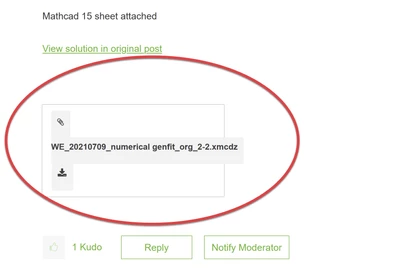
- Furthermore a really useful feature which I asked for already a couple of times still is not implemented: Showing the size of the attachment. This should be fairly basic and the feature seems to be there as we can see the attachments size when we create or edit our own posts:
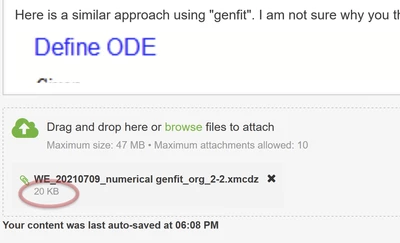
In this picture you also see the effect of a bug (which was already here prior to the current design change): When editing a post containing an embedded picture this pic is shown extremely large. When saving the edited post the pic thankfully appears as it should, though. Its possible that this effect only occurs if the pic was manually changed in size when posted in first place.
- In one thread (https://community.ptc.com/t5/PTC-Mathcad/Evaluating-entries-of-a-matrix-using-a-scalar-function/m-p/737501#M196507) I noticed a new button:

Looks like this is exactly why I had asked for . being able to quickly switch between threaded and flat view on a thread per thread basis and not globally via the personal settings. But this button is not present on most other threads I looked at. Is it only present in newly created threads?
EDIT: I think I found out. This button is placed below the "accepted solution", so its two postings down in midst of the whole thread. It might be better to place it at top, in front of the very first initial posting . Making it a floating item at the right, otherwise unused, column would be an option, too.
Guess thats it for now, Regards!