

olivierlp
Community Manager
July 7, 2021
Question

Thread structure on the forum

  • July 7, 2021
  • 1 reply
  • 44 views

Hello, 

One aspect of the long thread here has to do with the structure of a thread. I think @Werner_E you indicated that on a topic with many replies and contributors, it is difficult to track who is answering who... We don't have a magic solution for this. I just wanted to represent how a topic is structured. 


The graph below displays:

  • when there is a space between replies and when they are attached
  • the indentation depending what the level a reply addresses. 5 colors for 5 levels   

I hope this clarifies the anatomy of a thread. 
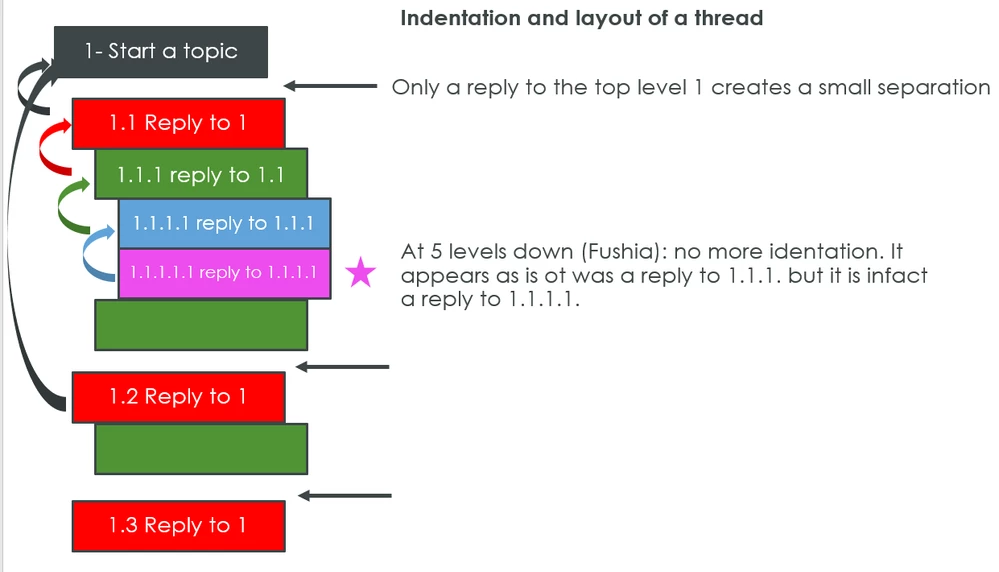


Thread anatomy.png


    1 reply

    25-Diamond I
    July 7, 2021

    I am not sure which posting of mine you are referring to, but its true that I often find it quite difficult to follow a longer thread with multiple forks and that I also find it hard to navigate therein.
    I see at the top of each posting to whome it is a risponse to (which is helpful), but I would have to click that link to be directed to the very posting (which is not necessarily what I want as there is no way back to the posting I was just starting to read!)
    I agree that there can't be a magic solution and indentations cannot be endless for obvious reasons.
    I guess that part of the problem is, that the page design is not only wasting very valuable vertical space but also horizontal space.

    There is a large white, mainly unused column to the right of the posting. So the room for the message bodies could take up some of that space (making the threads a bit shorter or the indentations better visible) and it would be possible to implement  a floating message tree in a column on the left of the bodies which could help significantly for easy and quick navigation in larger threads (not sure if Khoros offers that kind of element, it sure should).

    I also would vote for more flexibility. The user should be able to switch on or off the aforementioned tree with a simple click as its not needed for shorter threads.

    I also often have a problem finding the last posting in a larger thread which is already marked read. I know that I could set the flat view of all(!) threads in my personal settings but thats far too cumbersome to do. I would prefer a simple button in each thread where I quickly could change the thread view from indented to flat and vice versa.

    Just my 2 cents.


    olivierlp
    olivierlpCommunity ManagerAuthor
    Community Manager
    July 7, 2021

    Thank for the feedback @Werner_E 
    If you or any (of you all) can point to a Community(ies) that has the kind of layout that would be better, please me know. 

    To one of your point, we are looking into making the threads more compact to avoid so much empty space. The expansion left or right may be tricky, but we'll look. There are opportunities to limit the white space vertically, however. We have the resource on staff to start playing and testing with this in the coming weeks. I can't commit to a firm result or date at this time, but you get the idea...    

    Olivier
    19-Tanzanite
    July 8, 2021

    @olivierlp wrote:

    Thank for the feedback @Werner_E 
    If you or any (of you all) can point to a Community(ies) that has the kind of layout that would be better, please me know. 


    The old Mathcad Collaboratory. Long before your time. It had limitations compared to these forums, but threading wasn't one of them. I don't know how to point you to any copy or image of that though, so it's just an observation (that I suspect some others here may agree with).