
1-Visitor
May 31, 2017
Solved

Is it possible to convert an integer to time?

  • May 31, 2017
  • 2 replies
  • 3820 views

Hi all,

I would like to show how long a Test Session was in the "In Testing" state.

The DaysInState("In Testing") often returns a zero, so the precision of this info is insufficient.

The SecondsInState("In Testing") returns an integer, but no one reads in thousands of seconds. So, I need to convert this to a timestamp in days, hours, minutes, ... depending on the resolution. I can't seem to find a way to achieve this. Does anybody know?

Adriaan
Best answer by D_Thierjung

Hello @acoosemans,


i had a quick look at your problem and i think i have a solution using a computed field.

You need to create a short text field with the following computed expression:


Concat(ToText(floor(SecondsInState("In Testing")/3600)), Text(" Hours, ") ,ToText(mod((SecondsInState("In Testing")/60),60)),Text(" Minutes, "),ToText(mod(SecondsInState("In Testing"),60)),Text(" Seconds"))


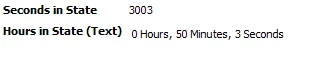
You should get something like this (i had the time in seconds also displayed to check my result)

2017-07-25 08_53_37-Requirements Analyst ViewSet - Integrity 11.png

You still need to evaluate, if you want to recompute the field dynamic or static.


Regards,

Dominik

2 replies

1-Visitor
June 1, 2017

Hi Adriaan,

There is some way that i found for this:-

1.) You can convert Seconds into hour from SecondInState Computation.

2.) sumTimeEntryByState("State-name") , you can use this function to calculate hour in current state.

But if you will calculate live it can affect your system performance, integrity calculate this every night, so calculating Days is always better option but may be you need this as per requirement. Kindly check and revert me back.

Regards

Kapil Jain

1-Visitor
June 2, 2017

Thanks for the quick reply, Kapil.

I believe I need to use time entries to use the second option, right? We're currently not using that (yet).

For the first, do you mean I need to divide by 60*60 to get hours? I was hoping there was some function I could use to convert it to a neatly formatted timestamp (weeks, days, hours, minutes, ...).

I was indeed thinking to have it statically updated at night.

1-Visitor
July 21, 2017

Hi,


maybe it's a bit too much, but you can use a trigger, which calculates once a day (or night) the seconds to a readable value and puts it into a date field? In trigger scripts you can use standard javascript functions like setTime() or such things.


And (this is just an idea without any proof) maybe this could go also with a similar function in a field computation?


cheers, Jens

1-Visitor
July 25, 2017

Hello @acoosemans,


i had a quick look at your problem and i think i have a solution using a computed field.

You need to create a short text field with the following computed expression:


Concat(ToText(floor(SecondsInState("In Testing")/3600)), Text(" Hours, ") ,ToText(mod((SecondsInState("In Testing")/60),60)),Text(" Minutes, "),ToText(mod(SecondsInState("In Testing"),60)),Text(" Seconds"))


You should get something like this (i had the time in seconds also displayed to check my result)

2017-07-25 08_53_37-Requirements Analyst ViewSet - Integrity 11.png

You still need to evaluate, if you want to recompute the field dynamic or static.


Regards,

Dominik

1-Visitor
August 2, 2017

Hi @D_Thierjung

I really liked your computation actually i also did the same earlier but converted into Days and Hours but your computation rule is very precise and give very keen information...

But i have a question in my mind...

This computation gives us Time , up to Seconds and this computation get executed by system every seconds so how about system performance ?

As per my view on the same we can use Static Updation which gets updated once in a day rather then dynamic updation.

What you think on the same ? 


Regards,

Kapil

1-Visitor
August 14, 2017

Hi @kjain-2


you raise exactly the point i made at the end of my example. You always need to evalute if you need static or dynamic computation depending on the customer needs.

In general i agree with you that it is preferable to use static updates (e.g. once per day) but it depends on your end users and how the use the computation results.


You could even do a bit of both. Use static updates once per day, but also add a check box or custom button to update the desired value on demand (maybe even display the time at which the computed value was last updated.)


Regards,

Dominik