Patriot_1776
22-Sapphire II
October 6, 2016
Solved

Comments comparing creo 3 to creo elements / pro 5.0...

  • October 6, 2016
  • 10 replies
  • 5994 views

Likes:

1.  I like that the option for shading with lines (like SW) exists.

2.  I like some of the new sketcher options (new fillet types, etc.).

3.  I like that you can get "references" by RMB, but I'm still trying to get used to that and wish for an actual button (unless I'm missing it).

4.  I like the new sectioning tools (like SW).

Hates:

1.  Hate the measuring too and it's functionality.  Where is my ability to measure NOT to the center axis of something but the surface instead???

2.  Think the file tab could use work, why are the model properties under "Prepare File" rather than the logical location of "Manage File"?  Makes ZERO sense.

3.  HATE that even though you CAN embed a sketched (planar) trajectory curve in a sweep feature, you CANNOT modify it internally in the feature.  you must go out, open the sweep feature, and redefine the sketch as a feature.  Seems like that feature is pushing us towards the "external sketches for everything " SW mentality....which is one major reason I don't like SW.  Total BS.  Or is there a trick I'm missing so far?

4.  TOTALLY hate the system "ASSuming" I want to view the sketcher section a certain way and immediately reorienting it without giving me a chance to correct it, and not giving me the options to easily change it.  THAT, is infuriating.  I ALWAYS have to re-orient it to see it how I want to.  Is there a way to stop that sh!t?

5.  Miss the "enhanced" rendering capability, think the older graphics were a lot better, and are worse now that they went all "SW" on us.

...to be continued...... 

Please feel free to chime in with corrections, tips, or your own personal rants on this comparison! 

Best answer by magnus.salomons

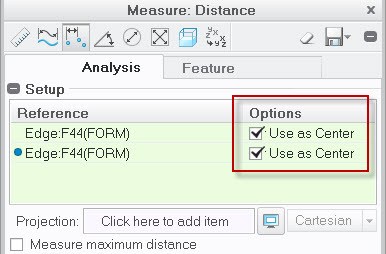
You will have to uncheck Use as Center option in measuring dialogue box.

Measure Creo 3.jpg

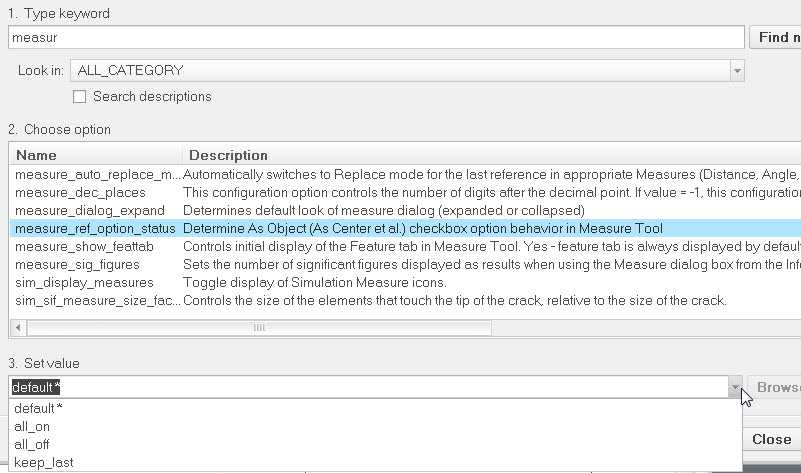
I assume you can change the behavour using this option, maybe use keep_last

Measure config options.jpg

10 replies

23-Emerald IV
October 6, 2016

TOTALLY hate the system "ASSuming" I want to view the sketcher section a certain way and immediately reorienting it without giving me a chance to correct it, and not giving me the options to easily change it.  THAT, is infuriating.  I ALWAYS have to re-orient it to see it how I want to.  Is there a way to stop that ****?

Try these config options:

sketcher_refit_after_dim_modify no

sketcher_starts_in_2d no

23-Emerald IV
October 6, 2016
15-Moonstone
October 7, 2016

You will have to uncheck Use as Center option in measuring dialogue box.

Measure Creo 3.jpg

I assume you can change the behavour using this option, maybe use keep_last

Measure config options.jpg

1-Visitor
October 7, 2016

Have you looked at the drafting side of things yet? Just wait until you see what they have done with the text editor!! I find it almost impossible to edit notes on my drawings, most of the time i end up deleting the note & starting from scratch. Then, don't get me started on all the additional mouse clicks required to get anything done in drawing mode. And finally before i end this rant, how about every time you run a mapkey, 9 times out of 10, you end up being in a tab that you don't need, you have to go back & reselect it. This mostly happens while modeling granted, but its a real pain in the ar@!

Regards

John

21-Topaz II
October 7, 2016

This is the reason we are still using Creo 2. We used to always update to the latest version but saw the aggregated complaints about the changes in drafting causing it to take even *more* time. It's already a time eater.

Patriot_1776
22-Sapphire II
October 7, 2016

Will have to check those out, thanks guys!

Sounds like I'll have to look at dwg mode.... 

1-Visitor
October 7, 2016

‌The selection and editing method I think is in preparation for how things are being done in Creo 4. It's different from what's done in Creo 2 and earlier.

12-Amethyst
October 7, 2016

I'm struggling with the change to Creo, too.  A lot of it is just paper cut, but it you get a lot of them, they really hurt (and bleed).  I assumed that some of them could be fixed with changes in configuration files, but that's as far as I've made it.  From the previous (and helpful) responses, my assumption is correct.

Quite frankly, my brain isn't wired to understand the Creo configuration files editor.  Between the config.win, config,pro, and config.sup files in the loadpoint, home folder, and start-in folder, I can't figure out how to save a new option or an option change to the right file. It's not just counter-intuitive, it's anti-intuitive.

Patriot_1776
22-Sapphire II
October 7, 2016

Many times it orients so fast I don't even get the chance to orient it, then i have to go back and re-orient it.  It's like it's just a$$uming an orientation quickly, and never the one I want.

1-Visitor
October 11, 2016

The sketch is auto-oriented based on the current 3D view of the model.

If it spins too fast try to set the following config while adjusting the number:

max_animation_time 0.5

21-Topaz II
October 10, 2016

Someone already linked to my post on the sketcher reference plane, so no need to comment on that. 😛

You might also find the "measure_dialog_expand yes" option useful. It makes the measure dialog fully open by default.

Patriot_1776
22-Sapphire II
October 11, 2016

THAT is EXACTLY what I wanted, thanks Doug!

1-Visitor
December 1, 2016

My rants:

1. When using the measure tool why do you have to hold the Ctrl button between picking the first & second entity? It was never like this in WF5. Then the kicker is, in Creo3 if you want to pick a third entity to measure from the first entity, you don't use the Ctrl button. I still keep getting it messed up.

2. When creating a sweep using multiple datum curves, you now have to hold the Shift button to pick them all instead of the Ctrl button. Why was it so important to change that?

It's little unnecessary changes like this that drive people crazy.

Patriot_1776
22-Sapphire II
December 19, 2016

Did I mention that the dwg text editor in creo 3 M080 is absolute GARBAGE??  How the h3ll did this ever pass testing?  Was Q/A or the people responsible for making sure the GUI didn't make it's users want to commit hara kiri totally ASLEEP??  Totally DRUNK??  Totally STONED now that it's legal in many states??  Gah!

PTC, this kind of garbage is EXACTLY why you are losing market share to SW.  The SW users using creo are constantly complaining about the interface, and while a lot of that is just griping, THESE kinds of things totally justify their rants about dwg mode.

I found a way to FORCE an "old school" Pro/E text editor to come up:

CREO 3 DWG TEXT EDITOR-01.jpg

21-Topaz II
December 20, 2016

We've been continuing along with Creo 2 because of the horrendous accounts of the drawing interface. Seems like there are some underlying themes here that are true of a lot of software these days:

(1) They think the world should be "paperless" and that these drawings are an anachronism, a holdout from the days when everyone smoked, we drank cups o' joe, and hats were de rigeur. But, see, out in the real world, a lot of small shops at best use autocad 2000, and more likely only use Mastercam. They absolutely need good paper drawings (or PDF files of them). So we need to be able to create them, hopefully with a minimum of pain.

(2) The people writing software have not and will not ever have to actually use that same software to do actual work. They don't have any idea of how annoying it is to have to reselect the same first reference 20 times to check a bunch of distances from a datum. How desk-poundingly irritating it is to try to move a dimension just that small amount to a snap line and have it revert back because you didn't move it "far enough" to pass some mystical rule that says yes you really wanted it to move. Argh.

(3) Windows is the interface we're forced to live under for our operating system and Office, etc. But that does not mean it is the goal for CAD software. Interface preference seems to be guided to making things easier for new users to do, but disregarding efficiency for experienced users.

Well, that's enough griping for now, feel free to pile on.

14-Alexandrite
December 20, 2016

Hi Ken

With config option "measure_auto_replace_mode" set to "yes" we don't have to keep on selecting first reference again if we want to keep first reference same

we need to press Ctrl key only on the second reference, after that any reference selected without pressing Ctrl key will replace latest selected reference