10-Marble
September 2, 2019
Solved

Creating a drawing "template view" which shows the model annotations

  • September 2, 2019
  • 1 reply
  • 5072 views

Hello,


I was wondering how you can add Template views to an drawing template file, and have it show all the model annotations from the model.


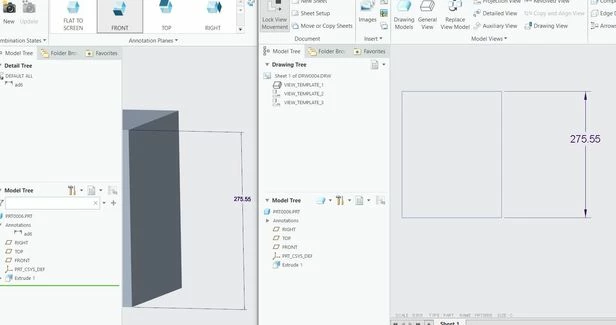
The model annotations that I manually added, are not shown automatically now. Is there a setting for this?

See picture:


Best answer by Mahesh_Sharma

@BWS Thanks for the image, dimension in image is 3d annotation and setting the config in last reply should help you. But only condition for that is annotation in 3d annotation should parallel to view.  


anno.jpg

1 reply

22-Sapphire I
September 2, 2019

@BWS 

Switch to template mode from drawing using Tools > Template.

Open drawing template > Tools > Template > Template VIew

BWS10-MarbleAuthor
10-Marble
September 2, 2019

Yes, I have added multiple template views.

But when I make a drawing of an existing model with annotations, these annotations are not shown on the drawing template. I only get the model itself without any dimensions/annotations.


22-Sapphire I
September 2, 2019

@BWS 


When inserting template view, check "dimensions" to show on crating view. 

Also, check config auto_show_3d_detail_items as yes to show 3d annotation in drawing. 


Can you share a sample part explaining what you want to show?