22-Sapphire II
February 20, 2025
Solved

Cutting plane lines in drawing views not rendered correctly

  • February 20, 2025
  • 1 reply
  • 642 views

Creo 9.0.80


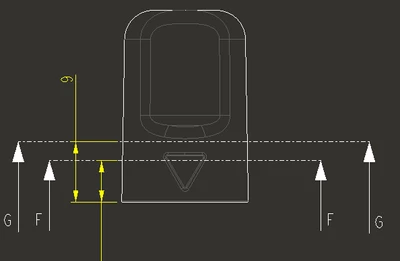
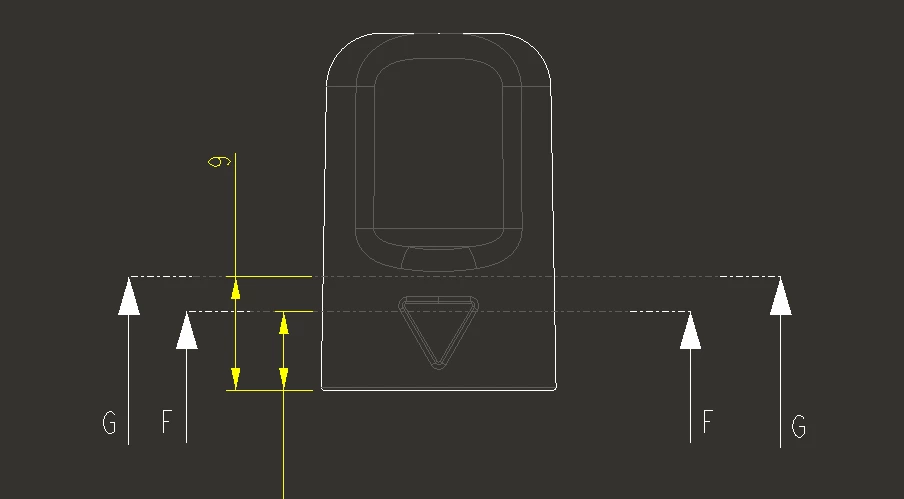
Section cutting plane lines have varying thickness when rendered. Has anyone seen this before or know the possible cause of this? The line font appears to be hidden font in some areas and visible in others.


This drawing template is out of the EU, is this the correct render for cut lines under an ISO dwg standard?
 

tbraxton_1-1740058376728.png

tbraxton_2-1740058476662.png


Best answer by tbraxton

The drawing setup file is coming from a client with their format. They intend to use ISO dwg standards in the setup file, but this has nothing to do with the root cause. I will have to try and find a reference documenting how this should be set for ISO drawing standards.


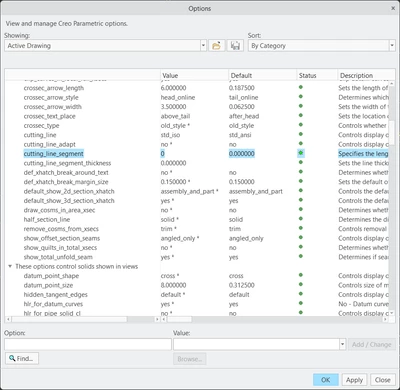
The cause is a detail option; by changing to the default value of 0 it renders as expected.

tbraxton_0-1740078070981.png

tbraxton_1-1740078276480.png


1 reply

23-Emerald III
February 20, 2025

Have you tried this out of the box, without any configurations? Just to rule out something in your setup.

tbraxton22-Sapphire IIAuthorAnswer
22-Sapphire II
February 20, 2025

The drawing setup file is coming from a client with their format. They intend to use ISO dwg standards in the setup file, but this has nothing to do with the root cause. I will have to try and find a reference documenting how this should be set for ISO drawing standards.


The cause is a detail option; by changing to the default value of 0 it renders as expected.

tbraxton_0-1740078070981.png

tbraxton_1-1740078276480.png