

Patriot_1776
22-Sapphire II
November 18, 2022
Question

Drawing markups/redlines...using AutoCAD

  • November 18, 2022
  • 3 replies
  • 10131 views

So, what I've been doing a lot of lately is marking up drawings of the people that I supervise for Promotion Requests in Windchill.  I tried using Adobe Pro, but, honestly, it sucks.  REALLY sucks.  TOTAL PITA to work with.  I hate Adobe in general and trying to draw GD&T symbols and geometry is miserable and time-wasting.  Then I had a brainstorm:  AutoCAD.  In AutoCAD I made a .dwt template that has a BLOCK (black) layer, and a MARKUP-RED and MARKUP-YELLOW layer, where the BLOCK layer is the current layer for when I import the PDF.  I import the PDF generated from Windchill as a block (so I can't accidentally change it) making sure to have the "Raster images" checkbox marked too:
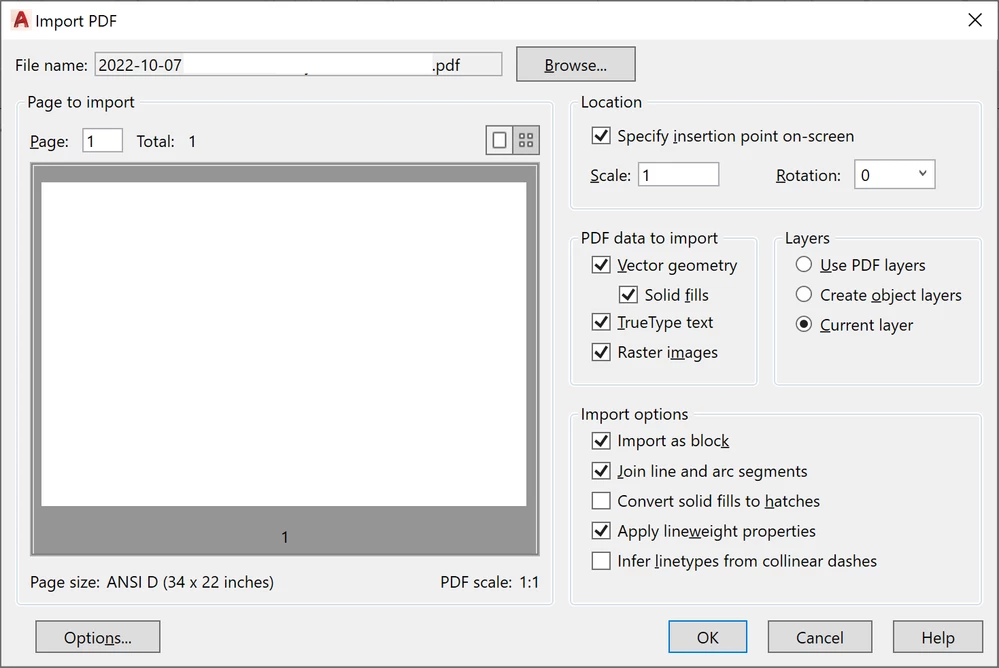
IMPORT PDF INTO AUTOCAD-01.png


Then I switch to the MARKUP-RED layer for corrections, and use the MARKUP-YELLOW layer for "ok".  You can create shapes (rectangles etc.) to use for yellow cross hatching, then freeze the BLOCK layer (so it doesn't get confused with the block geometry when trying to hatch the shapes), then thaw the BLOCK layer when you're done.  Then when I'm done I export it with the following settings:
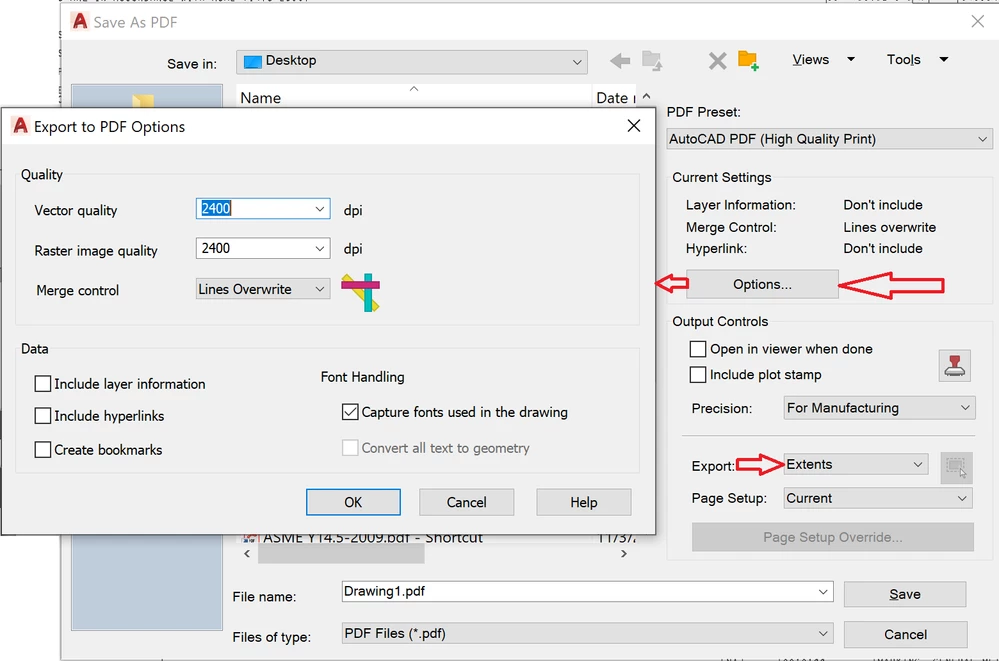
EXPORT PDF FROM AUTOCAD-01.png

The "Options" as marked by the arrows are important because that determines the quality of your output, and the "Extents" means everything inside the outer border of your format gets output, unless you have stuff floating out in space.  If you don't do that the PDF decides randomly what your size is with no consistency.  For multi-sheet dwgs, maybe there's an easy way to do it but I'm trying to re-learn AutoCAD after not using it for 20+ years so...  I bring them in one sheet at a time as a block, output each page as a separate PDF, then merge them all together in Adobe as a single PDF after all the sheets are done.  If I figure out a better way I'll post up.


Anyways, I find AutoCAD to be WAY better and easier, as you can easily add toleranced dims, basic dims, GD&T frames, easily create geometry, leader notes, anything you can think of, as AutoCAD IS a drafting package, whereas Adobe is definitely NOT.  Marking things up is SO much better, faster, and easier now.  I don't know if PTC has a similar package just for marking up dwgs, but if not, they should.  I may experiment with trying to do this in Creo, but compared to AutoCAD, Creo's sketching sucks so we'll see.


Have fun!


3 replies

Patriot_1776
22-Sapphire II
November 19, 2022

Sooo...nobody marks up dwgs?

21-Topaz II
November 21, 2022

Oh, we mark them up, but we use PDF X-Change viewer. It's not ideal, but the thought of having to use Autocad doesn't thrill me. I have never liked that program much, look upon it more as a necessary evil. In olden times when Pro/Engineer's drawing capabilities were perhaps not so great, we would actually use it to do drawings. Yikes.

Patriot_1776
22-Sapphire II
November 21, 2022

'Sup Ken!  Having started my CAD career in '86 in AutoCAD after being on the drafting board the previous 3-1/2 years, I have a soft spot for it and actually think it's 2D dwgs capabilites are a LOT better than Creo in a lot of ways.  Trying to use Adobe to mark things up (especially hand-creating GD&T frames) was an absolute nightmare, whereas stuff like that is quick and easy in AutoCAD.  After all, that's what it was designed for.  I looked at marking the dwgs up in Creo View, but that looked like a PITA as well.  So far, it's been working out excellent.  I might even go off for some AutoCAD training to be more proficient and learn what they've changed over the years.  I keep stumbling on new things to make it easier for me.  If you mark up dwgs, and have a copy of AutoCAD, give it a try and see what you think.  It's been an absolute game-changer for me!

23-Emerald III
November 21, 2022

Nothing beats a red pen, yellow hi-liter then a scanner.

Patriot_1776
22-Sapphire II
November 22, 2022

LOL  Olde School!  We actually had a system where the first markups were in red, the second in blue, then the last in green.  I actually really like doing them in AutoCAD, because then if I change my mind about something or whatever, then I can change them.

Patriot_1776
22-Sapphire II
November 22, 2022

Ok, so, when trying to print the dwgs the scaling was all FUBAR'd.  Turns out that AutoCAD doesn't output the extents of a dwg ("D" size, 34 x 22) correctly using the standard settings, you have to go into the "Page Setup Override" to set the extents (that SHOULD have been set by USING "Extents", but...  So, to output a "D" size dwg as a "B" size PDF correctly, you need to use the settings below:

AUTOCAD PDF EXPORT PAGE SETUP OVERRIDE-01.png