12-Amethyst
December 7, 2016
Question

Solidify/Cut issue in Creo Simulate containing an assembly with pattern

  • December 7, 2016
  • 3 replies
  • 5297 views

Hello all

I “suspect” that the command Solidify or Cut is not behaving in well in an assembly containing pattern inside Creo / Creo simulate. So far there is no explicit restriction when using it.

As we know solidify/cut is very useful to explore symmetry in FEM to reduce computing time. Especially in Creo solidify is a good approach if your model contains components having volumes regions to be used inside the simulation. From my experience it is easy to “lose” these volumes made in the CAD parts when you have an assembly that was cut using extrude/revolve feature – but this is another case…

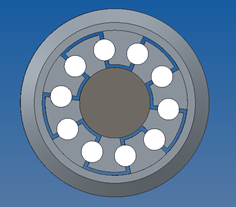
The below assembly (4 CAD parts) was also made patterning some sub-components.
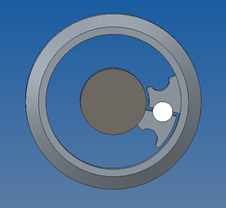
      

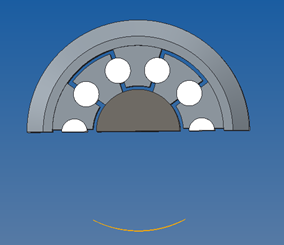
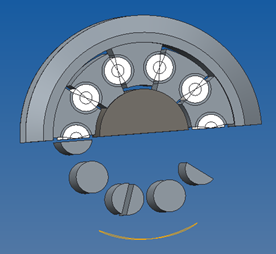
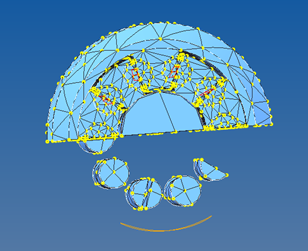
When I try to simplify it using the feature "solidify" (fig. a) the result is bad. If instead I create a volume to cut half of the assembly (fig. b) the result looks god – but not once the model is inside Cre Simulate (fig. c, d)!

a  b
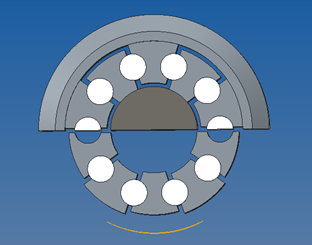
c  d

I do not see any logic or restriction why these commands should not work well with pattern. One can argue that since the model contains pattern we can pattern just enough to create the symmetry. This is indeed what I think I have to do in this case but truly it is not the best way since you have to build the model again – what can be very time demand in some cases.

_Has someone faced such problem and found a solution or work around?? I´m using Creo 2.0 M150.

Thanks,

R. Rabe


This thread is inactive and closed by the PTC Community Management Team. If you would like to provide a reply and re-open this thread, please notify the moderator and reference the thread. You may also use "Start a topic" button to ask a new question. Please be sure to include what version of the PTC product you are using so another community member knowledgeable about your version may be able to assist.

3 replies

1-Visitor
December 7, 2016

test / fe_asm0

1-Visitor
December 8, 2016

This really is a problem that I met before. The solidify functionality sometimes doesn't work. You can use extrude-remove material to cut what you don't need. Maybe this is a workaround.

rrabe12-AmethystAuthor
12-Amethyst
December 8, 2016

Thanks for confirming the issue


In my example the extrude cut "worked" in the CAD environment (fig b) but once in Simulate the assembly came degenerated having some cylinders included (fig c) - consequently this was not a solution.


However Paul just sent another assembly that suffers the same problem when using the function "solidify" but on the other hand a "extrude cut" shows the same model in CAD and in Simulate. In this case "cut" worked well.


My conclusion was that the way as the assembly is made seems to have an influence - although it is difficult to determine what will work.


Since this is a problem the best way is to plan in advance the FEM model and try to avoid to make use of symmetry by cutting the model in an assembly with pattern.


Ps: A bit off topic:

I found that if you have created a FEM volumes region in your part and after “cut” it in an assembly it is possible that you lose these FEM volume in your assembly. I noticed that this issue happens more often if you have created these volume regions in your part not using standard drawing shapes but yet making use of “offset “or “project” for example.

In the same way it is a very good practice to create any volumes (in a part or assembly) before to cut the part/assembly.


1-Visitor
December 8, 2016

model in simulate is not the same cad-model.

(example in creo simulate 2.0 m08

Regards

Paul

1-Visitor
December 8, 2016

The cutting plane used in a solidify feature has to intersect the geometry for it to work. At the part level you see the same thing happen when you add a plane that intersects the geometry and then drag the plane in the direction opposite that the direction arrow is pointing. More of the part is removed and when the plane no longer intersects the geometry (part is entirely on the side of the plane where material is to be removed) the entire part is displayed. Since the cutting plane doesn't intersect the geometry of the parts (shown in your picture a) in the assembly the material isn't removed.

rrabe12-AmethystAuthor
12-Amethyst
December 9, 2016

Thanks Kevin

But I´m sorry to say that I could not understand how your explanation can be applied in the assembled case. Or is it basically a comment?

Just to make sure I just picked-up a datum plane of my choice and applied the command found under ”Modifiers>Solidify” in the assembly model.

From my understanding it simples “cut” the entire assemble to the left or right depending of the choice. 

The problem is that or it behaves completely erratic or there are some important rules to follow – that I really don´t know.


For example here is the assembly model “fe_asm0_v2” that you can find in the message from Paul (above). I have just added two new datum planes.


I created a diagonal plane in the height direction and the solidify result was ok in CAD and inside Simulate.

Now I just created an offset plane in the side direction. The result is bad and also completely different depending even the direction of the cut!


Indeed the best solution is to prepare the symmetric model since the beginning (a suitable CAD parts design) and not after, using cut-extrude or solidify function in the final assembly.

"Cut" and "Pattern" have relationship problems when sharing the same assembly...


1-Visitor
December 9, 2016

Hi,

model in simulate (fe) is not for cad features

model_simulate.JPG

Regards

Paul