
11-Garnet
May 4, 2023
Question

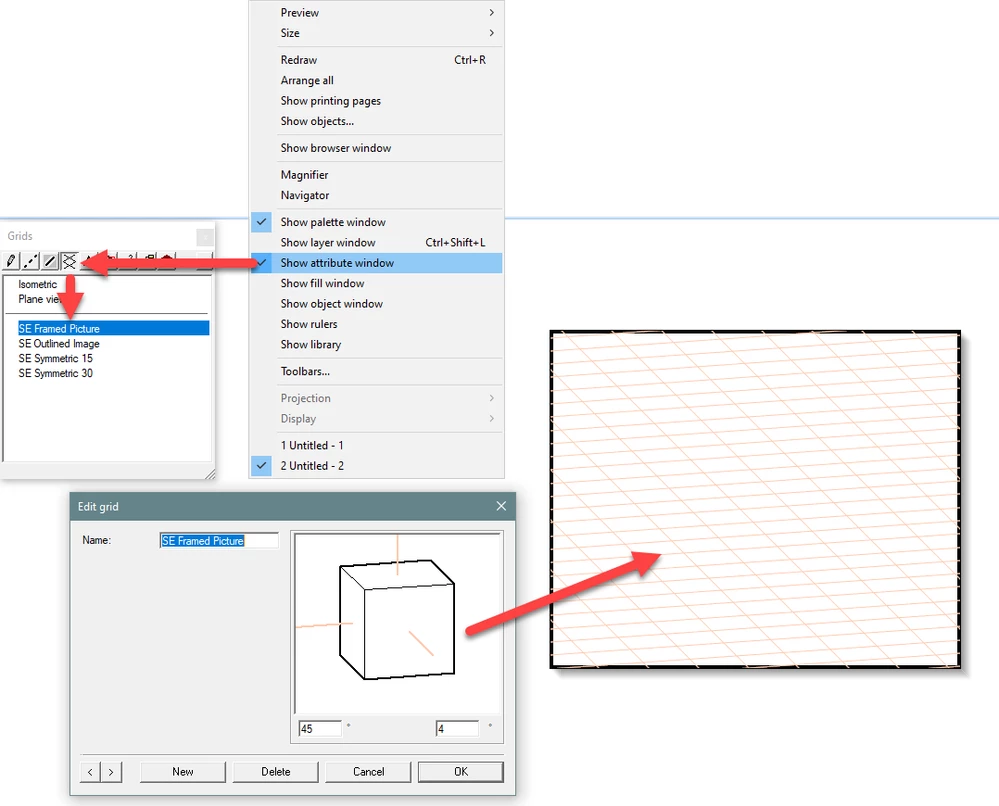
Would like to reproduce the Arbortext IsoDraw Grid Angles (i.e. 45x4 Degrees) in Creo Illustrate.

  • May 4, 2023
  • 1 reply
  • 2839 views

Arbortext IsoDraw allowed for a visual angle definition via the creation of oriented grids (see included image).  Trying to match these IsoDraw angles via x, y and z orientations in Creo Illustrate but can't come up with the "math" to do it.
 

IsoDraw 45-4 Angle.png


1 reply

16-Pearl
May 5, 2023

Hi Kevin,


I don't think you can get an exact replica of that grid, I tried and got close but couldn't get the 4 degree side 100% right.

These are the values I had:

Orientation settings.png

And this is the result viewed in Isodraw with the 45-4 grid set:

Result in Isodraw.png

As you can see the 45 degree side is bang on but the 4 degree side is slightly too shallow.


I think this would be a good candidate for an idea, you may have other grid related requirements you could include as well.


Regards

Adrian

11-Garnet
May 5, 2023

How were you able to get these angles (trial and error?)  I have the need for additional angles (30-15, 30-30 and 15-15) and wanted to understand your process.  Thanks, Kevin

16-Pearl
May 10, 2023

Hi Kevin,


Basically I just oriented a simple 3D object by eye, then opened the Custom View Orientations dialog and created a new orientation.

I tweaked the values slightly to get it a little closer and then did an export of the figure to idr to check it in Isodraw.

There I could see how close I was to the correct angles.

So it is very hit and miss at the moment I'm afraid, this may be a good candidate for an Forum Idea.


Thanks

Adrian