
1-Visitor
March 30, 2022
Solved

Re: Customization of toolbox in creo parametric

  • March 30, 2022
  • 1 reply
  • 2342 views

HI,
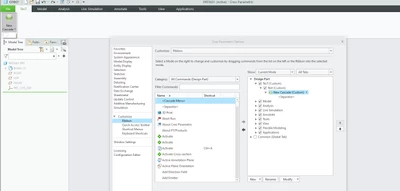
I'm an beginner in  Creo Parametric ui customization. I'm trying to create ribbon tab with group and button, but can only create the button cascade that have sub-menu. How to create just a button with no any cascade in it ?
Per the post, other questions mentioned in this thread with saving .rbn file I have already resolved, and now I'm confused why I can't design simple button.
VH_10228089_0-1648678102793.png


Best answer by zemanekp

[I responded because I kindly thought it was a personal question directly to me 🙂 Unfortunately I will not be the right person to answer the VB API problem.]


But I guess you haven't created any commands/buttons in your application yet. So you can't see it yet and can't add it to Ribbon. You must first Designate() command/button in your application, and after that will your button appear in the TOOLKIT Commands list/category. (A new command/button will probably be created via UICreateCommand().)


I would recommend you a chapter: 'Workflow to Add Menu Items to the Ribbon User Interface' and 'Designating Commands' in the VB API user manual, or wait for the answer of someone more experienced ...


Good luck to you.


PZ

1 reply

14-Alexandrite
March 31, 2022

Hi,

I'm not sure I understand. First select/choose  the correct target place in the right Ribbon list - choose Group (second Test(Custom)), then select required Command/Button, and move it from left list to right ribbon panel with arrow. 

(The Cascade menu you can Remove under the RMB context menu.)


PZ

1-Visitor
March 31, 2022

I wan to create button for further usage in my app and add my command handler for that button. Yes I can add any button from the list of required commands as a button, but I cant rename it for my purpose:

VH_10228089_0-1648711195334.png

Also I don't see the option how to make just button from the cascade:

VH_10228089_1-1648711253255.png

So the question is open.

In your answer I saw on the screenshot that you have your own created button, and it is not as a cascade:

VH_10228089_2-1648711424771.png

How you created that button ?

zemanekp14-AlexandriteAnswer
14-Alexandrite
March 31, 2022

[I responded because I kindly thought it was a personal question directly to me 🙂 Unfortunately I will not be the right person to answer the VB API problem.]


But I guess you haven't created any commands/buttons in your application yet. So you can't see it yet and can't add it to Ribbon. You must first Designate() command/button in your application, and after that will your button appear in the TOOLKIT Commands list/category. (A new command/button will probably be created via UICreateCommand().)


I would recommend you a chapter: 'Workflow to Add Menu Items to the Ribbon User Interface' and 'Designating Commands' in the VB API user manual, or wait for the answer of someone more experienced ...


Good luck to you.


PZ